
Cool Gradients by Akis
作者:YeahAkis_
A core shader with an easy way of adding custom animated gradients
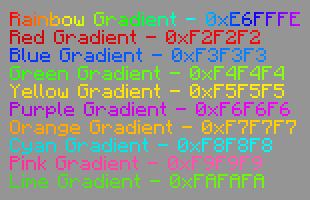
截图

介绍
中文介绍正在准备中,下面暂时显示原文。
Cool Gradients by Akis
Another simple core shader by me that lets you easily add custom moving gradients very easily
Registering custom
- Adding them is as easy as picking the trigger color, start color, end color, and speed:
  void initGradients() {
    registerGradient(0xF2F2F2,0xB5070A,0xFF0A0D,5000.0);
    // Trigger Color - #F2F2F2
    // Start Color - #B5070A
    // End Color - #FF0A0D
    // Speed - 5000
}- You can also just use this website I made!
- The current limit is 10, but you can easily up that by changing line 35:
Gradient gradients[10]; // make this number higher for more gradientsHow to install
Nexo:
- Download the latest version of the resource pack
- Put it into your
plugins/Nexo/pack/external_packs - Go into the game and run
/n rl allto reload Nexo - Et voilá, you’re done!
Minecraft
- Download the latest version of the resource pack
- Put it into your
.minecraft/resourcepacks - Et voilá, you’re done!
How to Use
- Copy the hex color code for your desired effect.
- Apply it to your text in Minecraft using formatting tools or plugins.
- Enjoy the results!
Contact
- if you need help, feel free to join the discord
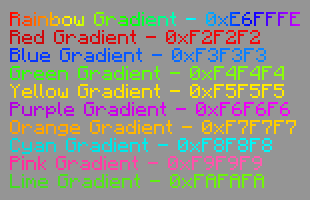
Default Examples
(Static Image, the gradients themselves actually move)
Need a reliable server? Check out NeyHost!
NeyHost offers affordable, high-performance servers for Minecraft (Java & Bedrock), 7DTD, Hytale, and more!

常见问题
Cool Gradients by Akis 支持哪些 Minecraft 版本?
Cool Gradients by Akis 支持 Minecraft Java 版 1.20.2–1.21.6,共 12 个版本。下载时注意选择和你游戏版本一致的文件。
Cool Gradients by Akis 怎么安装?
把下载的 .zip 文件(不用解压)放进游戏目录的 resourcepacks 文件夹,进游戏后在「选项 → 资源包」里把它移到右边启用。
YeahAkis_ 的其他作品
查看全部 →
FastChest Revived
by YeahAkis_
将箱子渲染为普通方块而非方块实体,这样大型存储室就不会再拖累你的帧数了
13.8万
16 天前
Modrinth · CurseForge

Transparent Scoreboard by Akis
by YeahAkis_
一款简单的核心光影,可移除计分板背景
8,618
1 年前
Modrinth

Magical Campfires
by YeahAkis_
靠近营火时为你治疗!完全支持自定义,并兼容普通营火和灵魂营火。
2,911
14 天前
Modrinth

Text Effects by Akis
by YeahAkis_
类似 ItemsAdder 插件的文本效果
2,758
1 年前
Modrinth
评论
登录后评论和评分