
WhatsMyLag
Find out exactly what’s lagging your world - with mod, entity, and tick info.
截图
介绍
🌀 Lag Detector — Find What’s Slowing You Down
See exactly which mods, entities, or blocks cause lag — on both client and server!
A lightweight and powerful tool to track performance issues directly in-game.
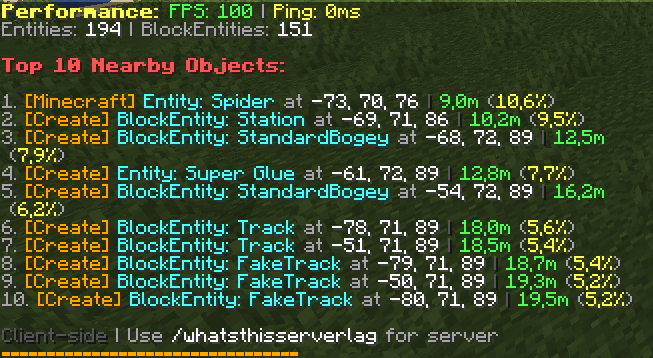
💻 Client-Side Lag Analysis
Command: /whatsmylag
- Shows FPS, entity count, and top 10 nearby lag sources
- Displays mod name, entity type, distance, and lag impact (%)
- Ideal for spotting laggy builds, farms, or particles
🧠 Note: If the mod is only installed on the client, only this command will be available.

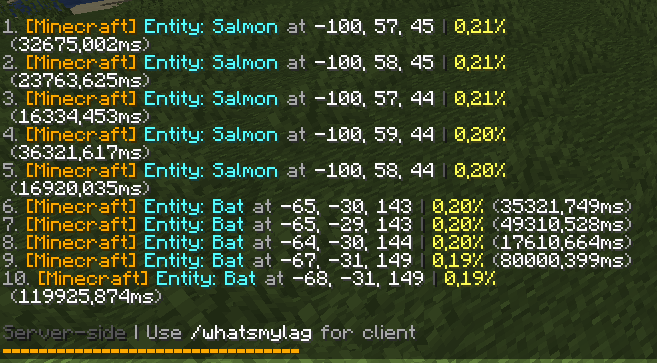
🌐 Server-Side Lag Analysis
Command: /whatsthisserverlag
- Shows server tick usage for the top 10 entities or blocks
- Displays coordinates, mod name, and performance percentage
- Perfect for diagnosing lag farms or overloaded chunks
🧠 Note: If the mod is only installed on the server, only this command will be available.
📊 Features
- ✅ Detects lag sources from any mod (Create, Minecraft, etc.)
- ✅ Clear, color-coded in-chat display
- ✅ Works in singleplayer and multiplayer
- ✅ Client and server commands work independently
- ✅ No setup — just install and type the command
🧩 Compatibility
- Supports Fabric / Quilt 1.20+
- Works alongside optimization mods like Sodium, Lithium, and FerriteCore
🧠 Perfect For
- Players who want smooth gameplay
- Server admins hunting lag farms
- Modpack developers testing performance
常见问题
WhatsMyLag 支持哪些 Minecraft 版本?
WhatsMyLag 支持 Minecraft Java 版 1.20–1.20.6,共 7 个版本,可用的加载器:Fabric / Quilt。下载时注意选择和你游戏版本一致的文件。
WhatsMyLag 怎么安装?
先用 PCL2 或 HMCL 启动器安装对应版本的 Fabric / Quilt,再把下载的 .jar 文件放进游戏目录的 mods 文件夹,重新启动游戏即可。开启了版本隔离的,mods 文件夹在 versions/版本名 下面。运行环境:客户端 / 服务端。
Jannik_ca 的其他作品
查看全部 →
Create: RailwaySignals
This Create addon adds Speedlimiter and SpeedSign blocks to control and display train speed limits. It also includes three ID items: Visitor, Supervisor, and Worker.

Create: TrainSounds
TrainSounds enhances the Create mod with dynamic engine sounds for various train types.

Create: Grenzzeichen
A Mod that adds a lot of train-related things!
评论
登录后评论和评分