
Adaptive Graphics
Automatically adjusts Minecraft graphics settings to maintain stable FPS.
截图
介绍

Adaptive Graphics
### 💥 READ CHANGELOG
## ⚠️ IMPORTANT: THIS MOD IS IN ACTIVE DEVELOPMENT
Features may be incomplete, buggy, or behave unexpectedly. Any issues, glitches, or unbalanced behavior you encounter will be addressed in future updates. Thank you for your patience!
A Minecraft Fabric mod that automatically adjusts graphics settings in real-time to maintain a stable target framerate.
Overview
Adaptive Graphics monitors your FPS and dynamically adjusts visual settings when performance drops below your target. When FPS recovers, settings are gradually restored to their original values. This allows you to set high-quality graphics without worrying about performance drops in demanding areas.
Features
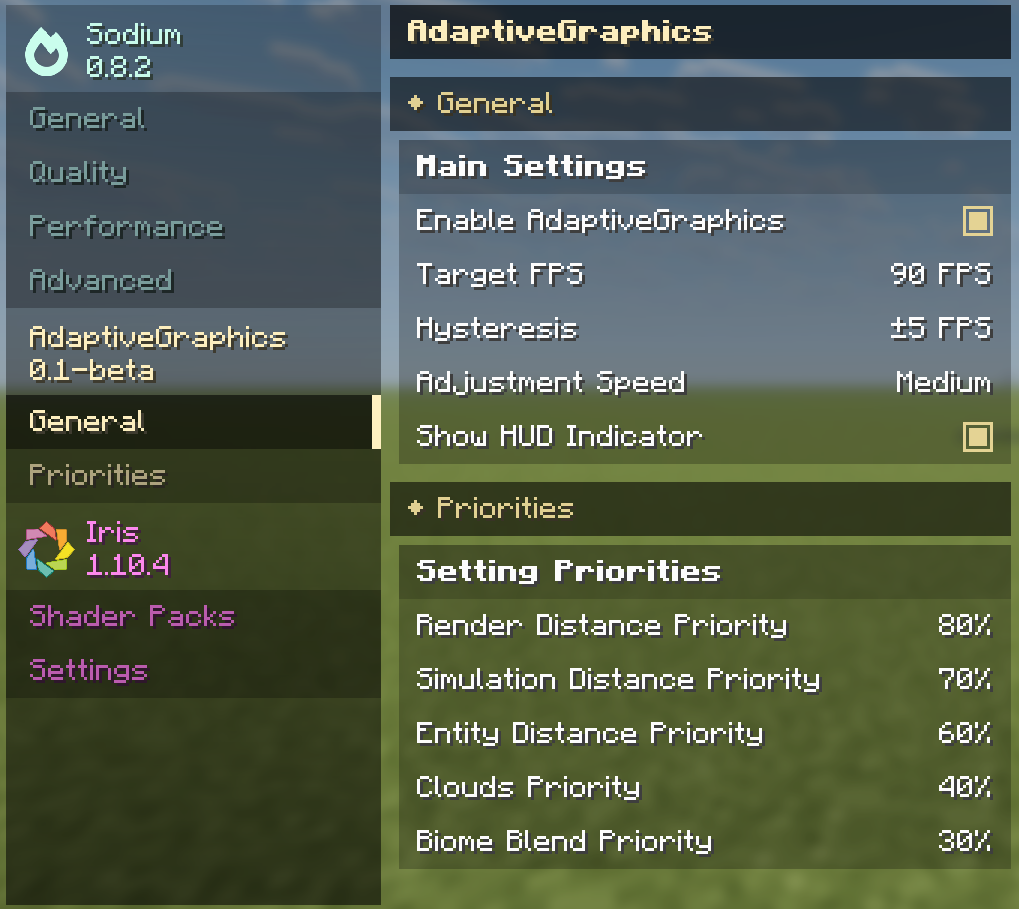
The mod adjusts the following settings based on configurable priorities:
Render Distance, Simulation Distance, Entity Distance, Cloud Quality, Biome Blend Radius
Each setting can be assigned a priority value. Higher priority settings are reduced first when FPS drops, and restored last when FPS recovers.
Configuration
Settings are accessible through the Sodium video settings menu. From there you can set your target FPS, adjustment speed, and priority values for each graphics setting.
The mod waits 10 seconds after loading a world before making adjustments, allowing chunks to load and FPS to stabilize. Similarly, after exiting the pause menu, there is a 5 second delay before adjustments resume.
Requirements
Minecraft 1.21.11 with Fabric Loader, Fabric API, and Sodium.
License
All Rights Reserved. This software and its source code are proprietary. You may not copy, modify, distribute, or use any part of this code. See LICENSE file for details.
常见问题
Adaptive Graphics 支持哪些 Minecraft 版本?
Adaptive Graphics 支持 Minecraft Java 版 1.21.11,可用的加载器:Fabric。下载时注意选择和你游戏版本一致的文件。
Adaptive Graphics 怎么安装?
先用 PCL2 或 HMCL 启动器安装对应版本的 Fabric,再把下载的 .jar 文件放进游戏目录的 mods 文件夹,重新启动游戏即可。开启了版本隔离的,mods 文件夹在 versions/版本名 下面。运行环境:仅客户端。

评论
登录后评论和评分