
截图
介绍
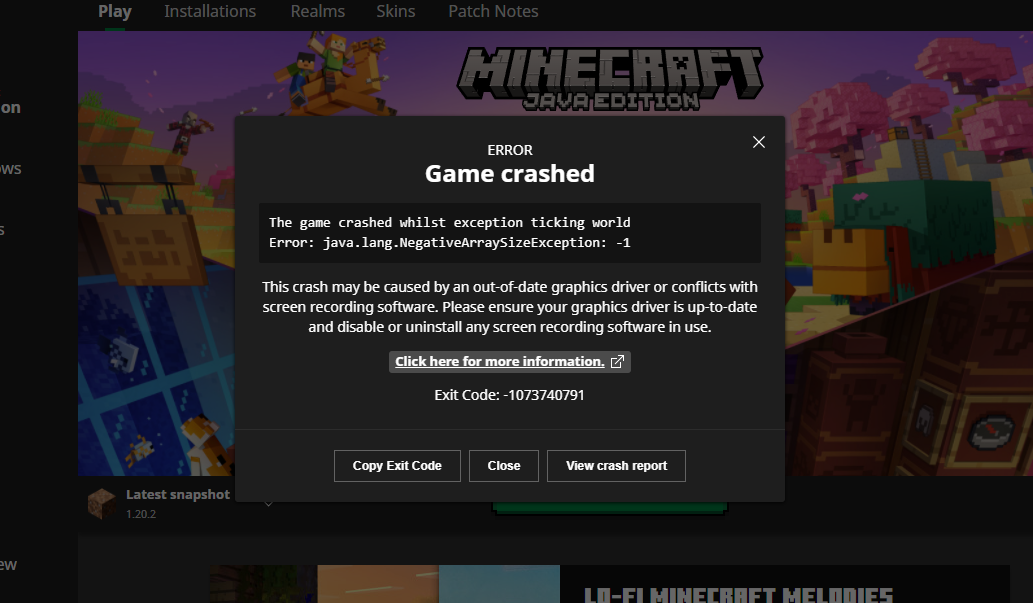
Crash minecraft with only 1 command instantly, on any PC
Have you ever thought of purposefully crashing minecraft with 1 command, for a cool effect for horror maps or just to prank your friends? Well this is a simple datapack I made to achieve this.
Run this command to crash the game:
/function ant:crash
The crash is not making lags on purpose or out of memory stuff, it is reusable, so you can safely join your world again after a crash and everything will probably be fine.
This datapack was made by using a worldgen bug MC-264777, so the function just loads a chunk in a custom void dimension that has noise settings height defined bigger than the max build height. The datapack can be installed both during world creation and to an existing world, but you need to re-enter your world 1 time after installing in an existing already loaded world, /reload won’t work. Before entering a world with this datapack you will see a warning.
Keep in mind that because it’s a bug, this can be fixed in future versions, and any mod may fix the crash or make things even worse. For example Concurrent Chunk Management Engine mod will break the datapack.
I strongly recommend to make backups of your important worlds before installing this datapack to them, because even tho my tests show that everything is fine, every type of crash may damage your world.
常见问题
The Game Crasher 支持哪些 Minecraft 版本?
The Game Crasher 支持 Minecraft Java 版 1.18–1.21.11,共 27 个版本,可用的加载器:Fabric / Forge / NeoForge / Quilt。下载时注意选择和你游戏版本一致的文件。
The Game Crasher 怎么安装?
先用 PCL2 或 HMCL 启动器安装对应版本的 Fabric / Forge / NeoForge / Quilt,再把下载的 .jar 文件放进游戏目录的 mods 文件夹,重新启动游戏即可。开启了版本隔离的,mods 文件夹在 versions/版本名 下面。运行环境:客户端 / 服务端。
SuperAnt_ 的其他作品
查看全部 →
No Dark Inventory Overlay
Removes dark background overlay from inventories and pause menu

Remove Damage Overlay
Removes hit color (tint) from all entities!

Custom Damage Overlay Color
Change hit color (tint) of all entities to ANY color!

No Light — No Color!
Blocks gradually turn black and white as light levels decrease.
评论
登录后评论和评分