
介绍
中文介绍正在准备中,下面暂时显示原文。
All descriptions are written by DeepL translation

Resource pack with minor changes
Version 2.0 adds new recipes and a workbench with GUI animation!
All can be configured or disabled in config/hyperdaimc-common.toml
_Complete damage nullification!_ 
「Muteki Star」
- This item is activated by placing it on a hotbar, in an armor slot (from command, etc.), or in an additional slot dedicated to it if the Curios mod is installed.
- Health does not decrease.
- Not selected by the command selector. (configurable)
- Gives resistance to robbery of items by some mods. (Ice and Fire, IntegratedDynamics, PneumaticCraft and Extra Botany)
_Instant death attack!_ 
「Novelcalibur」
- Holding this item in your hand and clicking on it will kill all entities in the vicinity of your line of sight.
- Clicking while crouching kills only the one that overlaps your line of sight. (configurable)
- Enchantment ability works.
_Absolute block protection!_ 
「Chroniclock」
- Holding this item in your hand and right-clicking on the start and end points will protect that area.
- Right-clicking while crouching allows selection of offset points on the face of the block. (configurable)
- Holding this item in your hand and clicking on the protected area will remove the protection.
- Stops non-owner block placement and destroying. (configurable)
- Depending on the configuration, stop interacting with the block as in adventure mode. (configurable, disabled by default)
_Ultimate block destruction!_ 
「Pickdox」
- Holding this item in your hand and clicking on it destroys the block in front of you.
- Clicking while crouching destroys the blocks one by one. (configurable)
- Can destroy fluids. (configurable)
- Enchantment ability works.
_Infinite resource supply!_ 
「V.R.X.」
- Holding this item in your hand and right-clicking on a block or entity opens the GUI.
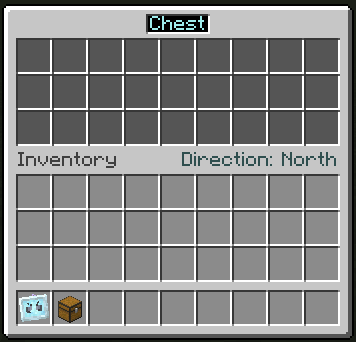
- Right-clicking on your player model in inventory will open a GUI for yourself.
- Closing the GUI will cause the configured items, fluids, energy, and even gases if Mekanism mod has been introduced, to be supplied to the Capability of the targeted block or entity from the specified direction.
- Change the supply direction on the current page to by clicking on the text to the right.
- Change pages by clicking on the text to the left.
- Clicking on an item overlaid on the upper slot allows it to be registered.
- If the item is a container of energy, fluid, or gas, it will be given priority for registration, but a middle-click will register the item itself.
- Registration can be done through JEI or REI, even if you do not have the actual item. (if it is an item, you can place it directly in your inventory)
- Clicking on the same item over and over with the same item increases the item being placed by the number of items you are holding. (or ten times that number if you hold down the shift key)
- Mouse scrolling can increase or decrease the number of items one by one. (in larger units if you hold down the shift key)
- Right-clicking can be used to set the number of items to half the number of items.
- Middle-clicking on a registered item allows you to copy the actual item as in creative mode. (if it is a fluid, then the bucket containing it)
- Left-clicking on a block or entity with V.R.X. to delete it.
_Godly immortal boss!_ 
「Fumetsu Wither」
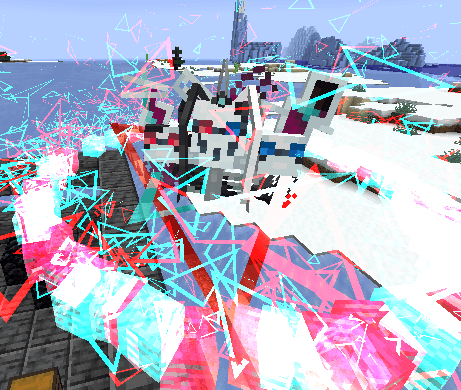
- When one of the players dies, logs in, logs out, etc., this entity logs out of this world and drops Bug Stars in its place.
- Attacks against this entity are nullified by「Muteki Star」.
- Attacks by this entity are by「Novelcalibur」.
- This entity can slip through walls.
- This entity does nothing at the time it is summoned and drifts in the air.
- Once this entity is harmed, it will start genociding the surrounding entities. (with priority given to the player)
常见问题
Hyperlink 支持哪些 Minecraft 版本?
Hyperlink 支持 Minecraft Java 版 1.18.2–1.20.1,共 2 个版本,可用的加载器:Forge / NeoForge。下载时注意选择和你游戏版本一致的文件。
Hyperlink 怎么安装?
先用 PCL2 或 HMCL 启动器安装对应版本的 Forge / NeoForge,再把下载的 .jar 文件放进游戏目录的 mods 文件夹,重新启动游戏即可。开启了版本隔离的,mods 文件夹在 versions/版本名 下面。运行环境:客户端和服务端都要装。


评论
登录后评论和评分