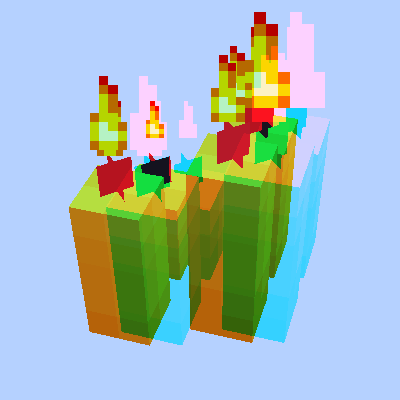
截图

介绍
中文介绍正在准备中,下面暂时显示原文。
Anaglyph-fabric
Requires: ClothConfigAPI; ModMenu
Red-cyan by default
Options (in ModMenu):
- Eye separation (Instructions below)
- Eye angle (set to 2⋅tan^(-1) ⋅ (distance between eyes)/(2 ⋅ distance to monitor) for best experience)
- Glasses RGB ( FTT for red-cyan, TTF for blue-yellow, etc)
- Crosshair rendering (as it is very distracting to aim with two of them)
- Grayscale fog (overworld one is blue, nether is red – both very bad for R-C glasses)
Nether has a very bad color scheme, so play a few hours in overworld first.
Recommended with something like https://www.curseforge.com/minecraft/texture-packs/pack-and-white to get used to the unusual eye position in Nether. You really should play around 2 days with it
Don’t look at diamonds/lava until you feel confident with colors
 |
 |
 |
 |
| Source | |||
常见问题
Anaglyph fabric 支持哪些 Minecraft 版本?
Anaglyph fabric 支持 Minecraft Java 版 1.18–1.20.4,共 12 个版本,可用的加载器:Fabric。下载时注意选择和你游戏版本一致的文件。
Anaglyph fabric 怎么安装?
先用 PCL2 或 HMCL 启动器安装对应版本的 Fabric,再把下载的 .jar 文件放进游戏目录的 mods 文件夹,重新启动游戏即可。开启了版本隔离的,mods 文件夹在 versions/版本名 下面。运行环境:仅客户端。
vlad2305m 的其他作品
查看全部 →
Akashic Tome of Tools Fabric
by vlad2305m
一本能将放进去的任何东西变形的书,效果做得相当到位。
17.8万
3 年前
CurseForge

Sound Physics Fabric
by vlad2305m
你听过的音效最出色的模组。为声音加入光线追踪效果。
6.8万
3 年前
CurseForge

Proper Mobcap Modifier Fabric
by vlad2305m
调整原版枚举中的生物生成上限等内容(兼容性很高)。
2.6万
2 年前
CurseForge

Fabric per player spawns
by vlad2305m
每位玩家都拥有独立的生物数量上限(默认 70)。
2.1万
1 个月前
Modrinth · CurseForge
评论
登录后评论和评分