
截图



介绍
🌙 Tanu’s Dark Mode
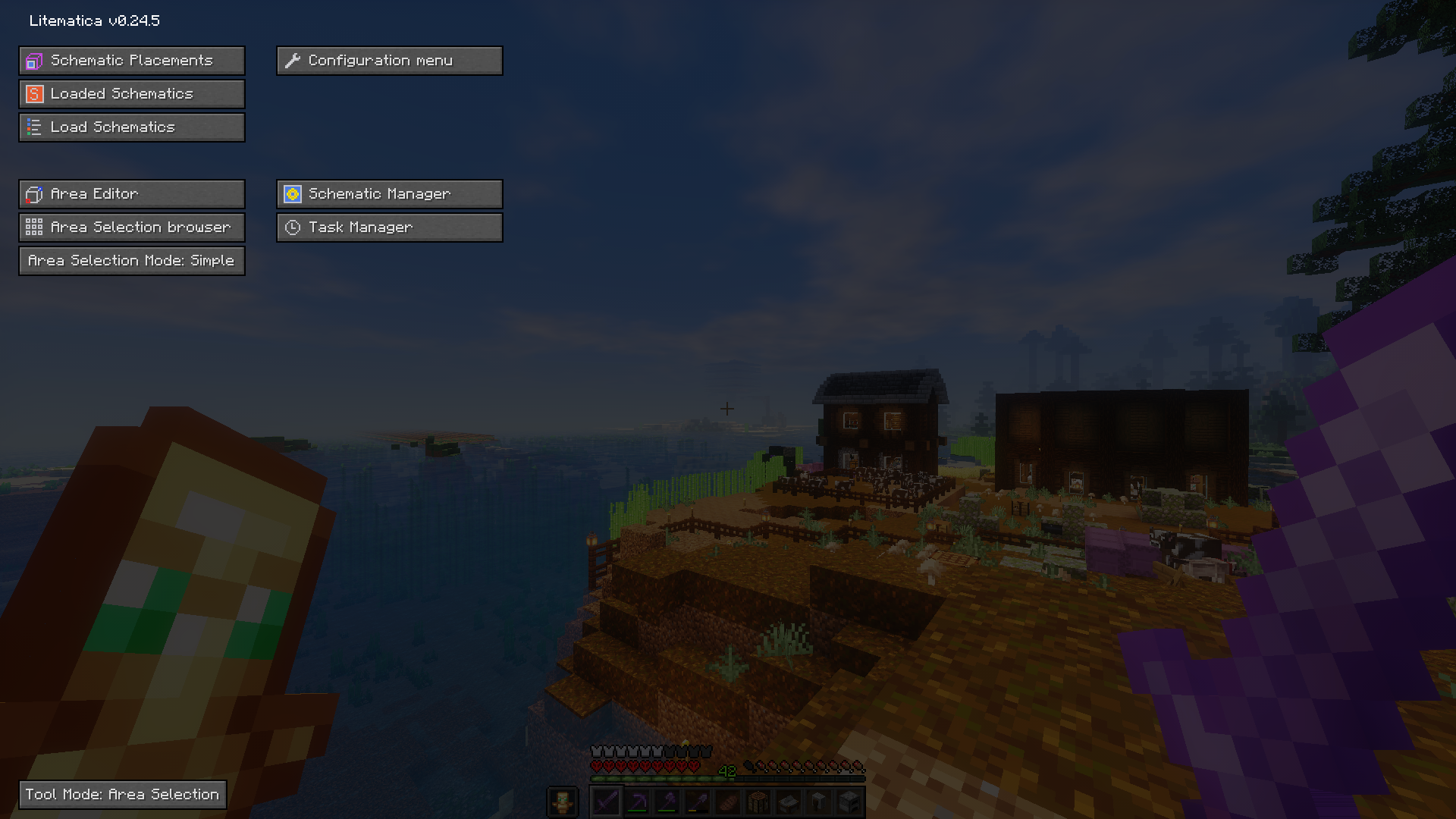
Tired of the bright vanilla Minecraft UI straining your eyes during late-night gaming sessions? Tanu’s Dark Mode transforms your entire Minecraft experience with a sleek, dark-themed interface that’s easy on the eyes and looks absolutely stunning.
✨ Features
Complete Vanilla UI Overhaul
- All vanilla Minecraft menus transformed with elegant dark themes
- Inventory, crafting tables, furnaces, chests, and more
- Books, signs, and text interfaces
- Pause menu and settings screens
- Death screen and respawn interface
MaLiLib Mod Support
- Full dark mode integration for all MaLiLib-based mods
- Tweakeroo, Litematica, MiniHUD, and more look perfect
- Consistent dark theme across all mod interfaces
Mod Menu Integration
- Beautiful dark-themed Mod Menu
- Perfect harmony between vanilla and modded interfaces
- Clean, professional appearance
🎨 Design Philosophy
Tanu’s Dark Mode uses carefully chosen dark gray tones instead of pure black, providing:
- Reduced eye strain during extended play sessions
- Better contrast for text and UI elements
- Modern, sleek aesthetic
- Perfect for night-time gaming
📦 Installation
- Download the resource pack
- Place the
.zipfile in your.minecraft/resourcepacksfolder - Open Minecraft and go to Options → Resource Packs
- Move “Tanu’s Dark Mode” to the active side
- Click Done and enjoy your new dark interface!
⚙️ Compatibility
- Minecraft Version: 1.21.10
- No mods required – works as a standalone resource pack
Enjoy your new dark mode experience! 🌙
常见问题
Tanu’s Dark Mode 支持哪些 Minecraft 版本?
Tanu’s Dark Mode 支持 Minecraft Java 版 1.21.9–1.21.11,共 3 个版本。下载时注意选择和你游戏版本一致的文件。
Tanu’s Dark Mode 怎么安装?
把下载的 .zip 文件(不用解压)放进游戏目录的 resourcepacks 文件夹,进游戏后在「选项 → 资源包」里把它移到右边启用。
Tanuliini 的其他作品
查看全部 →
Tanu’s Food Mod
Adds kebab stuff to the game and much more.

TanuPlus+
TanuPlus+ is a vanilla-friendly modpack that enhances Minecraft with performance improvements and much much more.
Tanu’s Dark Mode
Vanilla-Like Dark Mode For 1.21.10
评论
登录后评论和评分