
截图


介绍
This mod is made exclusively for the french roleplay server herobrine.fr. Which is a french roleplay server. So, the english description is at the bottom!
[Version Francaise]
Ce mod est fait pour le serveur roleplay herobrine.fr).
Le mod :
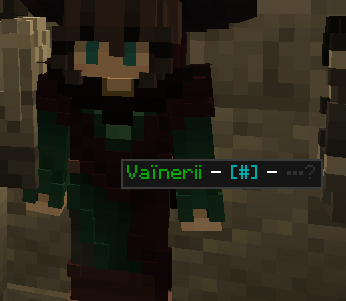
- Affiche un encart en haut à gauche de l’écran, avec le nom RP et le nom minecraft de la personne actuellement ciblée
- Quand le tchat est ouvert, on peut survoler les joueurs dans le monde pour afficher leur nom, la portée de voix minimale pour leur parler et s’ils sont en train d’écrire.
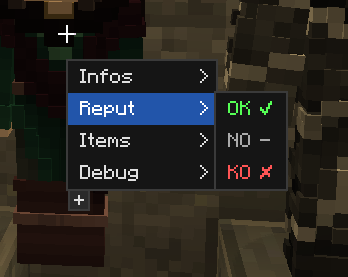
- Quand le tchat est ouvert, un clic droit sur un personnage permet d’ouvrir un menu contextuel pour agir dessus (donner des /avisok /reputok par exemple)
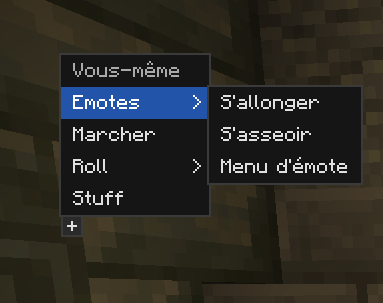
- Quand le tchat est ouvert, un clic droit dans le vide permet d’ouvrir un menu contextuel pour agir sur vous même (roll, emote, etc)
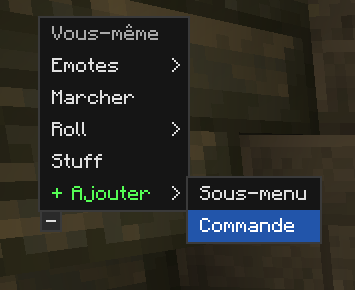
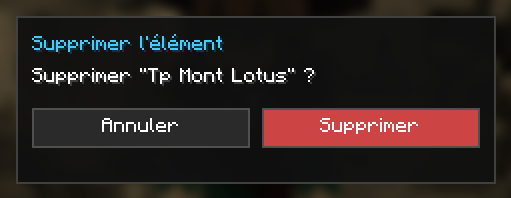
- Ces menus contextuel peuvent être modifiés en cliquant sur le carré “+”, vous pouvez y ajouter des sous menus ou des commandes, et les supprimer en appuyant sur “suppr” avec la souris dessus.
- Quand le tchat est ouvert, un clic central sur un joueur dans le monde ajoute le pseudo minecraft dans le tchat.
- Dorénavent, vous pouvez faire un clic droit sur le pseudo d’un joueur pour afficher son menu
- Faire un clic central sur un pseudo permet d’envoyer un MP (> ) au joueur.
Si vous êtes encadrant :
- Voyez les items du joueur dans le menu.
- Maintenez le clic gauche sur un joueur pour voir ses effets.
N’hésitez pas à me faire des suggestions !
[English version]
This mod allows you to :
- Displays a panel in the top-left corner of the screen, showing the RP name and Minecraft username of the currently targeted person
- When the chat is open, you can hover over players in the world to display their name, the minimum voice range needed to talk to them, and whether they are typing
- When the chat is open, right-clicking on a character opens a context menu to perform actions on them (giving /avisok, /reputok, for example)
- When the chat is open, right-clicking on empty space opens a context menu to perform actions on yourself (roll, emote, etc.)
- These context menus can be edited by clicking the “+” square — you can add submenus or commands, and remove them by pressing “delete” with the mouse hovering over them
- When the chat is open, middle-clicking adds the Minecraft username to the chat
- If you are a GM, you see the items in the menu
- If you are a GM, hold down left-click on a player to see their effects
常见问题
HB Tweaks 支持哪些 Minecraft 版本?
HB Tweaks 支持 Minecraft Java 版 1.21.8–26.2,共 6 个版本,可用的加载器:Fabric。下载时注意选择和你游戏版本一致的文件。
HB Tweaks 怎么安装?
先用 PCL2 或 HMCL 启动器安装对应版本的 Fabric,再把下载的 .jar 文件放进游戏目录的 mods 文件夹,重新启动游戏即可。开启了版本隔离的,mods 文件夹在 versions/版本名 下面。运行环境:仅客户端。
vainerii 的其他作品
查看全部 → HB Tweaks
Client small tweak for the french roleplay server herobrine.fr

HB Tweaks – Logs
Conversation logs made clean ! Saves the incomming chat text logs into an individual directory (logs_chat), without all the technical stuff.

Berlioz
Allows you to play music in-game in multiplayer (on compatible servers), define zones with ambient tracks, or broadcast songs to nearby players from YouTube, SoundCloud, or direct audio links.
评论
登录后评论和评分