
Selective Disenchanter
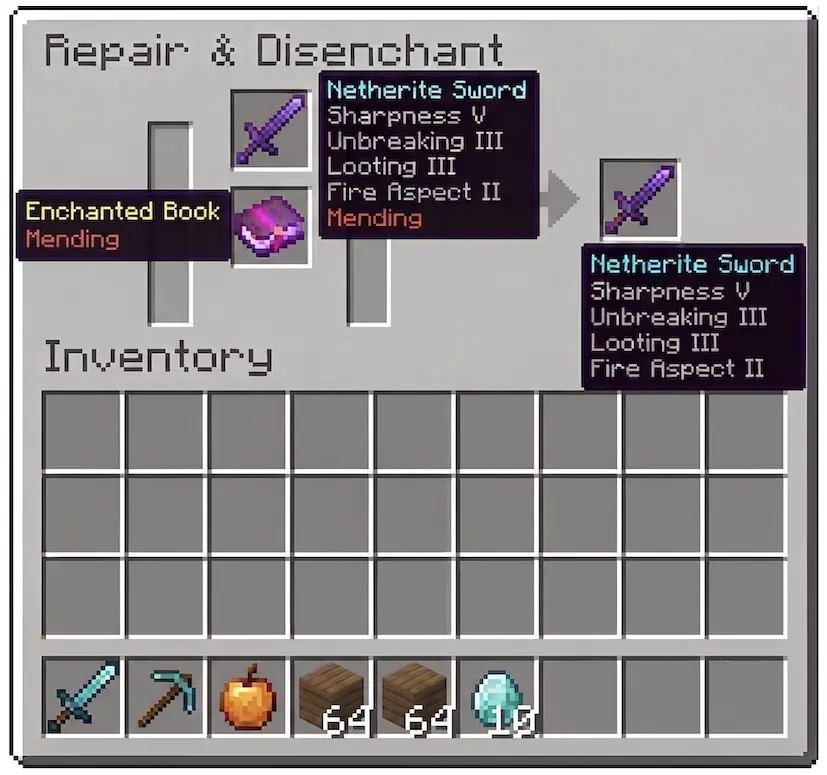
Selectively remove a single enchantment from any item using the grindstone by placing an enchanted book with the matching enchantment below it.
截图

介绍
A mod that lets you remove one specific enchantment at a time using the grindstone.




📖 Description
Tired of losing all your enchantments when using the grindstone? Selective Disenchanter gives you full control: remove exactly the enchantment you don’t want and keep the rest intact!
By default, Minecraft wipes every enchantment off an item when you use a grindstone. This mod tweaks the grindstone behavior so you can target a single enchantment using an enchanted book.
✨ Features
- Place your enchanted item in the top slot of the grindstone.
- Put a matching enchanted book in the bottom slot.
- Retrieve your item with only that enchantment removed — the rest are preserved.
- Works with books, tools, armor, and weapons.
📦 Installation
- Download the version matching your Minecraft version.
- Place the
.jarfile into yourmodsfolder:
.minecraft/mods/- Launch the game!
🔧 Requirements
| Loader | Dependencies |
|—|—|
| Fabric | Fabric API + Fabric Loader |
| NeoForge | NeoForge (no additional libraries needed) |
🧪 Compatibility
| Feature | Status |
|—|—|
| Minecraft 1.21.11+ | ✅ |
| Singleplayer | ✅ |
| Multiplayer | ✅ |
| Server-side only | ✅ (no client mod required for basic functionality) |
This mod is server-side only for basic functionality. Players do not need to install it on their client to join a server that has it.
🤝 Contributing
Suggestions and pull requests are welcome. Discord: itzchoko_
📜 License
Distributed under the MIT License.
Made with ❤️ by ItzChoko.
常见问题
Selective Disenchanter 支持哪些 Minecraft 版本?
Selective Disenchanter 支持 Minecraft Java 版 1.21.11–26.2,共 5 个版本,可用的加载器:Fabric / NeoForge。下载时注意选择和你游戏版本一致的文件。
Selective Disenchanter 怎么安装?
先用 PCL2 或 HMCL 启动器安装对应版本的 Fabric / NeoForge,再把下载的 .jar 文件放进游戏目录的 mods 文件夹,重新启动游戏即可。开启了版本隔离的,mods 文件夹在 versions/版本名 下面。运行环境:仅服务端。
ItzChoko 的其他作品
查看全部 → Selective Disenchanter
Selectively remove a single enchantment from any item using the grindstone by placing an enchanted book with the matching enchantment below it.

Enchantment Preview
See enchantments before you spend levels in the enchanting table.

Vault Reveal
Preview vault loot before wasting your Trial Keys. See exactly what's inside normal and ominous vaults at a glance.

Locator Head Mobs
Locator Head Mobs displays nearby hostile mobs and players as head icons on a radar bar at the locator XP bar.
评论
登录后评论和评分