
Respawn Save Points
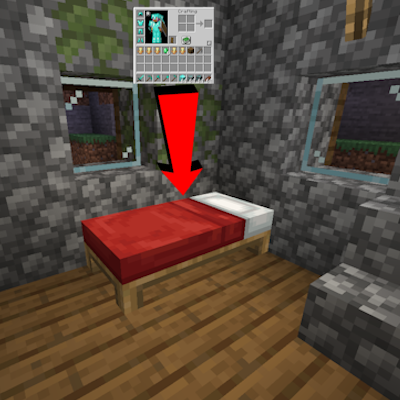
Beds and Respawn Anchors now act as "save points" that restore the players inventory from the last time the player right clicked on them.
截图
介绍
Description
Respawn Save Points is a mod that allows beds (and respawn anchors) to now act as “save points” that restore your inventory and levels to a previous state. New items and xp gained during your adventures will be dropped still if not saved and lost durability will transfer to your saved inventory. If you lose an item and don’t put it in the same slot, it’s not restored. These same rules should also apply to any item that has an inventory if they have the right setup (quark backpacks, supplementeries’ quivers, etc)
There are several config options that allow you to choose the % of items saved, what items to blacklist (bundles are backlisted on default), and if durability is transferred
Please note that this mod is in BETA until I’m in a happy enough state to put it as release. As such please report bugs and unintended dupe glitches to the github when possible.
La descripción
Respawn Save Points es un mod que hace que las camas (y nexos de reaparición) actúen como un “punto de guardado” que revierte su inventario y niveles de experiencia a un estado anterior. Todos los nuevos objetos y niveles de experiencia que hayas obtenido en tu aventura se perderán si no los guarda y la durabilidad perdida de sus objetos se transferirán en su inventario guardado. Si pierde un objeto y no lo pone en el mismo lugar, no se restaura. Estas mismas reglas aplican a cajas de shulker, las mochilas de Quark, las de Sophisticated Backpacks y las de Backpacked.
Estos muchos opciones en el config, que se puede elegir el % de objetos guardan, objetos no permiten, y si durabilidad se transfiere al morir
Demonstration video/el vídeo de demostración
常见问题
Respawn Save Points 支持哪些 Minecraft 版本?
Respawn Save Points 支持 Minecraft Java 版 1.20.1–1.21.1,共 3 个版本,可用的加载器:Forge / NeoForge。下载时注意选择和你游戏版本一致的文件。
Respawn Save Points 怎么安装?
先用 PCL2 或 HMCL 启动器安装对应版本的 Forge / NeoForge,再把下载的 .jar 文件放进游戏目录的 mods 文件夹,重新启动游戏即可。开启了版本隔离的,mods 文件夹在 versions/版本名 下面。运行环境:客户端和服务端都要装。
CreativelyJake 的其他作品
查看全部 →
Minecraft: A Colorful Brush
Dye blocks in-world using the brush! This datapack lets you dye blocks using the brush with a dye in your offhand!

Rabbits Simply Redone
A simple revamp to rabbits, including more rabbits per litter and changes to their attributes.
Ancient Gesture Sherd
Six Seven.. haha! Changes the Arms Up Pottery Sherd. Sorry.
Ancient Gesture Sherd
Six Seven.. haha! Changes the Arms Up Pottery Sherd. Sorry.
评论
登录后评论和评分