
截图
介绍
Modern TPA
This is a data pack that lets you send teleport requests to other players.
It’s just like TPA or similar mods, but as a vanilla data pack.
Menus
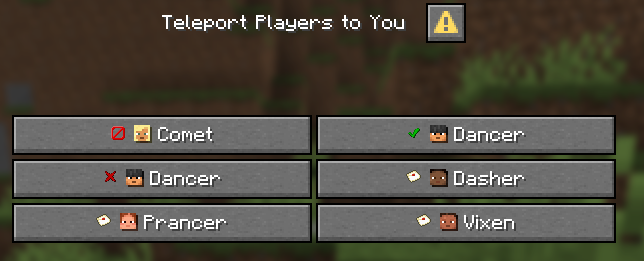
Dialog menus to select players are available in the pause menu and quick actions list (default keybind G).
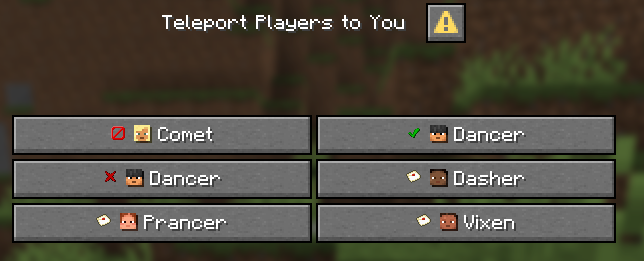
You can accept or reject incoming requests from players, or send or cancel your own requests.
Commands
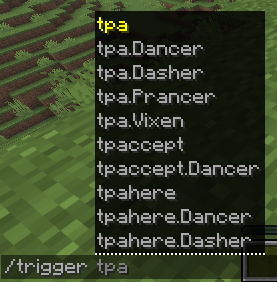
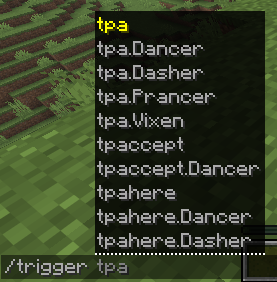
/trigger tpa– Request to teleport yourself to a player./trigger tpahere– Request to teleport a player to yourself./trigger tpaccept– Accept all incoming teleport requests./trigger tpreject– Reject all incoming teleport requests./trigger tpcancel– Cancel all your outgoing teleport requests.
Add a dot . and player name to target a specific player: /trigger tpa.Notch.
The /trigger autocomplete shows you all your available actions.
Mechanics
You can send a teleport request to any online player except yourself. You can even send multiple teleport requests to different players. Requests can be cancelled by the sender or rejected by the receiver. They are cancelled if either user logs out, or after 60 seconds passes with no response. There is no limit to sending another request once yours was cancelled or rejected.
Requests deliver a message in chat to the recipient. It can be accepted by clicking it, with a command, or with the menu.

If two players send matching requests to each other (one requesting to teleport, the other requesting to be teleported), both requests will be immediately accepted.
Adding this pack to a Singleplayer world will mark it as “experimental” and require clicking an extra button to join. This is caused by the integrated menus. If this annoys you, you can delete the data/minecraft/tags/dialog folder from the pack. Of course, the pack doesn’t do much in Singleplayer unless the world is opened to LAN.
常见问题
Modern TPA 支持哪些 Minecraft 版本?
Modern TPA 支持 Minecraft Java 版 1.21.11–26.2,共 5 个版本,可用的加载器:Fabric / Forge / NeoForge / Quilt。下载时注意选择和你游戏版本一致的文件。
Modern TPA 怎么安装?
先用 PCL2 或 HMCL 启动器安装对应版本的 Fabric / Forge / NeoForge / Quilt,再把下载的 .jar 文件放进游戏目录的 mods 文件夹,重新启动游戏即可。开启了版本隔离的,mods 文件夹在 versions/版本名 下面。运行环境:客户端 / 服务端。

评论
登录后评论和评分