
RRDiscordBridge
A Modern, Clean-looking, and Universal Discord bridge/relay designed to support both modern AND legacy versions of Minecraft. """Temporary""" logo made by my friend for the funny.
截图

介绍
Retro-Release Discord Bridge


Discord bridge/relay plugin that supports old Minecraft versions and server software (Beta 1.4-Release 1.21.1)
[!NOTE]
Currently on hiatus while I finish another project, as this project requires an entire build script rewrite.
For config info, check out this page.
Download: https://modrinth.com/plugin/rrdiscordbridge
When reading the source code, you may notice that the projects have odd names, this is to make the source look slightly cleaner.
See versions.md for more info.
Features
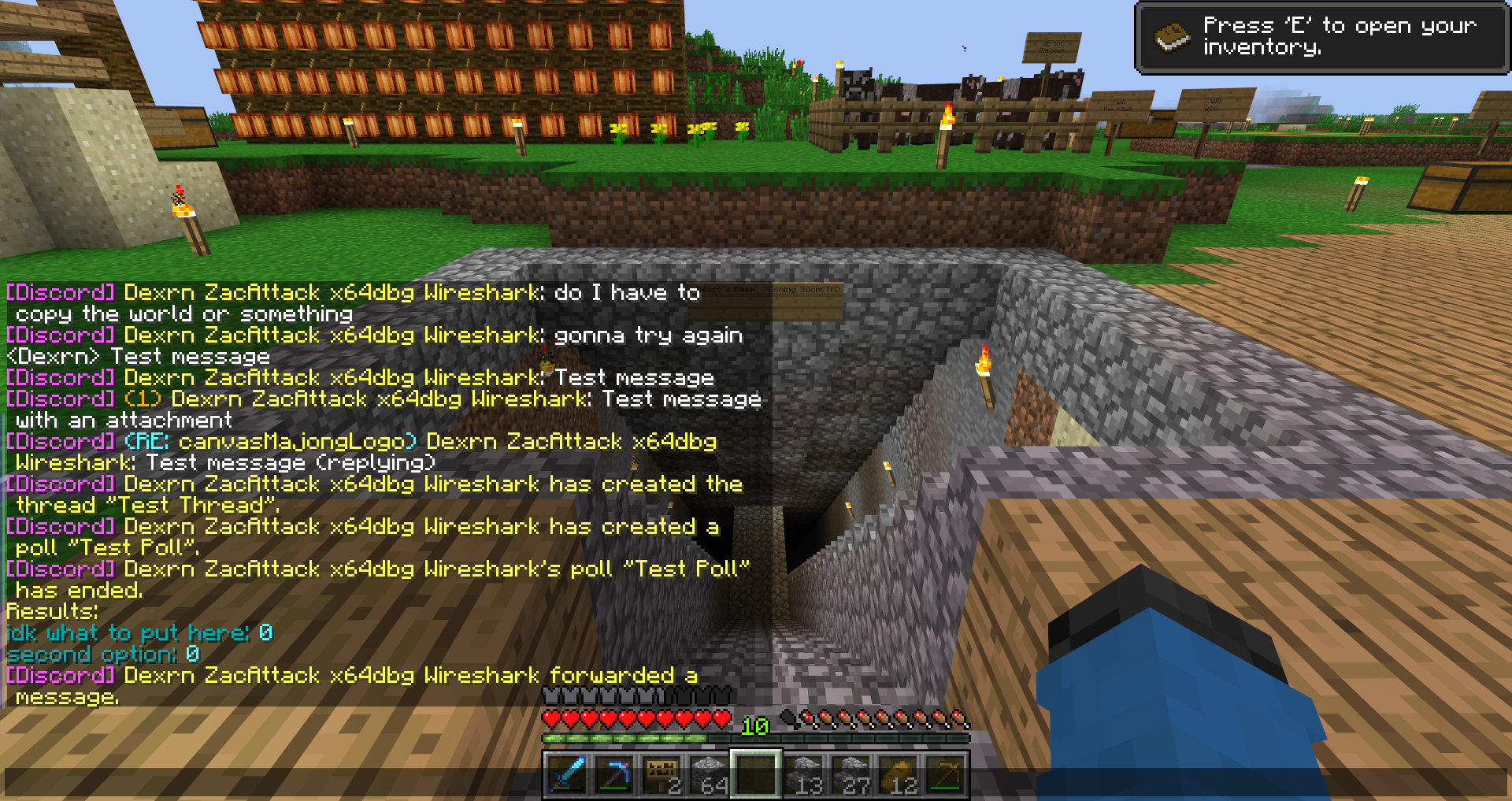
- Message Relay
- Version support
- Broadcasting (/dcbroadcast)
- Server Stats from Discord (/about)
- Relays the following to Discord (configurable)
- Player Join
- Player Leave
- Player Kick
- Player Death
- Player Chat
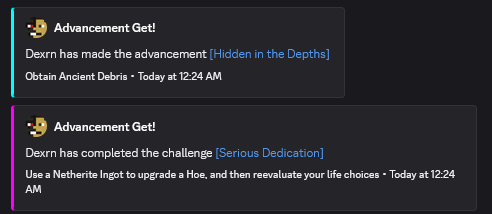
- Player Advancements/Achievements
- Contains advancement description (if applicable) and link to wiki page
- Server Start
- Plugin Reload
- Server Stop
- /say
- /me
Server Console (if configured)- Relays the following information from Discord (configurable)
- Channel message
- User join (if the relay channel is also the system messages channel)
- Server boost (if the relay channel is also the system messages channel)
- Thread creation
- Message pin
- Poll created/ended (with results)
- Slash commands used
- User app used (also activities)
- Message forwarded (probably not complete)
- Extensions (configurable)
- Extra info available in-game by typing
/rdbext help. - Built-in extensions:
- Waypoint embed (Waypoints)
- Allows for Xaero’s Minimap and JourneyMap/VoxelMap waypoints to be embedded in the relay channel.
- See config options
- Operator Chat (OpChat)
- Allows for communicating between ops and optionally a (likely private) discord channel.
- Inspired by MCGalaxy’s OPChat feature.
- Syntax: ## \
- See config options
- ### For development info, see the example repo
- Customizable color palette for messages sent to Discord
Supported versions
CraftBukkit (and forks)
- [X] UberBukkit
- [X] b1.2_01-b1.3_01 (int.
bukkitCake| Made for Bukkit Build 33) - Missing many features, as build 33 was missing many events.
- No commands
- [X] b1.4-r1.0 (int.
bukkitCookie) - [X] Project Poseidon
- [X] 1.1-1.2.5 (int.
bukkitFlat) - [X] 1.3.1-1.7.8 (int.
bukkitEmerald) - [X] 1.7.9-1.11.2 (int.
bukkitRealms) - [X] 1.12-1.19.1 (int.
bukkitColor) - [X] 1.19.2-Latest (int.
bukkitVex)
Fabric
- [ ] 1.14.4
- [ ] 1.15.2
- [X] 1.16.4-1.18.2
- [X] 1.19
- [X] 1.19.1-1.19.2
- [X] 1.19.3-1.20.1
- [X] 1.20.2
- [X] 1.20.3-1.20.5
- [X] 1.20.5-1.21.8
- [X] 1.21.9-Latest
NeoForge
- [X] 1.20.2-1.20.4
neoforge.mods.tomlwas unused until 1.20.5- [X] 1.20.5-1.21.8
- [X] 1.21.9-Latest
Forge
- [ ] 1.1-1.20
- [X] 1.20.1
- [X] 1.20.2
- [X] 1.20.3-1.20.5
- [X] 1.20.6-1.21.5
- [X] 1.21.6-1.21.8
- [X] 1.21.9-Latest
Ornithe
- Coming soon (hopefully)
Credits
- placeholder.co
- Used for waypoint badges
- MCHeads
- Used for player head avatar
- p0t4t0sandwich
- Was very helpful in helping me set up gradle and helped me through every issue I had
常见问题
RRDiscordBridge 支持哪些 Minecraft 版本?
RRDiscordBridge 支持 Minecraft Java 版 1.0–1.21.10,共 98 个版本,可用的加载器:Bukkit / Fabric / Forge / NeoForge / Paper / Purpur / Spigot。下载时注意选择和你游戏版本一致的文件。
RRDiscordBridge 怎么安装?
先用 PCL2 或 HMCL 启动器安装对应版本的 Bukkit / Fabric / Forge / NeoForge / Paper / Purpur / Spigot,再把下载的 .jar 文件放进游戏目录的 mods 文件夹,重新启动游戏即可。开启了版本隔离的,mods 文件夹在 versions/版本名 下面。运行环境:仅服务端。
Nostalgica Reverie 的其他作品
查看全部 →
Moderner Beta
为现代 Minecraft 带来新旧世界生成!

Programmer Art Continuation Project
Programmer Art 的高投入延续,涵盖 1.13-1.21+ 的资源。

Vidalia
自定义 1.7/1.8 时代及更多风格的视觉效果和动画。

Nostalgic Tweaks
还原Minecraft alpha、beta及正式版后遗失的游戏玩法元素。适合怀旧爱好者,也适合想通过调整模组来给游戏换上新风格的人。
评论
登录后评论和评分