
截图
介绍
Description:
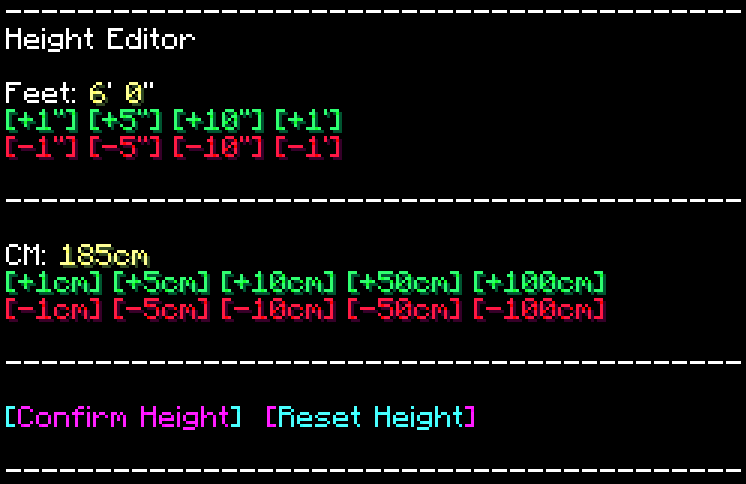
This Datapack/mod makes a Simple to use and functional Chat-based UI for changing your own player height, with values both in Centimetres and Feet/Inches. You can access this menu by typing “/trigger height_menu“
You will also recieve a one-time message upon joining a world with this Installed for the first time, notifying you of the functionality, and command.
1.3 Beta notes
Settings
Enable/Disable a welcome message for players informing them of the datapacks presence, default: false/0
/scoreboard players set welcome_message oszu_rh 1Disable the use of the ehight menu for players, default: false/0
/scoreboard players set disable_menu oszu_rh 0Enable/Disable random height assignment for players on initial join of the world, default: false/0
/scoreboard players set random_height oszu_rh 0Set minimum value for random hight to roll, default: 1
/scoreboard players set random_min_mm oszu_rh 1Set maximum height for random height to roll, default: 1000
/scoreboard players set random_max_mm oszu_rh 1000Re-roll
Re-roll a specific players random height
/execute as PLAYERNAME run function oszu_rh:height_logic/randomise_heightNOTE:
you can use @a as a playername, and it will re-roll the height for all palyers currently in the server
Notes:
Server-Side: meaning that it needs to be installed either on a singleplayer world, or on the server host side
Other:
License: ATTRIBUTION-NONCOMMERCIAL-SHAREALIKE 4.0 INTERNATIONAL
If you would like me to port this to any other Minecraft version, i would be more than happy to do so, please contact me! my details are below.
If you do find any issues/have any recommendations, suggestions for optimizations, improvements, or new features to add, feel free to contact me!
Discord
@oSzoukaua
src=”https://github.com/oSzoukaua/branding_assets/blob/main/kofi_button_link.png?raw=true”
alt=”Support me over at Ko-Fi! <3"
width=”400″
height=auto
style=”border:0px;”
/>
src=”https://github.com/oSzoukaua/branding_assets/blob/main/other_button_link.png?raw=true”
alt=”Check out my other links! <3"
width=”400″
height=auto
style=”border:0px;”
/>
Ko-Fi: ko-fi.com/oszoukaua
Other: linktr.ee/oSzoukaua
Technical details:
常见问题
oSzoukaua’s: Real Height 支持哪些 Minecraft 版本?
oSzoukaua’s: Real Height 支持 Minecraft Java 版 1.21–26.1.2,共 13 个版本,可用的加载器:Fabric / Forge / NeoForge / Quilt。下载时注意选择和你游戏版本一致的文件。
oSzoukaua’s: Real Height 怎么安装?
先用 PCL2 或 HMCL 启动器安装对应版本的 Fabric / Forge / NeoForge / Quilt,再把下载的 .jar 文件放进游戏目录的 mods 文件夹,重新启动游戏即可。开启了版本隔离的,mods 文件夹在 versions/版本名 下面。运行环境:客户端 / 服务端。
oSzoukaua 的其他作品
查看全部 →
oSzoukaua’s: Lucky Blocks
oSzoukaua 的幸运方块 这是我 oSzoukaua 制作的数据包,灵感来自名为“Lucky Blocks”的原版模组。 数据包新增了可合成的幸运方块,包含不同的幸运等级,以及许多可能触发的不同“事件”。

oSzoukaua’s: Realistic Spiders
这个整合包让蜘蛛更真实!也更可爱!

oSzoukaua’s: No Water & Fog
这个资源包会移除游戏中的所有水和雾气效果!

oSzoukaua’s: Bee Small
一个能缩小蜜蜂的数据包/模组! (也可以设置自定义默认尺寸!)
评论
登录后评论和评分