
截图

介绍
Real Time Link
This datapack links the time in your Minecraft world to your real-time (if on multiplayer, the time in the server’s timezone), down to the nearest minute. It is relatively optimised, using the latest features in 1.19.4 to allow parsing strings.
As opposed to other similar datapacks, this one minimises how often it does weird technical things, making it quite optimised, but there’s room for me to improve on it. You won’t notice the time going by, as it updates super smoothly 😀
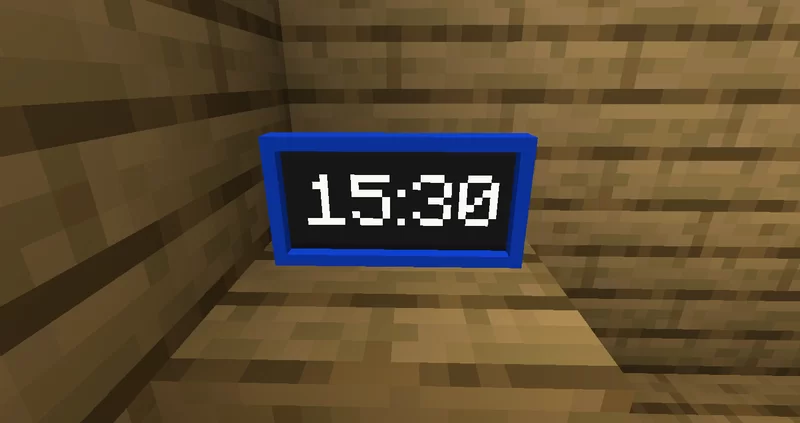
It also adds a new item – the Digital Clock, which shows the current time in HH:MM.
IMPORTANT NOTES
- This datapack only works in versions 1.19.4 and above!
- This datapack only works if command blocks are enabled.
- The resource pack is optional – you only need to use it if you want to use the Digital Clock item
Digital Clock
The Digital Clock shows your current time/the time of the server. It is accurate (to the time of the server) to within two seconds.
You can craft it with the recipe shown, or use the function /function give:clock

The digital clock requires the resource pack to use it, but it is not required for real-time linking or any other features.
Time Zone Offset
If your server that the datapack is installed on is hosted in a timezone which is, say, 4 hours behind your time zone, then you can offset the time. To do this, run /scoreboard players set .TZ_OFFSET rtime offset, where offset is a number from -11 to 14. If the server is 4 hours behind, you would want to offset the time to be 4 hours ahead of the server, so you would set it to 4.
- This only affects the real-time link, not the digital clock item
Thanks!
Want a Minecraft server, with a 25% discount? Click Here!

常见问题
Real Time Link 支持哪些 Minecraft 版本?
Real Time Link 支持 Minecraft Java 版 1.19.4,可用的加载器:Fabric / Forge / Quilt。下载时注意选择和你游戏版本一致的文件。
Real Time Link 怎么安装?
先用 PCL2 或 HMCL 启动器安装对应版本的 Fabric / Forge / Quilt,再把下载的 .jar 文件放进游戏目录的 mods 文件夹,重新启动游戏即可。开启了版本隔离的,mods 文件夹在 versions/版本名 下面。运行环境:客户端 / 服务端。
Silabear 的其他作品
查看全部 →
Realistic Item Drops
This datapack makes dropped items display with physics and rest nicely on the ground (using fun stuff with armor stands)!

VillEdit
Create custom villagers with the VillEdit datapack! This is an easy custom villager creator which works without mods.

BearEdit
A worldedit datapack for 1.20.2+ which is easy to use - no commands required! :D

Potato PC
Adds a literal potato pc with a literal potato operating system
评论
登录后评论和评分