
截图

介绍
TabGamemode
Have you ever had the suspicion that your friends are going into creative in your SMP? Want to bust a corrupt server admin? Well, do I got the mod for you!
Introducing: TAB Gamemodes!
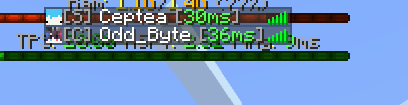
This mod allows you to see all player’s gamemodes in the tablist!
Here is an example of someone in survival:

The gamemodes are: [A] for adventure, [C] For creative, [S] for survival, and [Sp] for spectator!
IMPORTANT:
This WILL delete all rank prefixes / color applied to the player. This means you will not be able to see any ranks with this mod enabled. This mod can be toggled by clicking the middle mouse button. You can rebind this in minecraft’s controls menu.
Made by oddbyte
常见问题
Tab Gamemodes 支持哪些 Minecraft 版本?
Tab Gamemodes 支持 Minecraft Java 版 1.21–1.21.4,共 5 个版本,可用的加载器:Fabric。下载时注意选择和你游戏版本一致的文件。
Tab Gamemodes 怎么安装?
先用 PCL2 或 HMCL 启动器安装对应版本的 Fabric,再把下载的 .jar 文件放进游戏目录的 mods 文件夹,重新启动游戏即可。开启了版本隔离的,mods 文件夹在 versions/版本名 下面。运行环境:仅客户端。
评论
登录后评论和评分