
Gear Swapper
Gear Swapper is a simple but flexible block to allow swapping hotbar+armor easily
截图
介绍
Gear Swapper
With Gear Swapper you can easily define up to four different sets of hotbar + armor and switch with them easily. It works in-game with a block.
By default it works as follows:
- Sneak-left-click on one of the four slots to remember your current hotbar+armor selection in that slot. Your armor and hotbar remains on you. The block will also remember how many you had of the given item and it will attempt to restore that amount later.
- Right-click on one of the four slots to restore the hotbar+armor as it was remembered then. All items currently in your hotbar or armor that are in the way for the remembered items will be stored in your inventory. All slots that were empty when you remembered your setup will be unchanged (i.e. it will by default not empty them).
- When restoring a selection the block will first look in the player inventory, then in the local inventory (a 4×4 internal buffer) and finally in any possible adjacent inventories until it finds the items it needs.
- The Bauble inventory (when present) is also supported.
However, this block can be configured for more control. If you right-click the block on the ‘Settings…’ label or on the sides of the block then it will show a GUI:
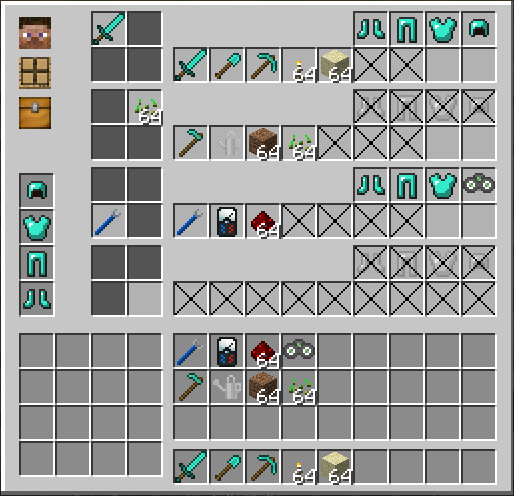
The example above shows a gui with four different configurations:
- The top-left configuration (top row in the gui) is configured with your prefered mining gear. i.e. sword, pickaxe, torches, some sand and good armor. The slots that are crossed out (two of them in this selection) will be cleared. The other two slots are left alone (i.e. whatever is there will remain there).
- The top-right configuration (second row in the gui) is configured for gardening. No armor is desired here.
- The bottom-left configuration (third row in the gui) is configured for tech work.
- The bottom-right configuration (last row in the gui) is configured to clear the hotbar and armor slots completely.
The three icons on the top-left of the gui show the preference for storing items from your hotbar and armor when you restore a different selection. The default settings are to first store items back in the players inventory. If that is full it will go to the internal inventory and if that also fails it will store it in an adjacent inventory. If that final fallback would also fail it will simply throw the items in the world. Nothing will be lost.
By clicking those three icons you can change the priority. For example. If you prefer that armor and tools that are stored away should go to the internal inventory then you can change the top icon until it resembles the wooden icon with the four boxes on it.
There are five different gear swappers (stone, wood, lapis lazuli, iron, and glass) and you can also configure another one with a modded texture through the config.
Modpacks
Feel free to use this in any modpack.
Demonstration video
常见问题
Gear Swapper 支持哪些 Minecraft 版本?
Gear Swapper 支持 Minecraft Java 版 1.7.10–1.12.2,共 11 个版本,可用的加载器:Forge。下载时注意选择和你游戏版本一致的文件。
Gear Swapper 怎么安装?
先用 PCL2 或 HMCL 启动器安装对应版本的 Forge,再把下载的 .jar 文件放进游戏目录的 mods 文件夹,重新启动游戏即可。开启了版本隔离的,mods 文件夹在 versions/版本名 下面。运行环境:客户端和服务端都要装。
McJty 的其他作品
查看全部 →
McJtyLib
McJty 所有模组(RFTools、XNet、Deep Resonance、Not Enough Wands、SignTastic 等)的配套模组
In Control!
掌控生物生成

XNet
XNet是一个高度优化的网络线缆系统,用于传输物品、能量、流体、信息等。

The Lost Cities
让玩家在废弃古城中游玩,而非普通主世界
评论
登录后评论和评分