
Wireless Redstone Lite
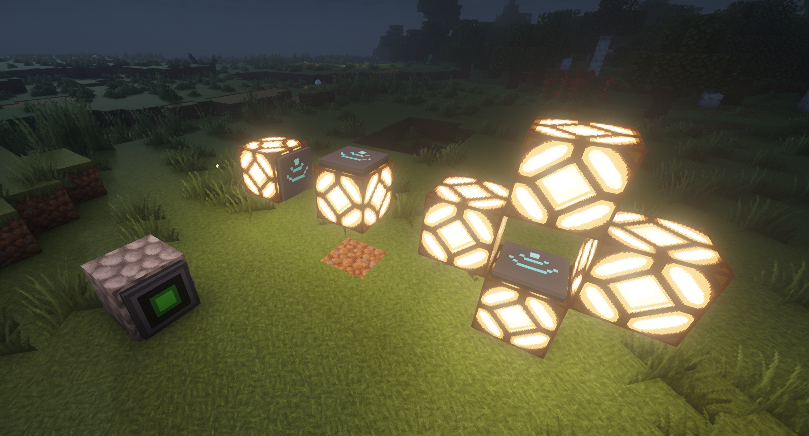
Wireless redstone for Minecraft 26.1.x. Pair transmitter and receiver blocks by channel + frequency — no wire, no spaghetti. Up to 128 blocks of range by default, configurable.
截图
介绍

Wireless Redstone
Tired of running redstone wire through your whole base just to flip one lamp? Drop a transmitter next to your switch, a receiver next to your lamp, match the channel — done. No wire. No floor‑tile mazes. No accidentally powering the wrong piston.
Features
- Transmitter — takes a redstone input from any side, broadcasts on its channel.
- Receiver — outputs the strongest signal it sees on its channel, like a redstone block.
- Channel (1–128) and Frequency (0–65535) — pick any pair to keep your networks separate. Over 8 million combinations per dimension.
- Lock toggle — freezes the channel/frequency so you can’t bump them by accident.
- Private toggle — binds the pair to your player, so two players can use the same channel without crossing wires on a multiplayer server.
- Item tooltips show the current config without placing the block — handy for sorting them in a chest.
- Configurable range — defaults to 128 blocks. Server admins can bump it up to 1024 or disable the limit entirely.
How it works
- Craft a transmitter and a receiver (recipes below).
- Place the transmitter and feed it redstone from any side — lever, button, comparator, whatever.
- Place the receiver anywhere in the same dimension within range.
- Right‑click either block to open the config screen. Match the channel + frequency.
- The receiver mirrors whatever signal strength the transmitter sees. Strength matters — comparator outputs travel intact.
Multiple transmitters on the same channel? The receiver picks the strongest. Multiple receivers? They all output the same. No cross‑dimension signalling (yet).
Recipes
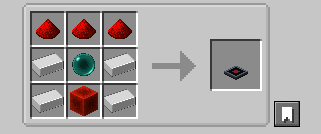
Transmitter — 4 iron + 3 redstone + 1 ender pearl + 1 redstone block
Receiver — 2 iron + 3 redstone + 1 ender pearl + 1 redstone torch
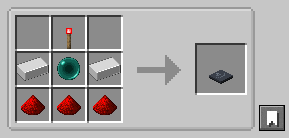
The ender pearl gates these behind your first enderman kill — far enough out that you’ve explored a bit, but accessible long before diamond or Nether tier.
Configuration
Config file lives at config/wirelessredstone.json (created on first launch):
{
  "rangeLocked": true,
  "maxRange": 128
}
| Key | Default | What it does |
|—|—|—|
| rangeLocked | true | When true, receivers ignore transmitters farther than maxRange blocks. Set false for unlimited range within a dimension. |
| maxRange | 128 | Block distance. Clamped to [4, 1024]. |
Edit the file and restart Minecraft (or the dedicated server) for changes to take effect.
Requirements
- Minecraft 26.1.x
- Java 25
- Fabric Loader 0.18.4+ with Fabric API, or NeoForge 26.1+
Roadmap
Future versions may add: a “fixed strength” mode (transmitter always emits a chosen 1–15 instead of mirroring its input), Jade/WAILA tooltips for in‑world inspection, and an owner‑only Private gamerule.
Source
GitHub: kestalkayden/wireless-redstone — CC0‑1.0.
常见问题
Wireless Redstone Lite 支持哪些 Minecraft 版本?
Wireless Redstone Lite 支持 Minecraft Java 版 26.1–26.3,共 5 个版本,可用的加载器:Fabric / NeoForge。下载时注意选择和你游戏版本一致的文件。
Wireless Redstone Lite 怎么安装?
先用 PCL2 或 HMCL 启动器安装对应版本的 Fabric / NeoForge,再把下载的 .jar 文件放进游戏目录的 mods 文件夹,重新启动游戏即可。开启了版本隔离的,mods 文件夹在 versions/版本名 下面。运行环境:客户端和服务端都要装。
kestalkayden 的其他作品
查看全部 →
Lonsdaleite [ Tools/Armors/Weapons ] + Omnitool
Adds a Lonsdaleite tier to Minecraft (Fabric) (1.16+, 1.17+, and 1.20+)

veinminer++
Vein Miner, Ore Harvester, Shovel Master, Tree Feller. Guided area. All rolled into one nice package!

Veinminer++
Vein Miner, Ore Harvester, Shovel Master, Tree Feller. Guided area. All rolled into one nice package!

Zombie Jerky
Turn Rotten Flesh into Zombie Jerky with the Smoker
评论
登录后评论和评分