
介绍
Gugle’s Carpet Addition



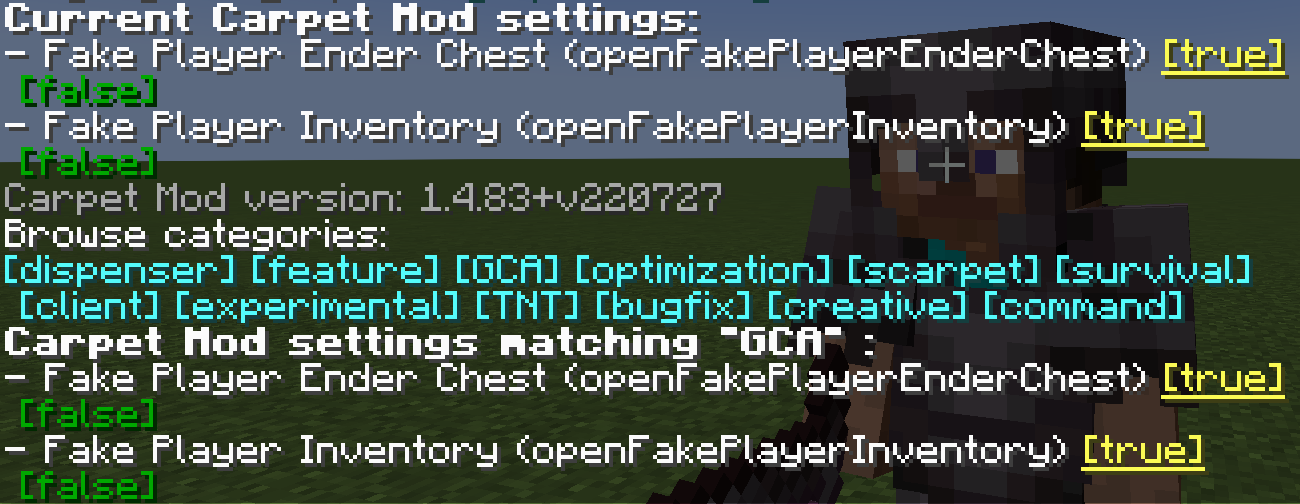
GCA
注意:
若要在 NeoForge 上通过 Sinytra Connector 运行 GCA,请从 NeoForge Sinytra 兼容版本中下载所需的兼容插件。
如果你需要适用于 Minecraft 1.13 的 GCA,请点击此处。
gcaPageSize
设置 GCA 列表页面每页显示的条目数量
- 类型:
int - 默认值:
8 - 选项:任意正整数
- 分类:
GCA
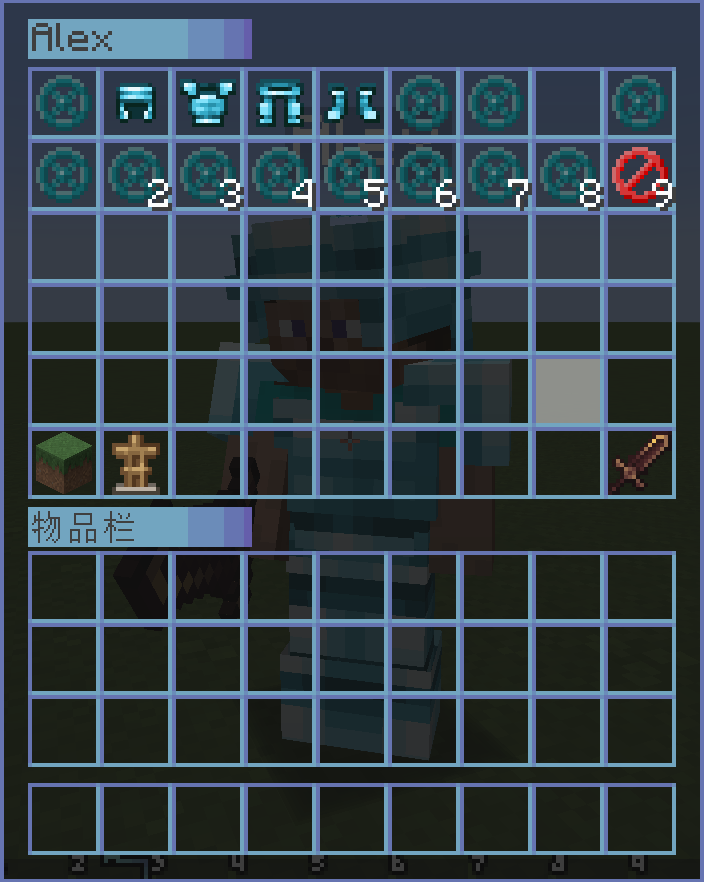
/carpet [setDefault] gcaPageSize 10openFakePlayerInventory
允许玩家打开假玩家的物品栏
- 类型:
boolean - 默认值:
false - 选项:
true、false - 分类:
GCA、BOT
/carpet [setDefault] openFakePlayerInventory true用法:右键点击假玩家以打开其物品栏
openRealPlayerInventory
允许玩家打开真实玩家的物品栏
- 类型:
String - 默认值:
false - 选项:
true、false、ops、0、1、2、3、4 - 分类:
GCA、experimental
/carpet [setDefault] openRealPlayerInventory true
/carpet [setDefault] openRealPlayerInventory ops用法:右键点击其他真实玩家以打开其物品栏,需要相应的权限等级
openFakePlayerEnderChest
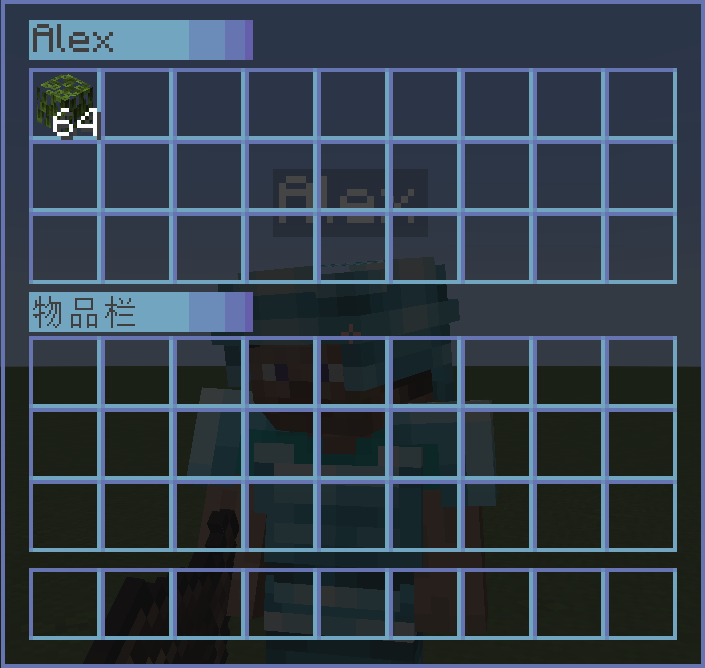
允许玩家打开假玩家的末影箱
- 类型:
String - 默认值:
false - 选项:
ender_chest、true、false - 分类:
GCA、BOT
/carpet [setDefault] openFakePlayerEnderChest true
/carpet [setDefault] openFakePlayerEnderChest ender_chest用法:潜行(按住 Shift)并右键点击假玩家以打开其末影箱
fakePlayerResident
退出世界时保留假玩家
- 类型:
boolean - 默认值:
false - 选项:
true、false - 分类:
GCA、BOT
/carpet [setDefault] fakePlayerResident truefakePlayerReloadAction
退出世界时保留假玩家的动作
- 类型:
boolean - 默认值:
true - 选项:
true、false - 分类:
GCA、BOT
/carpet [setDefault] fakePlayerReloadAction falsefakePlayerAutoRespawn
让假玩家在死亡后自动重生
- 类型:
String - 默认值:
false - 选项:
spawn、death、setting、false - 分类:
GCA、BOT、experimental
spawn:在出生点重生。
death:在死亡位置重生。
setting:在机器人列表中记录的位置重生。如果假玩家不在机器人列表中,则使用death模式。
/carpet [setDefault] fakePlayerAutoRespawn <spawn|death|setting>fakePlayerAutoReplenishment
让假玩家自动补充物品
- 类型:
boolean - 默认值:
false - 选项:
true、false - 分类:
GCA、BOT
/carpet [setDefault] fakePlayerAutoReplenishment truefakePlayerAutoReplenishmentFormShulkerBox
让假玩家从潜影盒中自动补充物品
- 类型:
boolean - 默认值:
false - 选项:
true、false - 分类:
GCA、BOT
/carpet [setDefault] fakePlayerAutoReplenishmentFormShulkerBox truefakePlayerAutoFish
让假玩家自动钓鱼。当鱼钩钓到鱼时,它会自动收竿并再次抛竿。
- 类型:
boolean - 默认值:
false - 选项:
true、false - 分类:
GCA、BOT
/carpet [setDefault] fakePlayerAutoFish true用法:让假玩家手持钓鱼竿,并使用 /player <name> use 开始钓鱼。假玩家会自动完成收竿和抛竿操作。
fakePlayerAutoReplaceTool
让假玩家自动替换即将损坏的工具
- 类型:
String - 默认值:
false - 选项:
true、false、keep - 分类:
GCA、BOT
true:带有经验修补的工具会保留 10 点耐久度;其他工具会在损坏后自动替换。
keep:所有工具都会保留 10 点耐久度。
/carpet [setDefault] fakePlayerAutoReplaceTool <true|keep>fakePlayerToolDamagedNotification
当假玩家的工具损坏或补货失败时,广播一条全服务器消息(可能导致消息刷屏)
- 类型:
boolean - 默认值:
false - 选项:
true、false - 分类:
GCA、BOT
/carpet [setDefault] fakePlayerToolDamagedNotification truefakePlayerPrefixName
假玩家名称前缀
- 类型:
String - 默认值:
#none - 选项:
#none、bot_ - 分类:
GCA、BOT
/carpet [setDefault] fakePlayerPrefixName bot_
/carpet [setDefault] fakePlayerPrefixName #none
fakePlayerSuffixName
假玩家名称后缀
- 类型:
String - 默认值:
#none - 选项:
#none、_fake - 分类:
GCA、BOT
/carpet [setDefault] fakePlayerSuffixName _fake
/carpet [setDefault] fakePlayerSuffixName #none
fakePlayerForceOfflineUUID
强制假玩家使用离线 UUID(需要启用 allowSpawningOfflinePlayers)
- 类型:
boolean - 默认值:
false - 选项:
true、false - 分类:
GCA、BOT
/carpet [setDefault] fakePlayerForceOfflineUUID true禁用此功能需要清除 usercache.json,并重启服务器/客户端,以切换回在线 UUID。
commandBot
用于保存、加载和分组管理假玩家的机器人管理菜单
- 类型:
String - 默认值:
ops - 选项:
ops、0、1、2、3、4、true、false - 分类:
GCA、BOT、command
/carpet [setDefault] commandBot ops命令用法:
/bot                                    # Show saved bot list
/bot list [page]                        # Show bot list with pagination
/bot add <player> <desc>                # Save current online fake player (including position, actions, etc.)
/bot load <player>                      # Load saved fake player
/bot remove <player>                    # Delete saved fake player
/bot group                              # Show bot group list
/bot group create <name>                 # Create bot group
/bot group remove <name>                 # Delete bot group
/bot group add <bot> <group>             # Add bot to group
/bot group load <group>                 # Load all bots in group
/bot group unload <group>               # Unload all bots in group
/bot group info <group>                 # View group details
/bot group generated <name> <count> [load]  # Batch generate bots and group them
机器人控制器
使用 /bot controller 可自定义假玩家额外控制面板上的按钮。按钮可以全局配置,也可以针对单个假玩家配置。当两者使用同一个槽位时,单个假玩家的设置会覆盖全局设置。
可用槽位为 3 到 26。点击按钮后,会使用目标假玩家的名称运行配置的 /player <player> <action> 命令,因此 <action> 只能包含玩家名称之后的部分。例如,attack continuous 会运行 /player <player> attack continuous。
命令用法:
/bot controller                                             # Show the global button list
/bot controller list [player]                               # Show global buttons or the effective buttons for a player
/bot controller global set <slot> <desc> <action>           # Set a global button
/bot controller global clear <slot>                         # Clear a global button from a slot
/bot controller global clear all                            # Clear all global buttons
/bot controller player <player> set <slot> <desc> <action>  # Set a button for one fake player
/bot controller player <player> clear <slot>                # Clear one button for a fake player
/bot controller player <player> clear all # Clear all buttons for a fake player示例:
/bot controller global set 3 "Continuous Attack" attack continuous
/bot controller player Steve set 4 "Continuous Use" use continuous
启用 openFakePlayerInventory 或 openFakePlayerEnderChest 后,潜行并右键点击假玩家即可打开额外的控制面板。当假玩家的末影箱功能启用时,控制按钮会显示在其内容上方。包含空格的按钮描述必须使用双引号括起来。
commandBotAction
用于为机器人添加或移除操作,以及设置机器人启动操作的操作管理菜单
- 类型:
String - 默认值:
ops - 选项:
ops、0、1、2、3、4、true、false - 分类:
GCA、BOT、command
/carpet [setDefault] commandBotAction ops命令用法:
/bot action <bot>                       # View bot's action list
/bot action <bot> add <action>          # Add action to bot
/bot action <bot> remove <id>           # Remove action from bot
/bot action <bot> startup set <action>  # Set bot's startup action
/bot action <bot> startup clear         # Clear bot's startup actions
commandTodo
待办事项管理菜单,支持添加、移除和标记完成
- 类型:
String - 默认值:
ops - 选项:
ops、0、1、2、3、4、true、false - 分类:
GCA、command
/carpet [setDefault] commandTodo ops命令用法:
/todo                           # Show todo list
/todo list [page]               # Show todo list with pagination
/todo add <desc>                # Add new todo item
/todo remove <id>               # Remove todo item
/todo success <id> [true/false] # Mark todo as done/undone
commandHere
快速向所有玩家广播你当前的位置,并为自己添加发光效果
- 类型:
String - 默认值:
ops - 选项:
ops、0、1、2、3、4、true、false - 分类:
GCA、command - 条件:仅当未加载 CarpetAmsAddition 时有效
/carpet [setDefault] commandHere ops命令用法:
/here   # Broadcast your coordinates, showing current dimension and converted coordinates
        # Also outputs Xaero's Minimap compatible waypoint format
commandWhereis
快速定位玩家并为目标添加发光效果
- 类型:
String - 默认值:
ops - 选项:
ops、0、1、2、3、4、true、false - 分类:
GCA、command
/carpet [setDefault] commandWhereis ops命令用法:
/whereis <player>   # Query specified player's location
/vris <player>      # Alias, same function
commandLoc
用于保存、查看和删除地点的地点管理菜单
- 类型:
String - 默认值:
ops - 选项:
ops、0、1、2、3、4、true、false - 分类:
GCA、command
/carpet [setDefault] commandLoc ops命令用法:
/loc                    # Show location list
/loc list [page]        # Show locations with pagination
/loc add <desc>         # Add location at current position
/loc remove <id>        # Remove specified location
/loc info <id>          # View location details (including dimension converted coordinates)
commandWlist
白名单管理,允许获得授权的普通玩家管理白名单
- 类型:
boolean - 默认值:
false - 选项:
true、false - 分类:
GCA、command
/carpet [setDefault] commandWlist true命令用法:
/wlist                              # Show current whitelist
/wlist add <player>                 # Add player to whitelist
/wlist remove <player>              # Remove player from whitelist
/wlist permission add <player>      # Grant player whitelist management permission (OP only)
/wlist permission remove <player>   # Revoke player's whitelist management permission (OP only)
commandBlist
封禁列表管理
- 类型:
boolean - 默认值:
false - 选项:
true、false - 分类:
GCA、command
/carpet [setDefault] commandBlist true
/blist
commandSop
简单获取管理员权限
- 类型:
boolean - 默认值:
false - 选项:
true、false - 分类:
GCA、command
/carpet [setDefault] commandSop true
/sop
commandSeed
设置使用 /seed 命令所需的权限等级
- 类型:
String - 默认值:
vanilla - 选项:
vanilla、true、false、ops、0、1、2、3、4 - 分类:
GCA、command
/carpet [setDefault] commandSeed ops
/carpet [setDefault] commandSeed 0
betterFenceGatePlacement
使放置的栅栏门拥有与所点击栅栏门相同的方块状态
- 类型:
boolean - 默认值:
false - 选项:
true、false - 分类:
GCA
/carpet [setDefault] betterFenceGatePlacement truebetterWoodStrip
只有名称中包含“Strip”的斧头才能剥去原木的树皮
- 类型:
boolean - 默认值:
false - 选项:
true、false - 分类:
GCA
/carpet [setDefault] betterWoodStrip truebetterSignInteraction
右键点击告示牌时,使与告示牌相连的方块进行交互
- 类型:
boolean - 默认值:
false - 选项:
true、false - 分类:
GCA
/carpet [setDefault] betterSignInteraction truebetterItemFrameInteraction
右键点击物品展示框时,使与物品展示框相连的方块进行交互
- 类型:
boolean - 默认值:
false - 选项:
true、false - 分类:
GCA
/carpet [setDefault] betterItemFrameInteraction truebetterQuickCrafting
快速合成期间将物品保留在物品栏中
- 类型:
boolean - 默认值:
false - 选项:
true、false - 分类:
GCA、experimental
/carpet [setDefault] betterQuickCrafting truesimpleInGameCalculator
简单的游戏内计算器
- 类型:
boolean - 默认值:
false - 选项:
true、false - 分类:
GCA
/carpet [setDefault] simpleInGameCalculator truefastPingFriend
快速提醒好友
- 类型:
boolean - 默认值:
false - 选项:
true、false - 分类:
GCA
/carpet [setDefault] fastPingFriend trueqnmdLC
设置 LC 值时使用的高度值
- 类型:
int - 默认值:
-1 - 分类:
GCA、experimental
/carpet [setDefault] qnmdLC 64
/carpet [setDefault] qnmdLC -1
fixedEndCrystalSync
修复末地水晶同步问题
- 类型:
boolean - 默认值:
false - 选项:
true、false - 分类:
GCA、experimental
/carpet [setDefault] fixedEndCrystalSync truewelcomePlayer
欢迎玩家
- 类型:
boolean - 默认值:
false - 选项:
true、false - 分类:
GCA
/carpet [setDefault] welcomePlayer truewanderingTraderSpawnFailedWarning
流浪商人生成失败警告
- 类型:
boolean - 默认值:
false - 选项:
true、false - 分类:
GCA、experimental
/carpet [setDefault] wanderingTraderSpawnFailedWarning truewanderingTraderSpawnRemind
流浪商人生成提醒
- 类型:
boolean - 默认值:
false - 选项:
true、false - 分类:
GCA、experimental
/carpet [setDefault] wanderingTraderSpawnRemind truecommandTransfer
/transfer 命令
- 类型:
boolean - 默认值:
false - 选项:
true、false - 分类:
GCA、command - 条件:需要 Minecraft >= 1.21
/carpet [setDefault] commandTransfer true
/transfer <server> [port]
commandTick
修复 Carpet 的 /tick 命令权限
- 类型:
String - 默认值:
3 - 选项:
true、false、ops、0、1、2、3、4 - 分类:
GCA、command、experimental - 条件:需要 Minecraft >= 1.20.3
/carpet [setDefault] commandTick 3fakePlayerLocatorBar
在定位栏中显示假人位置
- 类型:
boolean - 默认值:
true - 选项:
true、false - 分类:
GCA、command、BOT - 条件:需要 Minecraft >= 1.21.6
/carpet [setDefault] fakePlayerLocatorBar true
评论
登录后评论和评分