
ShadowKits
A simple Kits system designed for Minecraft Fabric servers Compatible whit any mod! EX: Cobblemon etc...
截图
介绍
ShadowKits
ShadowKits is a fully customizable kit system designed for Minecraft Fabric servers. It allows server administrators to create, manage, and configure kits that players can claim based on cooldowns, permissions, and other settings.
📜 Features:
- ✅ Fully Configurable Kits – Define kits in JSON format, including items, enchantments, names, lore, commands, cooldowns, and more.
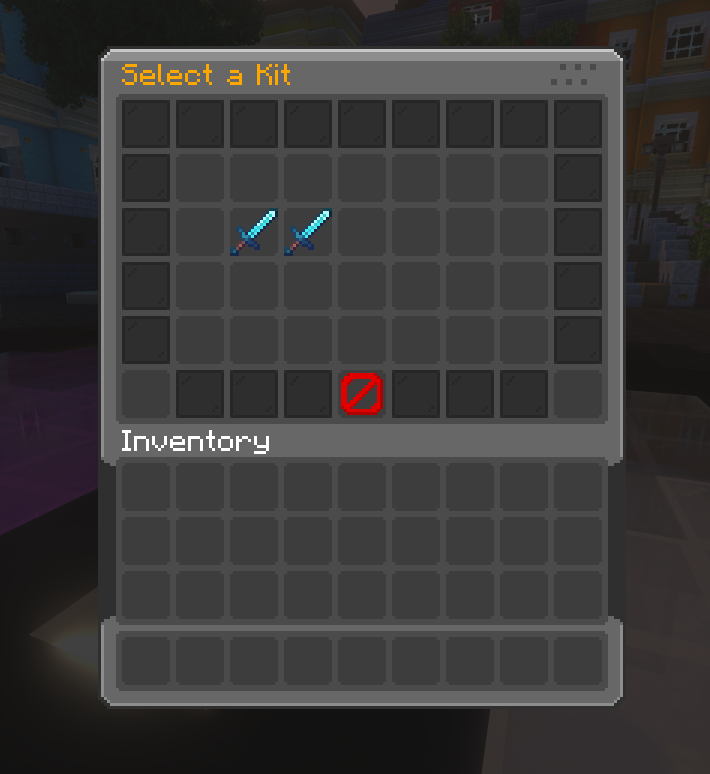
- ✅ Custom GUI Menus – Beautifully designed and configurable inventory GUIs for kit selection and previews.
- ✅ Custom Enchantment & NBT Support – Kits retain all item properties, including enchantments, custom model data, and NBT tags.
- ✅ Cooldown & Claim Limits – Set cooldowns and maximum claims per kit.
- ✅ Permission-Based Access – Restrict specific kits using LuckPerms or any permission plugin.
- ✅ Command Execution – Run custom commands when a player claims a kit.
- ✅ Custom Sounds – Play unique sounds when a kit is claimed or when it’s on cooldown.
- ✅ Language & Message Customization – Edit all messages, GUI titles, and lore with full RGB color support.
- ✅ Player Data Storage – Track kit usage, cooldowns, and claims in individual player JSON files.
- ✅ Kits Privew on Blocks – Allow admins to set custom privew kits menu on custom blocks.
⚙️ Commands:
Spoiler
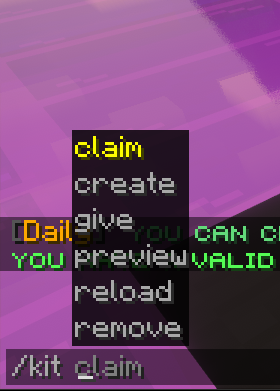
/kits– Opens the main kits GUI where players can browse and claim kits./kit claim <kit>– Claim a specific kit if available./kit give <kit> <player>– Admin command to give a kit to another player./kit remove <kit>– Deletes a kit from the configuration./kit create <kit>– Creates a new kit in kits folder./kit preview <kit>– Opens a GUI preview of a specific kit./kit reload– Reloads the kit configuration without restarting the server./kit block set <kit_name>– This command will transform the block you are looking at into a kit preview block, which you can interact with to preview the kit or claim it./kit block unset– With this command you will be able to transform the preview kit block back into a normal block.
🔒 Permissions:
Spoiler
kit.claim– Allows players to claim kits using /kit claimkits.view– Allows players to open the kits menu with /kitskit.preview– Allows players to preview a kit with /kit previewkit.create– Allows admins to create new kits using /kit createkit.give– Allows admins to give kits to players using /kit givekit.remove– Allows admins to remove kits using /kit removekit.reload– Allows admins to reload the kits configuration with /kit reloadkit.<kit_name>– Grants access to a specific kit by namekit.block.set– Allow admins to set the privew blockskit.block.unset– Allow admins to remove the privew blocks
📝 Configurable Menus:
- Kit Selection Menu – A GUI for browsing kits, with customizable slots, fill items, and pagination.
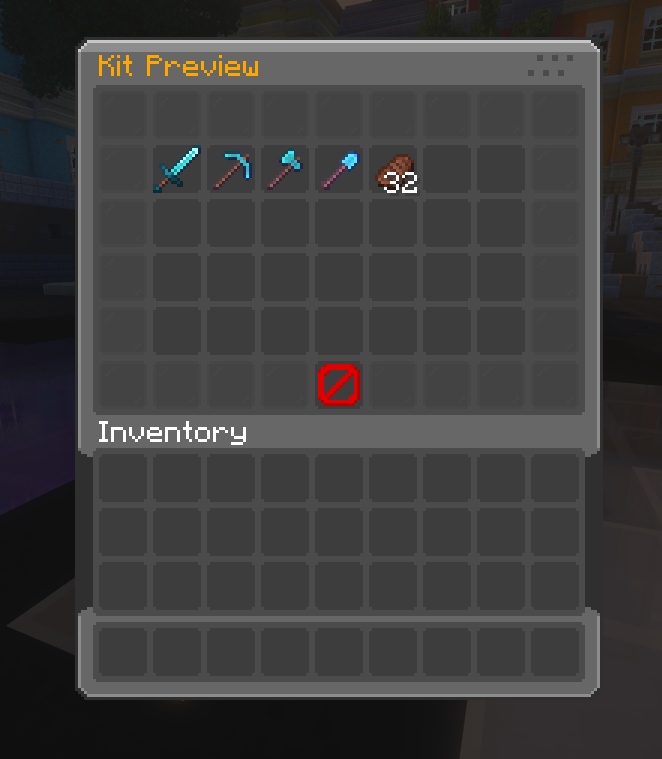
- Kit Preview Menu – A GUI that previews kit contents before claiming.
- Fully Customizable – All GUI elements (buttons, titles, filler blocks, navigation buttons) are fully configurable via menu.json and menu_preview.json.
📂 Configuration Files:
- 📁
/config/shadowkits/config.json– Stores general settings, cooldowns, and messages. - 📁
/config/shadowkits/kits/– Stores individual kit configurations in JSON format. - 📁
/config/shadowkits/menu.json– Configures the kit selection GUI. - 📁
/config/shadowkits/menu_preview.json– Configures the kit preview GUI.
📃 Config Ex:
Spoiler
{
  "name": "Starter",
  "onJoin": false,
  "firstTimeJoin": false,
  "cooldown": "1h",
  "claims": true,
  "maxClaims": 5,
  "permission": "kit.starter",
  "economyProvider": "auto",
  "currency": "money",
  "costMoney": false,
  "cost": 100,
  "claimSound": "minecraft:entity.player.levelup",
  "cooldownSound": "minecraft:entity.villager.no",
  "page": 1,
  "slotOnPage": 10,
  "displayItem": {
    "material": "minecraft:diamond_sword",
    "amount": 1,
    "displayname": "&bKit Starter",
    "lore": [
      "&7A powerful kit to begin your journey!",
      "&aIncludes enchanted tools and a food!"
    ],
    "cooldownLore": true,
    "enchantEffect": true,
    "unbreakable": false
  },
  "rewards": [
    {
      "type": "item",
      "material": "minecraft:iron_pickaxe",
      "amount": 1,
      "displayname": "&bIron Pickaxe",
      "lore": [
        "&7Handy starter tool"
      ],
      "enchants": [
        {
          "name": "minecraft:unbreaking",
          "level": 2
        }
      ],
      "enchantEffect": true
    },
    {
      "type": "command",
      "command": "give %player% minecraft:cooked_beef 16",
      "displayItem": {
        "material": "minecraft:cooked_beef",
        "amount": 16,
        "displayname": "&6Food Voucher",
        "lore": [
          "&7Runs a give-food command"
        ],
        "enchantEffect": false
      }
    },
    {
      "type": "item_pack",
      "displayname": "&aStarter Supplies",
      "lore": [
        "&7A small pack of basics"
      ],
      "pack": [
        {
          "material": "minecraft:oak_log",
          "amount": 32,
          "displayname": "&eOak Logs"
        },
        {
          "material": "minecraft:torch",
          "amount": 16,
          "displayname": "&eTorches"
        }
      ]
    },
    {
      "type": "command_pack",
      "displayItem": {
        "material": "minecraft:paper",
        "amount": 1,
        "displayname": "&dCommand Pack",
        "lore": [
          "&7Executes multiple commands"
        ],
        "enchantEffect": false
      },
      "pack": [
        {
          "amount": 1,
          "command": "effect give %player% minecraft:regeneration 5 1 true"
        },
        {
          "amount": 1,
          "command": "say ShadowKits: Command pack reward for %player%"
        }
      ]
    },
    {
      "type": "item_random",
      "displayname": "&eRandom Item",
      "lore": [
        "&7One random item from the list"
      ],
      "randomList": [
        {
          "weight": 1.0,
          "material": "minecraft:diamond",
          "amount": 1,
          "displayname": "&bDiamond"
        },
        {
          "weight": 3.0,
          "material": "minecraft:gold_ingot",
          "amount": 3,
          "displayname": "&6Gold Ingots"
        },
        {
          "weight": 6.0,
          "material": "minecraft:iron_ingot",
          "amount": 5,
          "displayname": "&fIron Ingots"
        }
      ]
    },
    {
      "type": "command_random",
      "displayItem": {
        "material": "minecraft:tripwire_hook",
        "amount": 1,
        "displayname": "&eRandom Command",
        "lore": [
          "&7Executes one random command"
        ],
        "enchantEffect": false
      },
      "randomList": [
        {
          "weight": 1.0,
          "amount": 1,
          "command": "effect give %player% minecraft:strength 60 1 true"
        },
        {
          "weight": 2.0,
          "amount": 1,
          "command": "effect give %player% minecraft:speed 60 1 true"
        },
        {
          "weight": 3.0,
          "amount": 1,
          "command": "say ShadowKits: Good luck, %player%!"
        }
      ]
    }
  ]
}
常见问题
ShadowKits 支持哪些 Minecraft 版本?
ShadowKits 支持 Minecraft Java 版 1.21–1.21.3,共 4 个版本,可用的加载器:Fabric。下载时注意选择和你游戏版本一致的文件。
ShadowKits 怎么安装?
先用 PCL2 或 HMCL 启动器安装对应版本的 Fabric,再把下载的 .jar 文件放进游戏目录的 mods 文件夹,重新启动游戏即可。开启了版本隔离的,mods 文件夹在 versions/版本名 下面。运行环境:仅服务端。
KrripeYT 的其他作品
查看全部 →
Cobblemon Shiny Boost Mod
Boost shiny rates for a limited time globally

ShadowCrates
It is a mod that implements the ability to add Crates System on fabric servers. And it has special support for cobblemon items display.

BEconomy
• BEconomy is a mod that adds virtual economy as well as item type economy, which makes it very customizable and easy to use. • Cobblemon Support
ShadowKits
A simple Kits system designed for Minecraft Fabric servers Compatible whit any mod! EX: Cobblemon etc...
评论
登录后评论和评分