
RetroArt Retextured
A Programmer Art add-on that retextures modern Minecraft blocks to match the classic pre-1.14 aesthetic. Includes retro-style ores, obsidian variants and more.
截图
介绍
🌟 RetroArt Retextured — Programmer Art Add-On
RetroArt Retextured is an add-on for Programmer Art that reimagines modern Minecraft textures in the classic, pre-1.14 style.
It restores the old pixel-heavy look, rough shading, and noisy patterns — making new blocks fit naturally into the nostalgic aesthetic.
🎨 Features
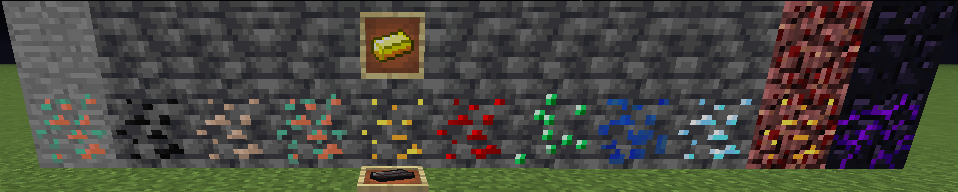
Crying Obsidian retextured using the classic Obsidian palette
Nether Gold Ore in old Netherrack style
All Deepslate Ores redesigned to match the classic stone ores
Custom Copper & Netherite ingots styled like pre-1.14 items
Fully consistent with Minecraft 1.13 Programmer Art
Clean, pixelated retro look — no modern shading
Lightweight, no mods required
📌 Requirements
⚠ This is an add-on, not a standalone pack.
To work correctly:
Enable Programmer Art
Place RetroArt Retextured ABOVE Programmer Art
Minecraft Version: 1.21.x
🧩 Compatibility
Minecraft Java Edition
Version 1.21.x
Works with Vanilla, Fabric, Forge, NeoForge, Quilt
No dependencies required
📚 Credits
Original textures © Mojang Studios
Classic base textures from Minecraft 1.13 Programmer Art
All modified or new textures created by Alry FireBlade
🛠 Tools Used
Paint.NET
Resourcepack format based on 1.21.x
📜 License
This pack may:
✔ Be used privately
✔ Be edited for personal use
✔ Be used together with Programmer Art
This pack may NOT:
✘ Be reuploaded elsewhere
✘ Be redistributed as your own
✘ Be included in modpacks without permission
License: All Rights Reserved (ARR)
💬 Feedback
Found an inconsistency or have a suggestion for another retro texture?
📣 Contact me:
Discord: alryfireblade
Minecraft: Alry_FireBlade
常见问题
RetroArt Retextured 支持哪些 Minecraft 版本?
RetroArt Retextured 支持 Minecraft Java 版 1.20.1–26.1,共 19 个版本。下载时注意选择和你游戏版本一致的文件。
RetroArt Retextured 怎么安装?
把下载的 .zip 文件(不用解压)放进游戏目录的 resourcepacks 文件夹,进游戏后在「选项 → 资源包」里把它移到右边启用。
评论
登录后评论和评分