
Simple Voice Chat Radios
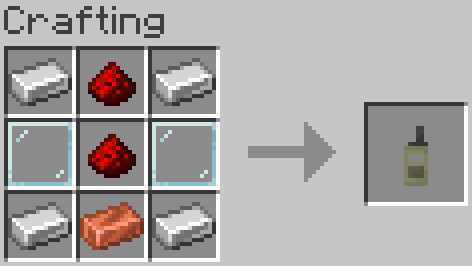
This mod adds radios to the simple voice chat that can add players to groups based on the frequency to combine immersion and long range communication.
截图

介绍
This mod adds a radio that allows the player to set a specific frequency and connect to it in conjunction with the Simple Voice Chat mod. This helps to retain immersion, while still allowing players to have long range communication using the mod.
To use the radio, simply hold right click and you will join the band of frequency that it is set to. In order to change the frequency on the radio, shift and right click, and move the slider.
I’m open to suggestions or requests — feel free to reach out if you have a mod idea.
If you notice any bugs or have any suggestions please contact me at [email protected] or on discord at italianchef123
常见问题
Simple Voice Chat Radios 支持哪些 Minecraft 版本?
Simple Voice Chat Radios 支持 Minecraft Java 版 1.21.1–1.21.11,共 11 个版本,可用的加载器:NeoForge。下载时注意选择和你游戏版本一致的文件。
Simple Voice Chat Radios 怎么安装?
先用 PCL2 或 HMCL 启动器安装对应版本的 NeoForge,再把下载的 .jar 文件放进游戏目录的 mods 文件夹,重新启动游戏即可。开启了版本隔离的,mods 文件夹在 versions/版本名 下面。运行环境:客户端和服务端都要装。
AstralSorceror 的其他作品
查看全部 →
Mechanical Trident
This mod adds a cheaper alternative to the trident which can be crafted using copper and prismarine shards.

Rinvenium
A mod with lethal weaponry at the cost of eating batteries

Spellbound
A mod focused around adding different items such as wands and scrolls that allow a user to cast an array of spells

Mithril
This is a small mod that adds mithril tools and weapons which each have special abilities such as the helmet granting the user night vision.
评论
登录后评论和评分