
截图
介绍
Potato PC
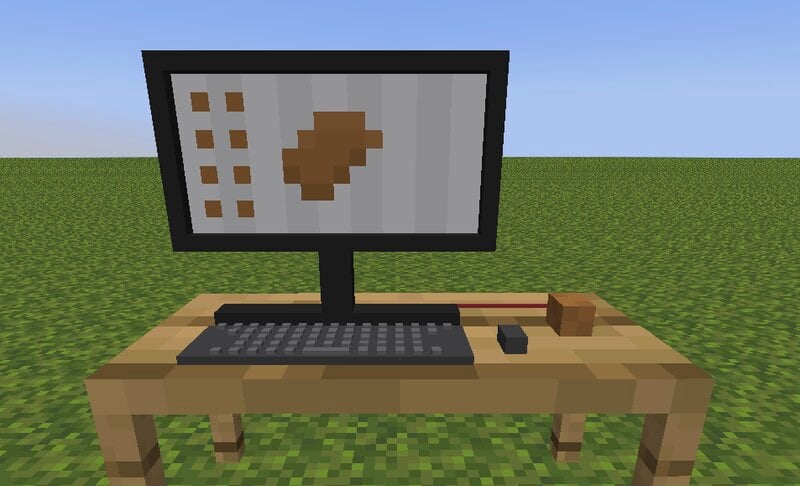
The Potato PC is a literal computer powered by a literal potato. It has four apps you can use
Description
You can craft the Potato PC like this:
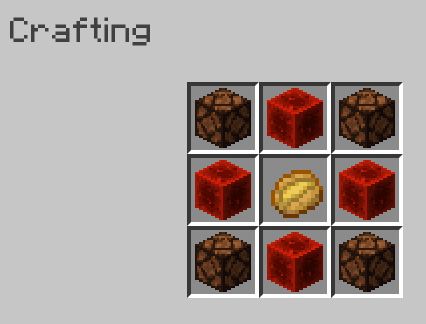
When you place it, right click on it to open the actual computer!
Potato Discord
Potato Discord has two servers you can visit by clicking the, on the sidebar. One is the Bear Cave, and one is the Potato Discord server.
Files
The Files app has 8 files – 3 are images and 5 are text documents. You can click on the files in the app to open them.
Images –
The images app can only be opened by opening an image through the Files app.
Games
The games app has one game, and that game is Worship-a-Potato. When you worship the potato by pressing the button, you have a chance at getting a diamond in return.
Music
The music app lets you play Pigstep when you press the play button.
常见问题
Potato PC 支持哪些 Minecraft 版本?
Potato PC 支持 Minecraft Java 版 1.17–1.19.3,共 9 个版本,可用的加载器:Fabric / Forge / Quilt。下载时注意选择和你游戏版本一致的文件。
Potato PC 怎么安装?
先用 PCL2 或 HMCL 启动器安装对应版本的 Fabric / Forge / Quilt,再把下载的 .jar 文件放进游戏目录的 mods 文件夹,重新启动游戏即可。开启了版本隔离的,mods 文件夹在 versions/版本名 下面。运行环境:客户端 / 服务端。
Silabear 的其他作品
查看全部 →
Realistic Item Drops
这个数据包让掉落的物品以物理效果展示,并稳稳地停在地面上(利用盔甲架实现了一些有趣的玩法)!

VillEdit
Create custom villagers with the VillEdit datapack! This is an easy custom villager creator which works without mods.

BearEdit
A worldedit datapack for 1.20.2+ which is easy to use - no commands required! :D

Drawing
Draw things in your Minecraft world!
评论
登录后评论和评分