
ExModifier
This is a highly configurable magic modification module for weapon equipment and accessory entries
截图
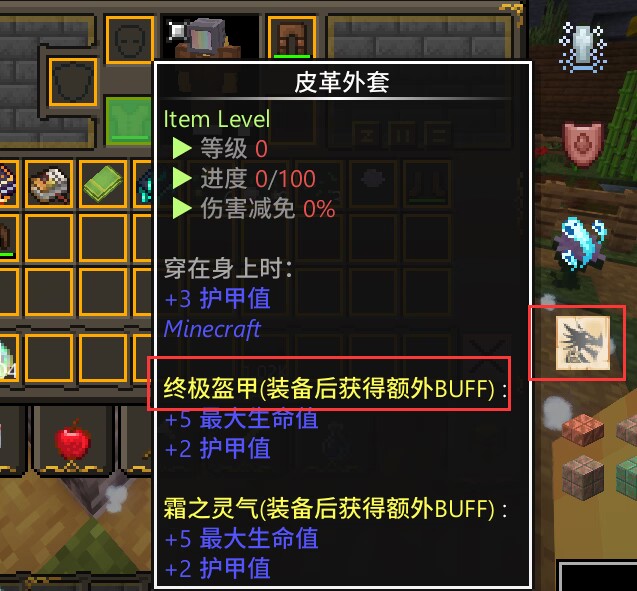
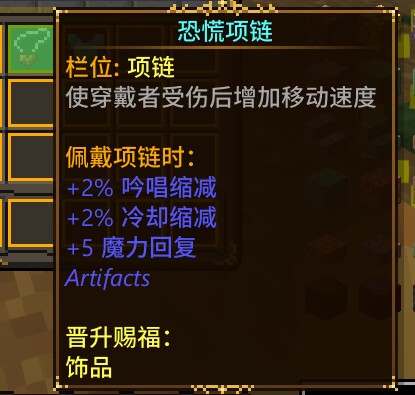
介绍
ExModifier – Enhance Your Gear and Expand Your Experience
Welcome to ExModifier! This is a Forge-based mod designed to add depth and variety to your Minecraft adventures. By introducing a new trait system, ExModifier allows you to equip your weapons, armor, and accessories with a wide array of enhancements. Whether it’s refining or set effects, customization has never been more personalized and versatile.
Course:https://github.com/catmoon233/ExModifier/wiki
Key Features:
- Trait Customization: Configure traits to include settings such as weight, limiting to specific items, items with certain tags, trait types, attribute sets, and random attribute counts.
- Detailed Attribute Editing: Each attribute can be further customized with options like UUID, name, value, operation mode, auto UUID, and auto name functionalities.
- Automatic Slot Matching: Traits can automatically match to the appropriate equipment slots, except for accessories.
- Set Effects: Define specific traits that trigger set effects, including 1-10 piece set bonuses with effects such as potion effects and attribute boosts.
- Highly Configurable: The reforging process can be customized in the configuration files to meet different user needs and supports compatibility with other mods like the Apotheosis mod.
- Future Prospects: Plans to develop this mod as an API platform for other mod developers to create official additional traits with unique effects.
- Target Audience:
Players who seek deeper gear systems
Gamers looking to implement more strategic gameplay
Mod enthusiasts wanting to add more fun to their servers or single-player games
Note: Please read the documentation before using this mod to understand all available features and configuration options.
常见问题
ExModifier 支持哪些 Minecraft 版本?
ExModifier 支持 Minecraft Java 版 1.18.2–1.20.3,共 5 个版本,可用的加载器:Forge。下载时注意选择和你游戏版本一致的文件。
ExModifier 怎么安装?
先用 PCL2 或 HMCL 启动器安装对应版本的 Forge,再把下载的 .jar 文件放进游戏目录的 mods 文件夹,重新启动游戏即可。开启了版本隔离的,mods 文件夹在 versions/版本名 下面。运行环境:客户端和服务端都要装。
canyuesama 的其他作品
查看全部 →
Ex Meteor Shower
A mod randomly generates meteor showers during night in your worlds.
YoukaisHomeComingCurios
Enable YoukaisHomeComing's headband to be worn in the curios section

OpenLink
为您带来更便捷的Frpc使用体验!Bring you a unique Minecraft Multiplayer playing experience OvO

StarRailExpress Library Mod
A lib of StarRailExpress with commands, development libs and resources
评论
登录后评论和评分