
截图


介绍
✦ JLBetterFont
A clean, refined Minecraft font designed to improve readability while preserving the familiar vanilla aesthetic.
JLBetterFont replaces the default Minecraft font with a smoother and more polished typeface, making menus, chat, tooltips, and in-game text easier to read without adding unnecessary visual clutter.\
Lightweight • Clean • Readable • Vanilla-inspired



🎥 Preview
✨ Version 1.2.1
Windows Emojis
Windows emoji support has been implemented.
You can access the Windows emoji picker with:
[ Win ] + [ . ]
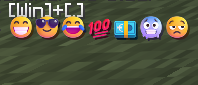
Main Menu
A refreshed main-menu experience is also included in Version 1.2.1 1.2.2
⚠️ Compatibility Note
Versions above 1.2 do not contain Transparent GUI or Windows Emojis.
If you specifically want these features, make sure you are using the appropriate JLBetterFont version.
Gallery
_Find more screenshots and previews in the Gallery._
💬 Feedback & Suggestions
Have an idea, found a bug, or want to request an optimization?
📊 Community Support
🎉 400+ Downloads ✔️
Next milestones
1,000 Downloads⏳5,000 Downloads⏳
Every download helps support the project and motivates future updates. 💜
💜 Thank You
Thank you for the incredible support!\
Every download, comment, and piece of feedback helps JLBetterFont continue to grow.
JLBetterFont — Better text. Same Minecraft.
常见问题
JLBetterFont 支持哪些 Minecraft 版本?
JLBetterFont 支持 Minecraft Java 版 1.13–26.2,共 44 个版本。下载时注意选择和你游戏版本一致的文件。
JLBetterFont 怎么安装?
把下载的 .zip 文件(不用解压)放进游戏目录的 resourcepacks 文件夹,进游戏后在「选项 → 资源包」里把它移到右边启用。
评论
登录后评论和评分