
beyond:Cmd-Extension
The mod extends the limited command set of Beyond Dimensions, adding comprehensive network management capabilities and additional utility features.
截图
介绍
Mod Overview
An auxiliary mod that extends the /bdtools command in the Beyond Dimensions mod with more features and adds some other small utilities. Primarily designed to help server administrators/owners manage the dimension network more easily.
Due to a significant discrepancy between the current mod’s functionality and its name, this mod has been archived and renamed to Beyond_Integration, aiming to provide greater integration support for Beyond Dimension.
Core Features
Network Management
For OP players (permission level >= 2):
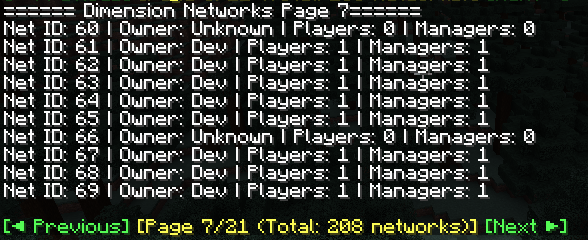
/bdtools network list – List all networks
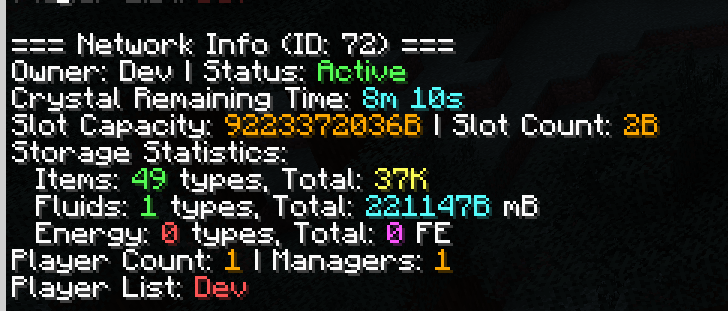
/bdtools network info – View network information
/bdtools network insert – Insert items into a network
/bdtools network giveTerminal – Give a terminal to a player
/bdtools network batchCreate – Batch create networks
/bdtools network openAny – Open the network GUI of any network
For regular players:
/bdtools open – Open the network GUI
/bdtools addMembers – Add members to a network
/bdtools addManagers – Add managers to a network
/bdtools removePlayers – Remove players from a network
/bdtools myNetworks – View your own networks
Enchantment Book Separation
Automatic separation – When a multi-enchantment book is inserted into the dimension network, it is automatically separated into single-enchantment books (configurable on/off)
Experience cost – The cost of separation is calculated based on enchantment type and level
Configurable formula – Supports custom cost calculation formulas
Tier list system – Different enchantments have different cost multipliers
Language
Default output language: English (en_us)
The language can be changed by modifying the configuration file at:
saves//serverconfig/beyond_cmd_extension-server.toml
Built-in language options: zh_cn (Simplified Chinese) and en_us (English)
常见问题
beyond:Cmd-Extension 支持哪些 Minecraft 版本?
beyond:Cmd-Extension 支持 Minecraft Java 版 1.20.1,可用的加载器:Forge。下载时注意选择和你游戏版本一致的文件。
beyond:Cmd-Extension 怎么安装?
先用 PCL2 或 HMCL 启动器安装对应版本的 Forge,再把下载的 .jar 文件放进游戏目录的 mods 文件夹,重新启动游戏即可。开启了版本隔离的,mods 文件夹在 versions/版本名 下面。运行环境:客户端和服务端都要装。

评论
登录后评论和评分