
scarpet-graphics
Carpet extension with functions for scarpet, used for headless image manipulation (A wrapper of Processing)
截图
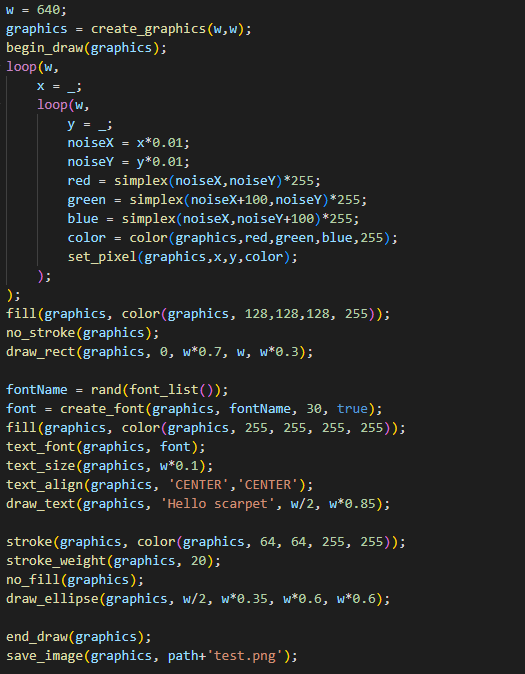
介绍
scarpet-graphics

A wrapper of Processing for scarpet
This can also be used with Discarpet to send the created images via Discord.
Values
This extension adds these new scarpet values:
image: Wrapper for PImagegraphics: Wrapper for PGraphics, extendsimagevalue (meaning it can be used in the same wayimagecan)font: Wrapper for PFont
Colors are handled using numbers (0xRRGGBBAA in hex), but can be constructed from RGB and HSB using the color function.
Functions
For a more detailed documentation for these functions, see the Processing reference
Most functions are just a wrapper function for the internal processing function.
Sometimes they may have slightly different names than the original Processing functions, due to the name being already used by scarpet (e.g. copy()) or to group them (all draw_?() functions).
Graphics and Image functions
load_image(location, shared?)
Loads an image from the specified location (string).
Can be a URL, or file name (path that works just like read_file).
If shared is true, uses shared app storage.
Returns an image value.
save_image(image, location, shared?)
Saves the image in the specified location (works like load_image)
create_graphics(width, height)
Creates a new graphics object with the specified dimensions.
copy_image(source, desination, sourceX, sourceY, sourceW, sourceH, destinationX, destinationY, destinationW, destinationH)
Copies pixels from one image/graphics to another.
get_pixel(image, x, y)
Returns the color of a certain pixel.
set_pixel(image, x, y, color)
Sets the pixel on the image to the color.
begin_draw(graphics)
Prepares the graphics object for doing drawing operations on it.
end_draw(graphics)
To be called when done drawing.
Drawing functions
See the 2D Primitives section in the processing reference. (The scarpet functions have draw_ prefixed with the processing function names)
draw_background(graphics, color)
draw_rect(graphics, a, b, c, d)
draw_ellipse(graphics, a, b, c, d)
draw_line(graphics, x1, y1, x2, y2)
draw_image(graphics, image, a, b, c, d)
draw_text(graphics, text, x, y)
Mode functions
color_mode(graphics, mode)
modes: 'RGB', 'HSB'
image_mode(graphics, mode)
modes: 'CORNER', 'CORNERS', 'CENTER'
ellipse_mode(graphics, mode)
modes: 'CORNER', 'CORNERS', 'CENTER', 'RADIUS'
rect_mode(graphics, mode)
modes: 'CORNER', 'CORNERS', 'CENTER', 'RADIUS'
Utility functions
color(graphics, v1, v2, v3, alpha)
Depending on the color_mode() set, v1,v2,v3 are either r,g,b or h,s,b values
fill(graphics, color)
no_fill(graphics)
stroken(graphics, color)
no_stroke(graphics)
stroke_weight(graphics, weight)
smooth(graphics)
no_smooth(graphics)
font_list() (Equivalent to PFont.list() in processing)
text_font(graphics, font)
text_size(graphics, size)
create_font(graphics, name, size, smooth?)
text_align(graphics, alignX, alignY)
常见问题
scarpet-graphics 支持哪些 Minecraft 版本?
scarpet-graphics 支持 Minecraft Java 版 1.19.1–26.3,共 22 个版本,可用的加载器:Fabric。下载时注意选择和你游戏版本一致的文件。
scarpet-graphics 怎么安装?
先用 PCL2 或 HMCL 启动器安装对应版本的 Fabric,再把下载的 .jar 文件放进游戏目录的 mods 文件夹,重新启动游戏即可。开启了版本隔离的,mods 文件夹在 versions/版本名 下面。运行环境:仅服务端。
replaceitem 的其他作品
查看全部 →
Symbol Chat
一款客户端模组,添加了符号/表情菜单,还能用不同的 Unicode 字体书写。
Integrated circuit
Adds integrated circuits to compact your redstone circuits into one block

Dynamic App Icon
Simple mod that changes the application icon of Minecraft to that of a world or server when joining

Secret Spectator
Serverside mod that prevents non-spectators from seeing spectators grayed out in the tab player list.
评论
登录后评论和评分