Material Beacons
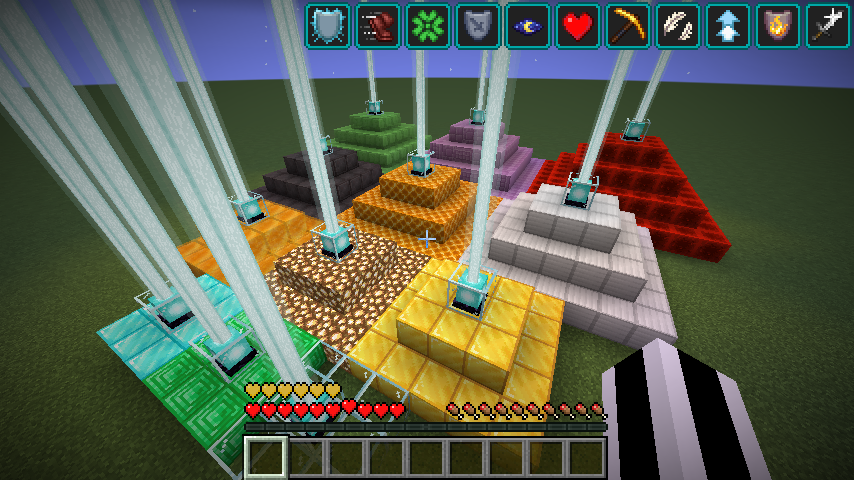
Changes the effect of beacons to be based on the material used to construct them.
截图
介绍

Material Beacons
Changes how beacons work depending on the material used.
Instead of beacons being built out of any valid material and then selecting an effect,
the material used to build the beacon determines the effect.
Based on the concept of
Hardcore Beacons
from the
Better Than Wolves
mod.
Current Materials and Effects
| Block | Effect |
|———–|—————–|
| Diamond | Strength |
| Emerald | Luck |
| Glass | None |
| Glowstone | Night vision |
| Gold | Haste |
| Honey | Regeneration |
| Honeycomb | Absorption |
| Iron | Resistance |
| Netherite | Fire Resistance |
| Purpur | Slow Falling |
| Redstone | Speed |
| Slime | Jump Boost |
Datapacks
Beacon materials and effects can be added/modified using datapacks.
The example json below creates a beacon using wool and/or clay with two tiers of effects:
- Tier 1: Blindness and Nausea
- Tier 2: Regeneration III
(/data/[namespace]/beacon/wool_clay.json)
{
  "bases": [
    "#minecraft:wool",
    "minecraft:clay"
  ],
  "powers": [
    [
      {
        "effect": "minecraft:blindness",
        "duration": 11,
        "amplifier": 0,
        "range": 10
      },
      {
        "effect": "minecraft:nausea",
        "duration": 11,
        "amplifier": 0,
        "range": 30
      }
    ],
    [
      {
        "effect": "minecraft:regeneration",
        "duration": 17,
        "amplifier": 3,
        "range": 30
      }
    ]
  ]
}
Bases are defined as a list of block tags or block ids. Powers are a list, with each index corresponding to a tier.
Each tier contains a list of effects. As shown in the first tier, multiple effects can be assigned to a single tier.
Note that each tier is independent of the others, and different effects and ranges can be applied for each tier.
常见问题
Material Beacons 支持哪些 Minecraft 版本?
Material Beacons 支持 Minecraft Java 版 1.20.1–26.3,共 19 个版本,可用的加载器:Fabric / NeoForge。下载时注意选择和你游戏版本一致的文件。
Material Beacons 怎么安装?
先用 PCL2 或 HMCL 启动器安装对应版本的 Fabric / NeoForge,再把下载的 .jar 文件放进游戏目录的 mods 文件夹,重新启动游戏即可。开启了版本隔离的,mods 文件夹在 versions/版本名 下面。运行环境:客户端和服务端都要装。
评论
登录后评论和评分