截图

介绍
中文介绍正在准备中,下面暂时显示原文。
Glassy Tools Resource Pack
Version: 1.0
Minecraft Version: 1.20+
Resolution: 16×16
Overview
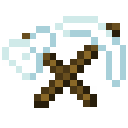
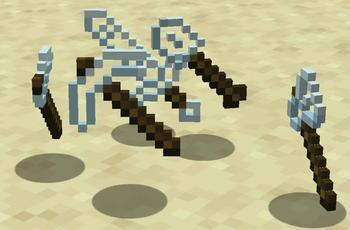
Glassy Tools is a minimalist resource pack that transforms your Netherite tools and sword with a sleek, transparent glass texture. Bring a modern and elegant aesthetic to your Minecraft experience as you wield shimmering, glass-like tools that stand out in any inventory or hotbar.
Features
- Enhanced Visuals: Adds a unique glass texture to all Netherite tools and sword, creating a translucent look without affecting durability or functionality.
- Immersive and Unique: Perfect for players looking to add a subtle, stylish twist to their high-level gear without overwhelming Minecraft’s classic style.
Included Tools
- Netherite Sword
- Netherite Pickaxe
- Netherite Axe
- Netherite Shovel
- Netherite Hoe
Compatibility
This pack is compatible with Minecraft 1.20+ and works seamlessly with other packs, as it only modifies the Netherite tools’ textures.
Installation
- Download the Glassy Tools .zip file.
- Open Minecraft and navigate to
Options > Resource Packs. - Select Open Pack Folder and place the .zip file in the folder.
- Back in Minecraft, enable the Glassy Tools pack, and enjoy!
常见问题
Glass Tools 支持哪些 Minecraft 版本?
Glass Tools 支持 Minecraft Java 版 1.20–1.21.2,共 10 个版本。下载时注意选择和你游戏版本一致的文件。
Glass Tools 怎么安装?
把下载的 .zip 文件(不用解压)放进游戏目录的 resourcepacks 文件夹,进游戏后在「选项 → 资源包」里把它移到右边启用。
Michaelninder 的其他作品
查看全部 →
Bedwars Wool Overlay
by Michaelninder
An Wool overlay for 1.8 bedwars & co.
4.9万
1 年前
Modrinth

Bedwars Wool
by Michaelninder
Wool Overlay For Bedwars
7,402
1 年前
Modrinth
Bedwars Wool
by Michaelninder
Wool Overlay For Bedwars
7,402
1 年前
Modrinth

Katana Swords
by Michaelninder
Lets Swords look like Katanas
6,365
1 年前
Modrinth
评论
登录后评论和评分