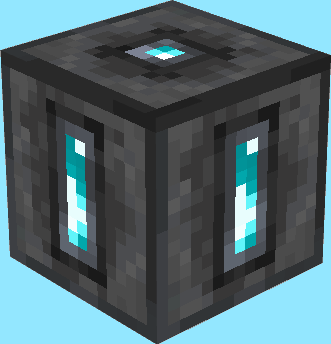
截图

介绍
Are you tired of building nether portal hubs to connect your friends’ and your homes, but in need for a fast and efficient way?
Seems like Teleportation Shrines are exactly what you were looking for!
This datapack adds mystical shrines which can be connected to travel between different places at ease 🙂
Usage
Teleportation Shrines can be crafted like this:
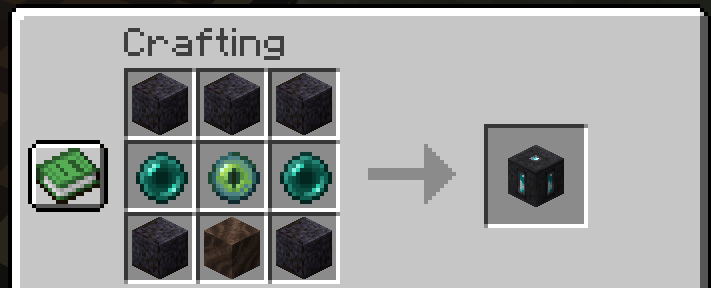
After you place them down you will be able to open their GUI and will be able to see and configure 5 carefully crafted refined types of the vanilla minecraft ores!
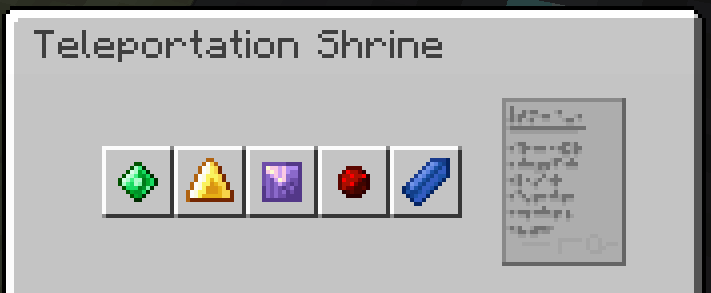
You can click them to select the next one. (Toggling happens in this order: Emerald, Gold, Amethyst, Redstone, Lapis, repeat 🔂)
If two shrines show the same collection of ores in the same order they will be linked – which means you can now teleport yourself from one to the other shrine!
To do so simply stand on top of a linked shrine and sneak for a few seconds. If blue particles start appearing around your character, that means you did everything correctly and will be teleported shortly 🙂
…however if red flames start appearing around you you _might_ have done something wrong and I’d reccomend stepping off the shrine before it takes you to the wrong place… or causes you to _splinch_
The shrine you are teleporting to will also show particles to inform people around that someone new is arriving – keep that in mind while invading other people’s places… your invisibilty potion won’t help you when dabbling in ancient magic
Speaking of ancient magic… our current understanding of it is limited, preventing you from using this way of traveling in dimensions other than the overworld– this may be changed as our knowledge evolves
⚠️ Please note that even with the mod version of this datapack installed, you can not use /give to obtain shrines. Use /loot give @s loot tp_shrines:block/teleportation_shrine instead
Known Bugs
These Bugs are known and should be kept in mind and will be fixed in a future update. To report new bugs please visit this datapack’s GitHub page
- trying to put any item into one of the 5 “ore slots” in a Teleportation Shrine will permanently delete it. don’t do this.
- none 🙂
Interested in making your own datapacks? 🙂
I am part of a small team of people owning Datapack Hub, the perfect discord server for helping you do just that! Wether you are just getting started or have advanced questions, with 1700+ members and our team of verified helpers we got you covered!
(This is 100% a passion project and I don’t get paid anything for promoting this :))

Need a minecraft server?
Click the below image and use my promo code “Flynecraft” to get 25% off of minecraft servers hosted by Bisect Hosting, covering top tier performance and exceptional customer support at any time!

常见问题
Teleportation Shrines 支持哪些 Minecraft 版本?
Teleportation Shrines 支持 Minecraft Java 版 1.20.5–26.3,共 11 个版本,可用的加载器:Fabric / Forge / NeoForge / Quilt。下载时注意选择和你游戏版本一致的文件。
Teleportation Shrines 怎么安装?
先用 PCL2 或 HMCL 启动器安装对应版本的 Fabric / Forge / NeoForge / Quilt,再把下载的 .jar 文件放进游戏目录的 mods 文件夹,重新启动游戏即可。开启了版本隔离的,mods 文件夹在 versions/版本名 下面。运行环境:客户端 / 服务端。
Flyrr 的其他作品
查看全部 →
Flyrr’s Paxels
Adds the Paxel tool, a combination of pickaxes, shovels and axes to the game!

Hexenwerk (Beta)
Magic datapack which adds wands, spells, etc. and will soon even be well polished!

Corrupted
Adds powerful "corrupted" variants to all Diamond related items!

Mascom (Mass Commands)
Run any command as often as you like AT ONCE and easier than ever before :)
评论
登录后评论和评分