
截图


介绍
中文介绍正在准备中,下面暂时显示原文。

About
Adds fancy plaques to the top of container GUI’s!
Also available in Dark Mode!

View all:
all plaques:
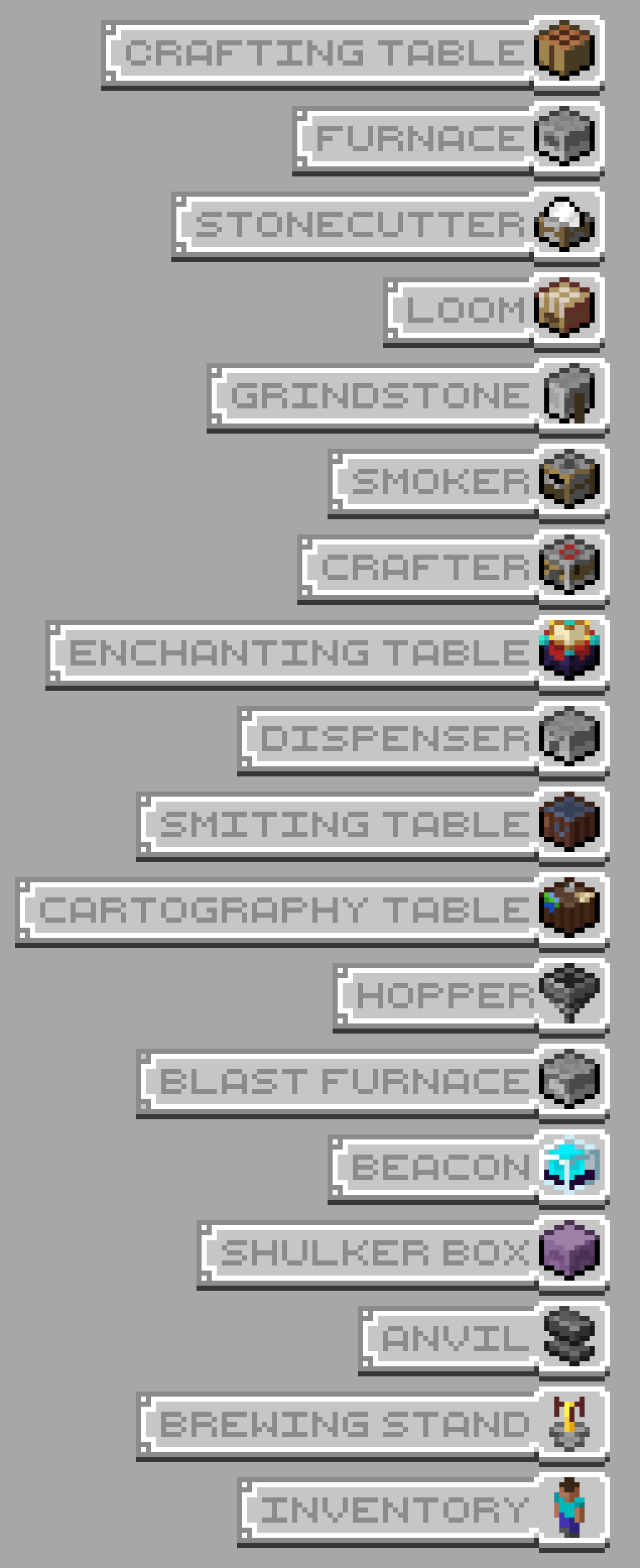
FAQ / Issues:
- Incompatible with other resoruce packs that change container GUI due to how resoruce packs work. If you want to have the plaques with another pack, you will have to combine the textures in microsoft paint or something
- If there is text on the top left of the GUI that dosen’t look like it’s supposed to be there, then go to “
.minecraft\resourcepacks\Ben's Container Plaques\assets\minecraft\lang`and add new .json file for the language you are using in Minecraft. I use [this site](https://mcasset.cloud/1.21.5/assets/minecraft/lang), but you can get it from wherever you like. Now, open it in notepad or whatever and find (ctrl + F) "container". Once you get past the commands and reach something that looks like`"container.beacon": "Beacon"`, then remove the text in the quotes so it will say`"container.beacon": ""“. Do this for all the containers that have textures in the pack. Save the file and reload textures on Minecraft by pressing F3+T and it should work.
Contact
@bennymccarthy on Discord if you find any issues or want to reach out
常见问题
Ben’s Container plaques 支持哪些 Minecraft 版本?
Ben’s Container plaques 支持 Minecraft Java 版 1.20.1–1.21.5,共 2 个版本。下载时注意选择和你游戏版本一致的文件。
Ben’s Container plaques 怎么安装?
把下载的 .zip 文件(不用解压)放进游戏目录的 resourcepacks 文件夹,进游戏后在「选项 → 资源包」里把它移到右边启用。
BennyMcCarthy_ 的其他作品
查看全部 →
Fresh Buckets
by Team Disco
一款添加 3D 水桶模型的 Minecraft 资源包!
163.4万
9 天前
Modrinth

Ben’s Bundles
by BennyMcCarthy_
手持时显示 3D 束口袋,同时在 GUI 中保留原版 2D 图标
101.2万
9 个月前
Modrinth

Fresh Ores and Ingots
by Team Disco
为锭、砖块和矿石带来 3D 外观,让它们看起来更精致、细节更丰富。
48.9万
8 天前
Modrinth

Ben’s Christmas Mod
by BennyMcCarthy_
Festive / winter holiday food, lights and decorations
5,568
10 个月前
Modrinth
评论
登录后评论和评分