
Spotify Hud
A lightweight Minecraft mod that displays your currently playing Spotify track in-game with a clean and customizable HUD.
截图
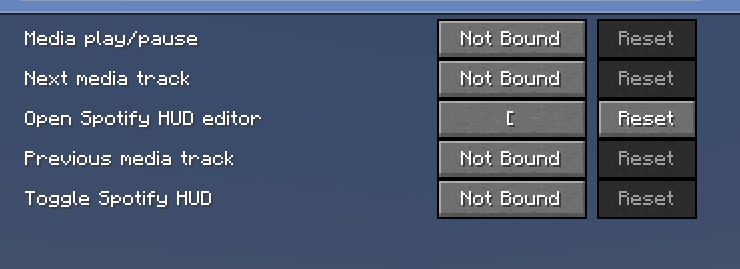

介绍
Spotify HUD
A lightweight Minecraft mod that brings your currently playing Spotify
track into Minecraft with a clean, customizable HUD.
Features
- Displays the currently playing song and artist in-game
- Clean Spotify-inspired HUD
- Customizable HUD position and appearance
- Designed to stay lightweight and unobtrusive
- Works while playing on singleplayer worlds and multiplayer servers
Requirements
- Minecraft
- Fabric Loader
- Any dependencies listed on the version download page
- Spotify
Installation
- Install Fabric Loader for the supported Minecraft version.
- Install any required dependencies listed on the download page.
- Download Spotify HUD.
- Place the
.jarfile inside your Minecraftmodsfolder. - Launch Minecraft using your Fabric profile.
Configuration
Open the mod’s settings in-game to configure the available HUD options.
Privacy
Spotify HUD only uses the information required for its Spotify
integration. Check the project documentation and source code for details
about authentication and data handling.
Compatibility
Check each release on Modrinth for its supported Minecraft versions and
required dependencies.
Issues & Suggestions
If you find a bug or have a feature suggestion, report it through the
project’s issue tracker.
**Spotify HUD is an independent Minecraft mod and is not affiliated with
or endorsed by Spotify or Mojang Studios.**
常见问题
Spotify Hud 支持哪些 Minecraft 版本?
Spotify Hud 支持 Minecraft Java 版 1.21.1–26.2,共 15 个版本,可用的加载器:Fabric。下载时注意选择和你游戏版本一致的文件。
Spotify Hud 怎么安装?
先用 PCL2 或 HMCL 启动器安装对应版本的 Fabric,再把下载的 .jar 文件放进游戏目录的 mods 文件夹,重新启动游戏即可。开启了版本隔离的,mods 文件夹在 versions/版本名 下面。运行环境:客户端 / 服务端。
评论
登录后评论和评分