
ArbuzOptimized
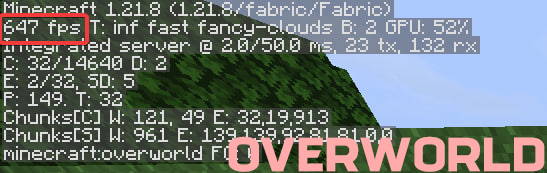
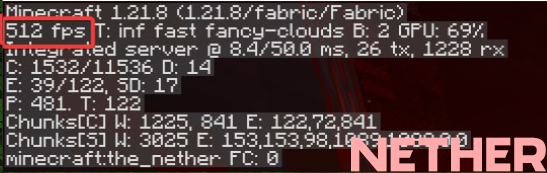
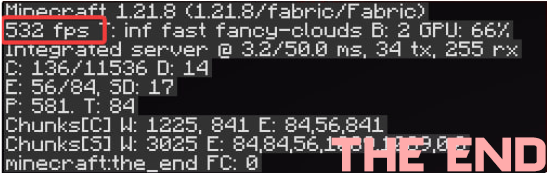
565+ FPS FOR MINECRAFT | BEST OPTIMIZED MODPACK & SPEED PERFORMANCE
截图
介绍
🍉 ArbuzOptimized : 565+ FPS for Minecraft
[



The ultimate performance modpack for Minecraft. Turn your potato PC into a gaming rig. Smooth chunk loading, insane FPS, and zero stutter — all with a single download.
🚀 What is ArbuzOptimized?
ArbuzOptimized is a carefully crafted Fabric modpack focused purely on performance and speed. It strips away unnecessary bloat and combines the most powerful optimization mods available.
Whether you are playing on a high-end RTX machine or an old office laptop, this pack unlocks the true potential of Minecraft’s engine.
🔥 Key Features
- ✅ Insane FPS Boost: Experience up to 565+ FPS (depending on hardware) with zero input lag.
- ✅ Low-End Friendly: Designed specifically to make Minecraft playable on integrated graphics and older CPUs.
- ✅ Vanilla Gameplay: 100% vanilla mechanics and visuals — we don’t change the game, we just make it faster.
- ✅ Lightweight: Minimal impact on RAM and disk space.
- ✅ Active Support: Regularly updated for the latest Minecraft versions.
⚙️ Core Mods Included
| Mod | Description |
| :— | :— |
| Sodium | The king of rendering optimization. Rewrites the rendering engine for massive FPS gains. |
| Lithium | Optimizes the game’s internal server and entity logic without breaking mechanics. |
| Entity Culling | Stops rendering entities you can’t see (saves GPU power). |
| Krypton | Network compression and optimization (reduces server ping spikes). |
| FerriteCore | Memory usage reduction — lowers RAM consumption by 20-30%. |
| Immersive Portals (Optional) | (If included) Seamless portal transitions with optimized rendering. |
📥 Installation Guide
Prerequisites
- Java 17 or higher installed on your system.
- Fabric Launcher or a third-party launcher (CurseForge, Prism, MultiMC, ATLauncher).
Easy Setup (Recommended)
- Download the latest
.ziprelease of ArbuzOptimized from the Releases tab. - Open your preferred launcher (e.g., Prism Launcher / MultiMC).
- Select “Add Instance” -> “Import from ZIP” -> Select the downloaded file.
- Launch and enjoy!
Manual Setup (Advanced)
- Download the Fabric Installer from the official website.
- Install Fabric for your Minecraft version.
- Navigate to your
.minecraft/modsfolder. - Drag and drop all the
.jarfiles from themodsfolder of this pack. - Launch Minecraft with the Fabric profile.
🛠️ Performance Tips (For 565+ FPS)
To squeeze out the absolute maximum FPS:
- Allocate RAM: Do not allocate too much! For Vanilla + Optimization, 2GB – 4GB is the sweet spot. Allocating 8GB can actually cause lag due to Java Garbage Collection.
- Graphics Settings:
- Turn “Render Distance” down to 8-12 chunks.
- Set “Graphics” to Fast.
- Turn “Clouds” off or set to Fast.
- Disable “Vsync”.
- JVM Arguments: Use these for better garbage collection:
-XX:+UseG1GC -Dsun.rmi.dgc.server.gcInterval=2147483646 -XX:+UnlockExperimentalVMOptions -XX:G1NewSizePercent=20 -XX:G1ReservePercent=20 -XX:MaxGCPauseMillis=50 -XX:G1HeapRegionSize=32M包含的模组 18 个
 Cloth Config API
 Cubes Without Borders
 Dynamic FPS
 实体剔除
 FerriteCore
 Forge Config API Port
 ImmediatelyFast
 Iris Shaders
 LambDynamicLights - Dynamic Lights
 锂
 More Culling
 鼠标微调
 Packet Fixer
 Reese's Sodium Options
 Remove Reloading Screen
 钠
 Sodium Extra
绿色边框的模组本站有收录,点进去看中文介绍;其余跳转到 Modrinth。
常见问题
ArbuzOptimized 支持哪些 Minecraft 版本?
ArbuzOptimized 支持 Minecraft Java 版 1.21.8–26.2,共 7 个版本,可用的加载器:Fabric / NeoForge。下载时注意选择和你游戏版本一致的文件。
ArbuzOptimized 怎么安装?
点本页「前往下载」拿到整合包文件(Modrinth 的是 .mrpack,CurseForge 的是 .zip),在 PCL2 或 HMCL 启动器里选择「导入整合包」,启动器会自动装好 Minecraft、加载器和全部模组。这个整合包有 18 个模组,建议在启动器里给游戏分配 4–6 GB 内存。
ArbuzOptimized 开服需要多大内存?
推荐服务器内存 12 GB。在线人数多、或者建了大量机器和区块加载器时,可以再加 2–4 GB。
怎么和朋友一起玩 ArbuzOptimized?
点本页的「一键开服」,选好配置后会自动安装 ArbuzOptimized 的服务端,几分钟就能开好。把服务器地址发给朋友,大家用同一个版本的整合包连进去就行。
PopugaiOnTheBeat 的其他作品
查看全部 →
Forge Optimized
The best Forge optimization modpack for 1.21.8 | FPS 200+ For comfortable play with friends or on servers without lags

Horror Pack
A horror-themed Minecraft modpack focused on exploration, survival, and creepy atmosphere.
Horror Pack
A horror-themed Minecraft modpack focused on exploration, survival, and creepy atmosphere.
评论
登录后评论和评分