
Redstone Manager
Control all your redstone switches from one place. Link all the levers and control them from a single block.
介绍
Redstone Manager
This mods is relatively new and might have some bugs.
Please report issues and feedback on the GitHub.
Manage all your redstone switches from one central command block
Here is a sample image of how the mod is supposed to work, this is still all work in progress, and things are sure to change:
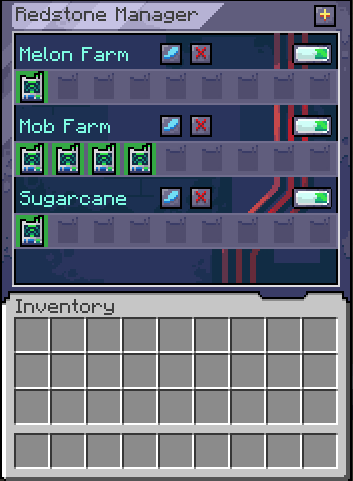
Using the mod
Start by crafting a Manager and a Linker.
Crouch + right click with the Linker on a Lever to link them.
Open the manager and create your first group by clicking on the plus button.
Place the Linker inside the newly created group.
From within the Manager, you can now toggle that single lever on/off or toggle the entire group.
For modpacks
The linker works on a tag system, where it looks if the block has a tag: redstonemanager:linkable_items.
If the block has that tag, it will allow the link to be created between them.
Afterward it is checking for the powered state of that block to get its state.
For devs
You can add this mod to your project by adding this:
maven {
    name = "Gac Repository"
    url = uri("https://maven.igorilic.dev/releases")
}
And then adding this as a dependency:
implementation "dev.igorilic:redstonemanager:${rm_version}"Have suggestions?
If you have any suggestions that you think can improve the modpack, open an issue for it and let’s have a discussion about it.
Or join the discord server: https://discord.gg/7maXVvt2c4
常见问题
Redstone Manager 支持哪些 Minecraft 版本?
Redstone Manager 支持 Minecraft Java 版 1.21.1–26.1.2,共 2 个版本,可用的加载器:NeoForge。下载时注意选择和你游戏版本一致的文件。
Redstone Manager 怎么安装?
先用 PCL2 或 HMCL 启动器安装对应版本的 NeoForge,再把下载的 .jar 文件放进游戏目录的 mods 文件夹,重新启动游戏即可。开启了版本隔离的,mods 文件夹在 versions/版本名 下面。运行环境:客户端和服务端都要装。
GacBL 的其他作品
查看全部 →
BBL Routers Facades
An addon mod for BBL Routers adding facades to importers and exporters

Redstone Manager
Control all your redstone switches from one place. Link all the levers and control them from a single block.

BBL Routers Facades
An addon mod for BBL Routers adding facades to importers and exporters
BBL Routers Facades
An addon mod for BBL Routers adding facades to importers and exporters
评论
登录后评论和评分