
Jade🔍+ Sapixcraft Mod Support
🔶 Jade compatibility for Sapixcraft - includes all themes & icons
截图


介绍
Want to use Sapixcraft together with Jade?
Jade is the modern information HUD mod – the successor to Hwyla/WAILA. It shows block names, mob health, furnace progress, chest contents, and more when you look at things in the world.
If the default Jade tooltip boxes feel out of place next to Sapixcraft’s UI, this patch fixes that.
This resource pack restyles Jade’s HUD with Sapixcraft-styled tooltip backgrounds, borders, and progress bars – so block info, mob health, and machine readouts all feel like part of the pack.
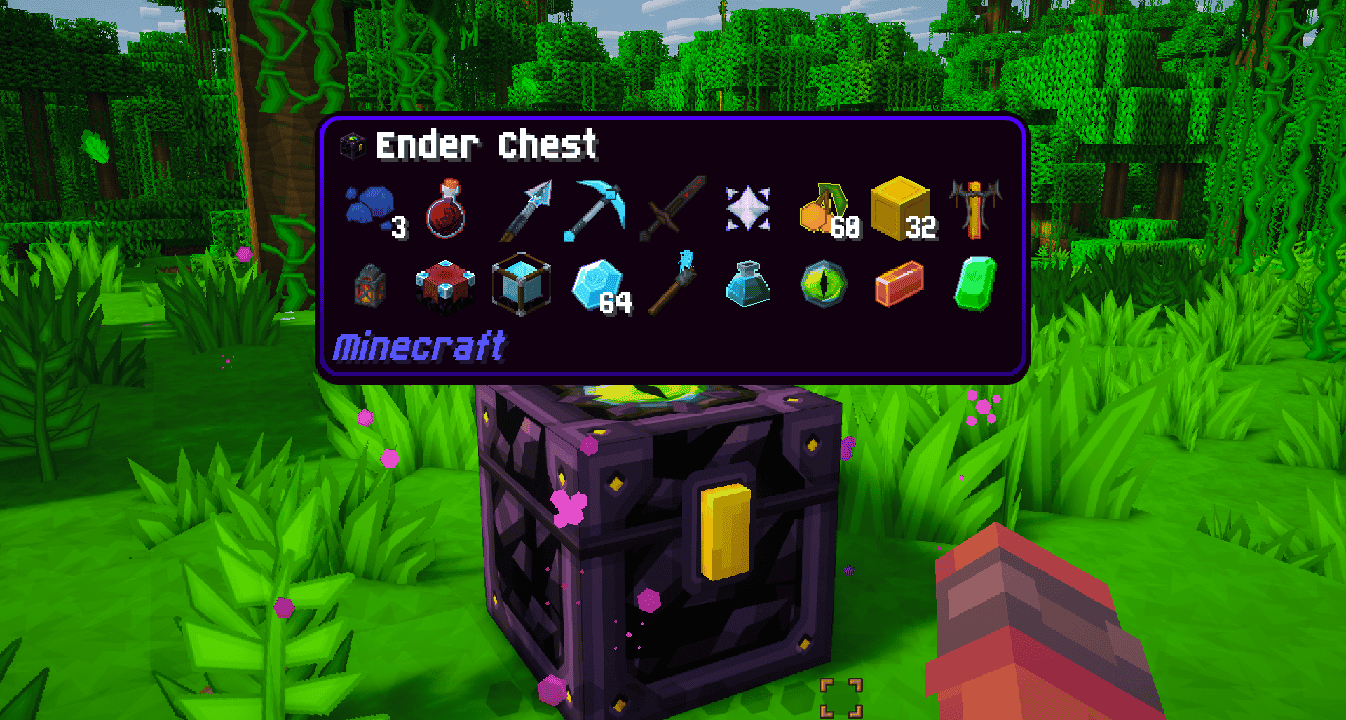
What this patch changes
- Tooltip backgrounds — restyled for all built-in Jade themes
- Slim borders & nested boxes — updated to match Sapixcraft’s look
- Progress bars — furnace progress, brewing timers, and similar HUD elements
Restyled Jade themes
Jade ships with several built-in themes. This patch updates all of them:
Waila (default)

Dark

Create

One Probe

Load order: place this mod patch above Sapixcraft.
This pack is designed specifically to use with Sapixcraft and the Jade mod.
Note: Jade can be installed on the client only, but some features (item storage, brewing stand fuel, bees in beehives, etc.) require Jade on the server as well.
Other Supported Mods



(all FREE)
Sapixcraft Add-ons
FREE add-ons




Premium add-ons



Community
Want to give feedback or hang out? Join the Sapixcraft Discord.
Thanks for downloading! 🧡
– Sapix

常见问题
Jade🔍+ Sapixcraft Mod Support 支持哪些 Minecraft 版本?
Jade🔍+ Sapixcraft Mod Support 支持 Minecraft Java 版 26.2。下载时注意选择和你游戏版本一致的文件。
Jade🔍+ Sapixcraft Mod Support 怎么安装?
把下载的 .zip 文件(不用解压)放进游戏目录的 resourcepacks 文件夹,进游戏后在「选项 → 资源包」里把它移到右边启用。
Sapix 的其他作品
查看全部 →
SAPIXCRAFT 32x
🔶 用鲜艳卡通风格高清材质重新演绎 Minecraft,分辨率从 16x 到 512x

AppleSkin + Sapixcraft Mod Support
🔶 Sapixcraft 模组支持 AppleSkin,可选多种颜色款式

SAPIXCRAFT 16x
🔶 Fully Reimagine MC with Vibrant, Cartoony styled HD Textures | Available in 16x → 512x

SAPIXCRAFT 16x
🔶 Fully Reimagine MC with Vibrant, Cartoony styled HD Textures | Available in 16x → 512x
评论
登录后评论和评分