
Simple Chat Bubbles
Simple Chat Bubbles adds lightweight, clean chat bubbles above players’ heads so you can see who said what in-world, without constantly checking the chat window.
截图


介绍


Overview
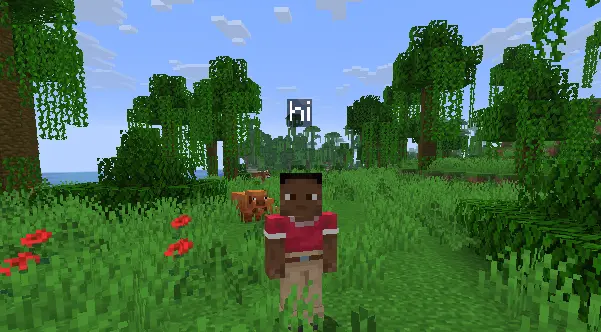
Tired of missing messages because you’re focused on the game instead of the tiny chat box? This mod adds clean chat bubbles right over players’ heads. Perfect for SMPs or just hanging out with friends.
Features
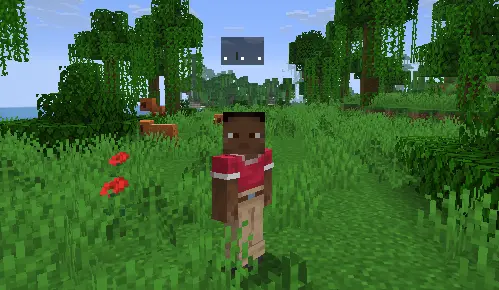
- Typing Indicator: Shows a “. . .” bubble over your head while you type so people know you aren’t just AFK.
- Vanilla Look: Simple, clean text bubbles designed to match the native Minecraft UI style.
- No FOV Distortion: Bubbles won’t stretch out or warp, even if you play on Quake Pro.
- 100% Client-Side: Works on any server without needing the mod installed on the backend. It reads your local chat HUD automatically.
- Smart First-Person Hiding: Bubbles stay invisible in first-person so they don’t block your view, but show up perfectly when you switch to F5.
Previews
Typing Indicator
In-Game Chat Bubbles
Dependencies ⚠️
- Requires Fabric API.
Unlike other bloated chat bubble mods that tank your performance, this mod is highly optimized, lightweight, and won’t affect your FPS.

常见问题
Simple Chat Bubbles 支持哪些 Minecraft 版本?
Simple Chat Bubbles 支持 Minecraft Java 版 1.21–26.2,共 16 个版本,可用的加载器:Fabric。下载时注意选择和你游戏版本一致的文件。
Simple Chat Bubbles 怎么安装?
先用 PCL2 或 HMCL 启动器安装对应版本的 Fabric,再把下载的 .jar 文件放进游戏目录的 mods 文件夹,重新启动游戏即可。开启了版本隔离的,mods 文件夹在 versions/版本名 下面。运行环境:仅客户端。
buildaran 的其他作品
查看全部 →
Durability Display
Displays percentage of every item including how much use left of it. Including Elytra's, Armor, Weapons, etc. on the toolbar.

Aran’s Discord Presence
A lightweight, customizable Discord Rich Presence mod for Fabric. Features a built-in settings menu to toggle Server IP, biomes, dimensions, and player heads on your Discord status.
评论
登录后评论和评分