Widgets
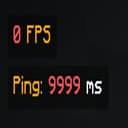
A customizable HUD mod that displays FPS, ping, coordinates, time, date, memory, CPU, and GPU info. Move widgets anywhere on the screen, adjust their appearance, and toggle them on/off via an in-game config menu.
介绍
[EN]
Enhance your Minecraft experience with customizable on-screen widgets!Widgets Mod adds a set of useful, fully customizable widgets to your Minecraft HUD, providing real-time information at a glance. Whether you’re monitoring your FPS, ping, coordinates, or system performance, this mod has you covered. With an intuitive configuration screen, you can easily tweak the appearance and position of your widgets to suit your needs.
✨ Key Features:
- Multiple Widgets: Display FPS, ping, coordinates, time, date, memory usage, CPU, and GPU info.
- Predefined Positions: Choose from four corners (top-left, top-right, bottom-left, bottom-right) to place your widgets.
- Color Coding: FPS and ping widgets change color based on their values (e.g., green for high FPS, red for low).
- Configurable Text: Customize the text format for each widget using placeholders (e.g., $fps$, $ping$) and Minecraft color codes.
- Background Toggle: Enable or disable a semi-transparent background for better readability.
- Performance Optimized: Lightweight and efficient, with minimal impact on your game’s performance.
- Cloth Config Integration: Easily tweak settings via an in-game configuration screen (requires Cloth Config API).
📋 Supported Widgets:
- FPS: Shows your current frames per second with color-coded indicators.
- Ping: Displays your server ping (multiplayer only) with color-coded values.
- Server Address: Shows the address of the server you are currently playing on.
- Coordinates: Shows your X, Y, Z coordinates in various formats.
- Memory Usage: Monitors your game’s memory usage (used/total MB).
- CPU & GPU Info: Shows your CPU and GPU details for system monitoring.
常见问题
Widgets 支持哪些 Minecraft 版本?
Widgets 支持 Minecraft Java 版 1.20–1.21.5,共 13 个版本,可用的加载器:Fabric。下载时注意选择和你游戏版本一致的文件。
Widgets 怎么安装?
先用 PCL2 或 HMCL 启动器安装对应版本的 Fabric,再把下载的 .jar 文件放进游戏目录的 mods 文件夹,重新启动游戏即可。开启了版本隔离的,mods 文件夹在 versions/版本名 下面。运行环境:仅客户端。
euphorria_a 的其他作品
查看全部 →
AutoFish+
Enhance your fishing experience with automatic recasting, customizable delays, and smart rod management — all in a clean and lightweight mod.
DisplayFPS
DisplayFPS shows your in-game FPS with customizable colors, positions, and background options. Perfect for monitoring performance in style!

AxeControl
Requires sneaking (Shift) to strip logs with an axe. Client-side mod for enhanced control.

TimeChat
A client-side mod that adds customizable timestamps to Minecraft chat with 12h/24h format support.
评论
登录后评论和评分