
SimpleProxyChat
【Bungee Chat Sync + Velocity Chat Sync】一款简单的插件,可实现跨服务器全局通信与消息同步,并支持 PlaceholderAPI、LuckPerms、LiteBans、AdvancedBan、NetworkManager 和 Discord。
截图


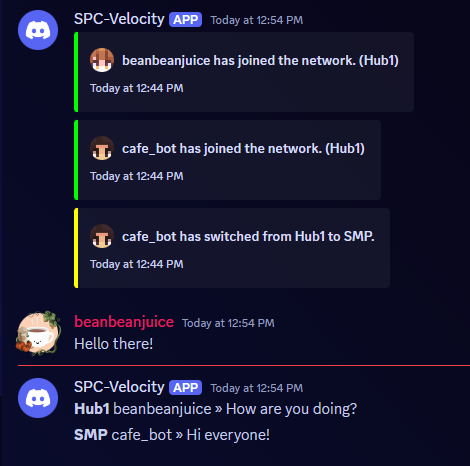
介绍

这是一个适用于 Bungeecord Chat Sync、Velocity Chat Sync 和 Proxy Chat Sync 的插件。它能轻松实现全局 跨服务器通信和消息互通,并支持PlaceholderAPI、LuckPerms、LiteBans、AdvancedBan、NetworkManager和Discord。
支持的 Minecraft 版本
| 平台 | 支持的版本 |
|—|———————————————————|
| Velocity(代理) | 取决于你的 Velocity 安装;如有需要,请安装 ViaVersion |
| BungeeCord/Waterfall(代理) | 取决于你的代理安装;如有需要,请安装 ViaVersion |
| Spigot/Paper/Bukkit(辅助插件) | 1.21.11 – 26.3 |
| Fabric(辅助插件) | 26.1+ |
| NeoForge(辅助插件) | 26.1.2+ |

独立模式(仅代理,无需辅助插件)
这是最简单的配置方式,对于标准的 BungeeCord/Velocity 网络,实现跨服务器聊天只需这些即可。
- 将插件 jar 文件放入 BungeeCord/Waterfall/Velocity
plugins代理的文件夹中。 - 重启代理即可,插件开箱即用!
在独立模式下,代理会在聊天消息传递过程中拦截消息。如果你希望聊天消息在后端插件(例如各服务器上的 LiteBans)处理后才进行转发,希望支持PlaceholderAPI,或需要为Fabric/NeoForge服务器启用特定的后端钩子,请安装下方的辅助插件。
使用辅助插件
可在此处下载辅助插件。
辅助插件会在每台后端服务器上运行,并在后端插件处理聊天消息后通过 TCP 将消息转发给代理。它还可以启用PlaceholderAPI支持(仅限 Spigot/Paper/Bukkit)。
代理端设置(安装任何辅助插件前都必须完成):
- 按照上方独立模式部分的说明,在BungeeCord/Waterfall/Velocity上安装代理插件(确保
ProxyChat/config.yml已存在)。 - 编辑
ProxyChat/config.yml并设置:
use-websocket: truewebsocket-port(默认8766)- 任意未占用的 TCP 端口;所有辅助插件都必须使用相同端口。websocket-secret(默认"changeme")- 请改成强度较高的密钥;所有辅助插件都必须使用相同密钥。
- 重启代理(或运行
/spc-reload)。
然后,在每台后端服务器上安装对应平台的辅助插件版本。三个平台的配置项相同;只有文件位置和默认密钥略有不同。
Spigot/Paper/Bukkit
- 下载辅助插件。Velocity/Bungeecord 的主插件与此相同。
- 将插件放入服务器的
plugins文件夹,然后启动服务器一次以生成plugins/SimpleProxyChatHelper/config.yml。 - 编辑生成的配置文件,将其指向你的代理:
    proxy-host: "localhost"       # host where the proxy runs
    proxy-port: 8766              # must match websocket-port in the proxy config
    proxy-secret: "changeme"      # must match websocket-secret in the proxy config
server-name: "survival" # must match this server's name in velocity.toml / BungeeCord's config.yml- (可选)在服务器上安装PlaceholderAPI,以便在 Minecraft 聊天消息中解析占位符。
- 重启服务器。
Fabric
- 下载与你的服务器版本匹配的 Fabric 辅助模组。
- 将模组 jar 文件放入服务器的
mods文件夹,并启动一次服务器以生成config/simpleproxychathelper.yml。 - 使用与上方 Spigot 示例相同的键编辑生成的文件(
proxy-host、proxy-port、proxy-secret、server-name)。 - 重启服务器。
NeoForge
- 下载与你的服务器版本匹配的 NeoForge 辅助模组。
- 将模组 jar 文件放入服务器的
mods文件夹,并启动一次服务器以生成config/simpleproxychathelper.yml。 - 使用与上方 Spigot 示例相同的键编辑生成的文件(
proxy-host、proxy-port、proxy-secret、server-name)。 - 重启服务器。
如需支持 PlaceholderAPI,必须安装辅助插件,且占位符只能用于 Minecraft 聊天消息。目前它们无法用于加入/离开消息。PlaceholderAPI 仅适用于 Spigot/Paper/Bukkit 辅助插件(Fabric/NeoForge 没有对应版本)。
与 Discord 配合使用
- 访问 discord.com/developers 并选择新建应用程序。名称可以任意填写。
- 进入 OAuth2 部分。
- 打开 OAuth2 URL 生成器,并为其添加 bot 范围。
- 在 Bot 权限下选择:
- 管理频道(必需:常规权限)
- 发送消息(必需:文本权限)
- 管理消息(必需:文本权限)
- 读取消息历史记录(必需:文本权限)
- + 还可以添加其他所需权限……
- 复制底部的生成的网址。
- 将生成的网址粘贴到浏览器中。
- 邀请 Bot 加入你的服务器。
- 返回 discord.com/developers。
- 选择你的 Bot。
- 点击 bot。
- 点击重置令牌,并将令牌复制到安全的位置。
- 向下滚动到特权网关意图。
- 选择 SERVER MEMBER INTENT 和 MESSAGE CONTENT INTENT。
- 将插件放入 BungeeCord/Velocity 的
plugins文件夹中。 - 完整启动一次服务器,然后停止。期间会出现错误,这是正常现象。
- 在生成的
ProxyChat/config.yml文件中粘贴你的 Bot Token,并选择要发送消息的频道。 - 重启代理服务器!

- 全网络聊天
- 支持 LuckPerms
- 支持 LiteBans
- 支持 AdvancedBan
- 支持 NetworkManager
- 支持 Discord
- 支持 Velocity/Waterfall/BungeeCord
- 彩色聊天
- 跨服务器通信
- 支持 PlaceholderAPI
- ……以及更多功能!

config.yml
请提供要翻译的英文内容。
# ==========================================================
#                       INFORMATION
#                 HEX Values are Supported
#  Example: <#FFFFFF>Some text</#FFFFFF> this is a message!
#         Supports Mini-Message/Legacy Color Codes
# ==========================================================

# True if you will be using Discord. The reload command does not work with this.
use-discord: false

# Discord Bot Token (IGNORE IF use_discord = false).
BOT-TOKEN: "TOKEN_HERE"

# Channel to send Discord messages to (IGNORE IF use_discord = false).
CHANNEL-ID: "GLOBAL_CHANNEL_ID"

bot-activity:
   # Valid Types: ONLINE, DO_NOT_DISTURB, IDLE, INVISIBLE
   status: ONLINE
   # Valid Types: PLAYING, STREAMING, LISTENING, WATCHING, COMPETING, CUSTOM_STATUS
   type: "CUSTOM_STATUS"
   # Valid placeholders are %online% and/or %max-players% (UPDATES EVERY 5 MINUTES)
   text: "%online%/%max-players% - SimpleProxyChat by beanbeanjuice"

# The amount of seconds to check if a server is online/offline.
# Smaller numbers can cause errors. Beware.
server-update-interval: 3

# Use this if you want to change the default aliases.
# It MUST be the same name you have in your bungee/velocity config.
# Simply set it to disabled: disabled to disable it.
aliases:
   ServerInConfigExample: ServerAliasExample
   hub: Hub1
   smp: smp1

# Whether to use the permission system.
# Some permissions (denoted with ➕) are always active even if this is false.
# simpleproxychat.read.chat - Read chat messages.
# simpleproxychat.read.join - Read join messages.
# simpleproxychat.read.leave - Read leave messages.
# simpleproxychat.read.fake - Read the fake join/leave messages. Players must also have the REAL join/leave permission.
# simpleproxychat.read.switch - Read switch messages.
# simpleproxychat.read.update - Read update messages. ➕
# simpleproxychat.toggle.chat - Toggle proxy chat for a single server. ➕
# simpleproxychat.toggle.chat.all - Toggle proxy chat for all servers. ➕
# simpleproxychat.reload - Reload the config. ➕
# simpleproxychat.ban - Ban a player from the proxy. ➕
# simpleproxychat.unban - Unban a player from the proxy. ➕
# simpleproxychat.whisper - Whisper to another player on the proxy. ➕
# simpleproxychat.broadcast - Broadcast a message to everyone on the server. ➕
use-permissions: false

# Only messages that start with this character will be sent through the plugin.
# Set to '' to disable.
# Example: If it is set to '$', then when a player sends $hello, it will be sent through the proxy.
proxy-message-prefix: ''

# Whether to send if the statuses of the servers connected to the proxy when the proxy starts up.
# THIS IS FOR DISCORD MESSAGES ONLY.
use-initial-server-status: true

# Whether to send a fake join/leave message when vanishing/unvanishing.
use-fake-messages: true

# Format: https://docs.oracle.com/javase/8/docs/api/java/time/format/DateTimeFormatter.html
# Timezone: https://www.joda.org/joda-time/timezones.html
timestamp:
   format: "hh:mm a"
   timezone: "America/Los_Angeles"

# True if you will be using the helper plugin via TCP WebSocket.
# When enabled, the proxy will NOT intercept PlayerChatEvent directly.
# Instead, chat is forwarded by the helper plugin after backend processing
# (allowing plugins like LiteBans to cancel messages before they reach the proxy).
use-websocket: false
websocket-port: 8766
websocket-secret: "changeme"

update-notifications: true

# It is HIGHLY recommended to use a more robust proxy-wide banning system such as LiteBans or AdvancedBan.
# However, if you would rather a light-weight, simple, banning system. You can enable it here.
# A FULL PROXY RESTART IS REQUIRED TO USE THIS.
use-simple-proxy-chat-banning-system: false

# This will store and re-send the last few chat messages when a player switches servers.
# This is here because sometimes Velocity/Bungee does not keep the previous messages when switching.
# This WILL retain old formatting if you change the formatting prior to reloading.
send-previous-messages-on-switch:
   enabled: false
   amount: 15

# These require a restart in order to take place.
commands:
   reload-aliases:
      - "spcreload"
   chat-toggle-aliases:
      - "chattoggle"
   ban-aliases:
      - "spcban"
   unban-aliases:
      - "spcunban"
   whisper-aliases:
      - "spc-msg"
   reply-aliases:
      - "spc-r"
   broadcast-aliases:
      - "spc-bc"
      - "broadcast"

# Disable servers from sending/receiving proxy messages.
disabled-servers:
   - example1

# Disable this if you don't want to receive switch messages in all servers.
proxy-switch: true

# DO NOT TOUCH THIS
file-version: 18
messages.yml
请发送需要翻译的英文内容。
# ==========================================================
#                       INFORMATION
#                 HEX Values are Supported
#  Example: <#FFFFFF>Some text</#FFFFFF> this is a message!
#         Supports Mini-Message/Legacy Color Codes
# ==========================================================

# Prefix for the plugin. %plugin-prefix% usable anywhere.
plugin-prefix: "&8[<bold><rainbow>SimpleProxyChat&r&8]"

# Minecraft Stuff
minecraft:
   join:
      enabled: true
      message: "&e%player% &ahas joined the network. (%server%)"
   leave:
      enabled: true
      message: "&e%player% &chas left the network. (%server%)"
   chat:
      enabled: true
      message: "&8[&3%server%&8] &e%player% &9» &7%message%"
      vanished: "&cYou cannot send proxy messages while vanished. Your message must end with a '&e/&c' to speak."
   switch:
      enabled: true
      default: "&e%player% &7moved from &c%from% &7to &a%to%&7."
      no-from: "&e%player% &7moved &7to &a%to%&7."
   whisper:
      send: "&8[&dyou&8] &f⇒ &8[&d%receiver%&8] &9» &e%message%"
      receive: "&8[&d%sender%&8] &f⇒ &8[&dyou&8] &9» &e%message%"
      error: "&c/spc-whisper (user) (message)"
   discord:
      enabled: true
      message: "**%server%** %player% » %message%"
      embed:
         use: false
         title: "[%server%] %player%"
         message: "%message%"
         color: "#FFC0CB"
         use-timestamp: true
   command:
      no-permission: "%plugin-prefix% &cSorry, you do not have permission to run this command."
      unknown: "%plugin-prefix% &cUnknown command."
      must-be-player: "%plugin-prefix% &cYou must be a player to run this command."
      reload: "%plugin-prefix% &aThe plugin has been successfully reloaded!"
      chat-lock:
         usage: "%plugin-prefix% &cCorrect usage is &a/spc-chat all lock/unlock &c or &a/spc-chat lock/unlock"
         single:
            locked: "%plugin-prefix% &6%server% &cwill no longer send proxy chat messages."
            unlocked: "%plugin-prefix% &6%server% &awill now send proxy chat messages."
         all:
            locked: "%plugin-prefix% &cAll servers will no longer send proxy chat messages."
            unlocked: "%plugin-prefix% &aAll servers will now send proxy chat messages."
      proxy-ban:
         usage: "%plugin-prefix% &c/(un)ban (player)"
         banned: "%plugin-prefix% &c%player% &7has been banned."
         unbanned: "%plugin-prefix% &c%player% &7has been unbanned."
         login-message: "&cYou have been banned from the proxy."
      broadcast:
         usage: "%plugin-prefix% &c/spc-broadcast (message)"
         message: "%plugin-prefix% &8[&a&lBROADCAST&r&8] &6%message%"

# Discord Stuff
discord:
   join:
      enabled: true
      message: "%player% has joined the network. (%server%)"
      use-timestamp: true
      # Incompatible with use-timestamp.
      use-embed: true
   leave:
      enabled: true
      message: "%player% has left the network. (%server%)"
      use-timestamp: true
      # Incompatible with use-timestamp.
      use-embed: true
   switch:
      enabled: true
      message: "%player% has switched from %from% to %to%."
      use-timestamp: true
      # Incompatible with use-timestamp.
      use-embed: true
   chat:
      enabled: true
      minecraft-message: "&8[&bDiscord&8] %role% &f%user% &9» &7%message%"
   topic:
      online: "There are %online% players online."
      offline: "The proxy is offline."
   proxy-status:
      enabled: true
      messages:
         enabled: "✅ Proxy enabled!"
         disabled: "⛔ Proxy disabled."
         title: "Server Status"
         message: "Status: "
         online: "Online ✅"
         offline: "Offline ⛔"
         use-timestamp: true

# Console Stuff - Uses Minecraft Messages
console:
   chat: true
   join: true
   leave: true
   switch: true
   discord-chat: true
   server-status: true

# The message for any updates that are sent.
# The plugin-prefix is automatically appended to the beginning of this message.
update-message: "&7There is an update! You are on &c%old%. New version is &a%new%&7: &6%link%"

# DO NOT TOUCH THIS
file-version: 10

/spc-reload– 重新加载配置文件。/spc-chat– 锁定/解锁聊天。/spc-whisper– 向某人发送私信。/spc-reply– 回复私信,无需指定用户。/spc-ban– 在代理端封禁玩家。/spc-unban– 在代理端解除对玩家的封禁。/spc-broadcast– 向网络中的所有玩家广播消息。

simpleproxychat.read.chat– 查看聊天消息。simpleproxychat.read.join– 查看加入消息。simpleproxychat.read.leave– 查看离开消息。simpleproxychat.read.fake– 查看伪造的加入/离开消息。还必须拥有对应的真实权限。simpleproxychat.read.switch– 查看切换消息。simpleproxychat.read.update– 查看更新通知。simpleproxychat.toggle.chat– 为单个服务器切换代理聊天。simpleproxychat.toggle.chat.all– 为所有服务器切换代理聊天。simpleproxychat.reload– 重新加载配置。simpleproxychat.ban– 封禁某人。simpleproxychat.unban– 解除对某人的封禁。simpleproxychat.whisper– 私信权限。simpleproxychat.broadcast– 向服务器上的所有人广播消息。

%plugin-prefix%– 插件指定的前缀。%server%– 当前连接的服务器。若指定了别名,则使用别名。%original_server%– 与%server%相同,但不使用别名。%to%– 当前连接的服务器。若指定了别名,则使用别名。%original_to%– 与%to%相同,但不使用别名。%from%– 玩家刚刚断开的服务器。若指定了别名,则使用别名。%original_from%– 与%from%相同,但不使用别名。%player%– 玩家的 Minecraft 用户名。%escaped_player%– 转义后的玩家 Minecraft 用户名。(在“_”前添加“\\”,以避免显示斜体。)%sender%– 私信发送者。仅限私信%receiver%– 私信接收者。仅限私信%user%– 玩家的 Discord 用户名。%nick%– 玩家的 Discord 昵称。%role%– 玩家的 Discord 身份组。%prefix%– 玩家的前缀。仅限 LuckPerms%suffix%– 玩家的后缀。仅限 LuckPerms%message%– 玩家的消息。%epoch%– 获取当前时间(毫秒)。可以使用这类格式。例如:<t:%epoch%>。仅限 Discord%time%– 与%epoch%类似,但使用config.yml中指定的特殊格式和时区。%online%– 仅限 Discord 状态%max-players%– 仅限 Discord 状态

- 目前,隐身支持仅适用于BungeeCord/Waterfall。插件仍会正常运行,但如果你进入隐身状态,它就不会发送伪造的加入/离开消息。
- 要让前缀和后缀生效,必须在代理端安装 LuckPerms。然后,你可以使用
%prefix%和%suffix%。 %epoch%,并且时间戳仅在 Discord 的某些位置生效。作为替代方案,你可以选择让部分嵌入消息显示use-timestamp: true。遗憾的是,这不由我控制……😔

Velocity 统计

BungeeCord/Waterfall 统计

常见问题
SimpleProxyChat 支持哪些 Minecraft 版本?
SimpleProxyChat 支持 Minecraft Java 版 1.8–26.3,共 75 个版本,可用的加载器:Bukkit / Fabric / NeoForge / Paper / Spigot / Velocity。下载时注意选择和你游戏版本一致的文件。
SimpleProxyChat 怎么安装?
先用 PCL2 或 HMCL 启动器安装对应版本的 Bukkit / Fabric / NeoForge / Paper / Spigot / Velocity,再把下载的 .jar 文件放进游戏目录的 mods 文件夹,重新启动游戏即可。开启了版本隔离的,mods 文件夹在 versions/版本名 下面。运行环境:仅服务端。

评论
登录后评论和评分