
Chunk Editor – MCA-Selector
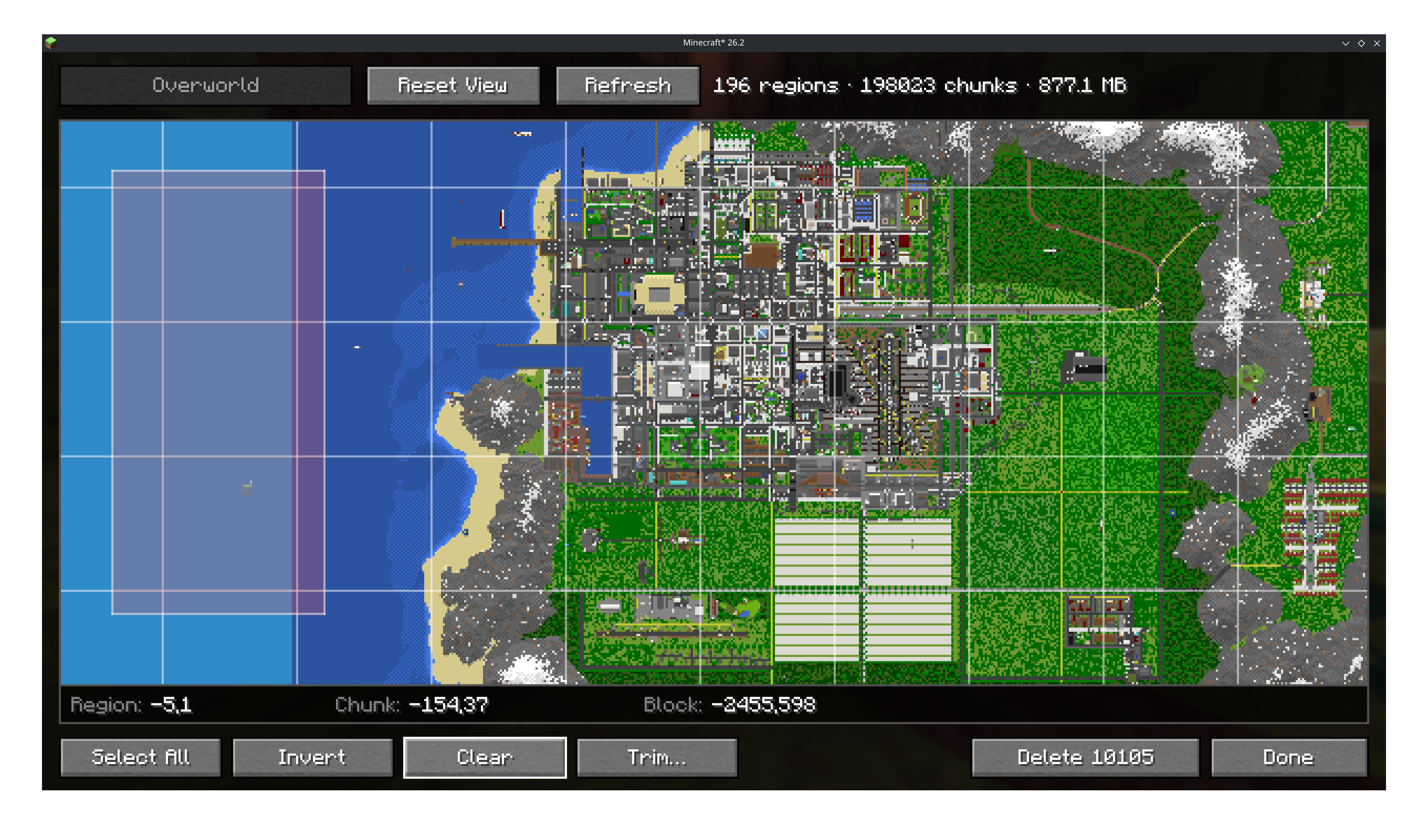
Adds a chunk editor like MCASelector directly ingame! Select chunks by hand or rules (e.g. inhabit time), delete or extract them. Or just see your world in high speed!
截图
介绍
🗺️ ️Chunk Editor
An MCA-Selector like chunk map, in game.
Adds a Chunk Editor button to Minecraft’s world edit screen (World Menu -> Edit -> Chunk Editor).
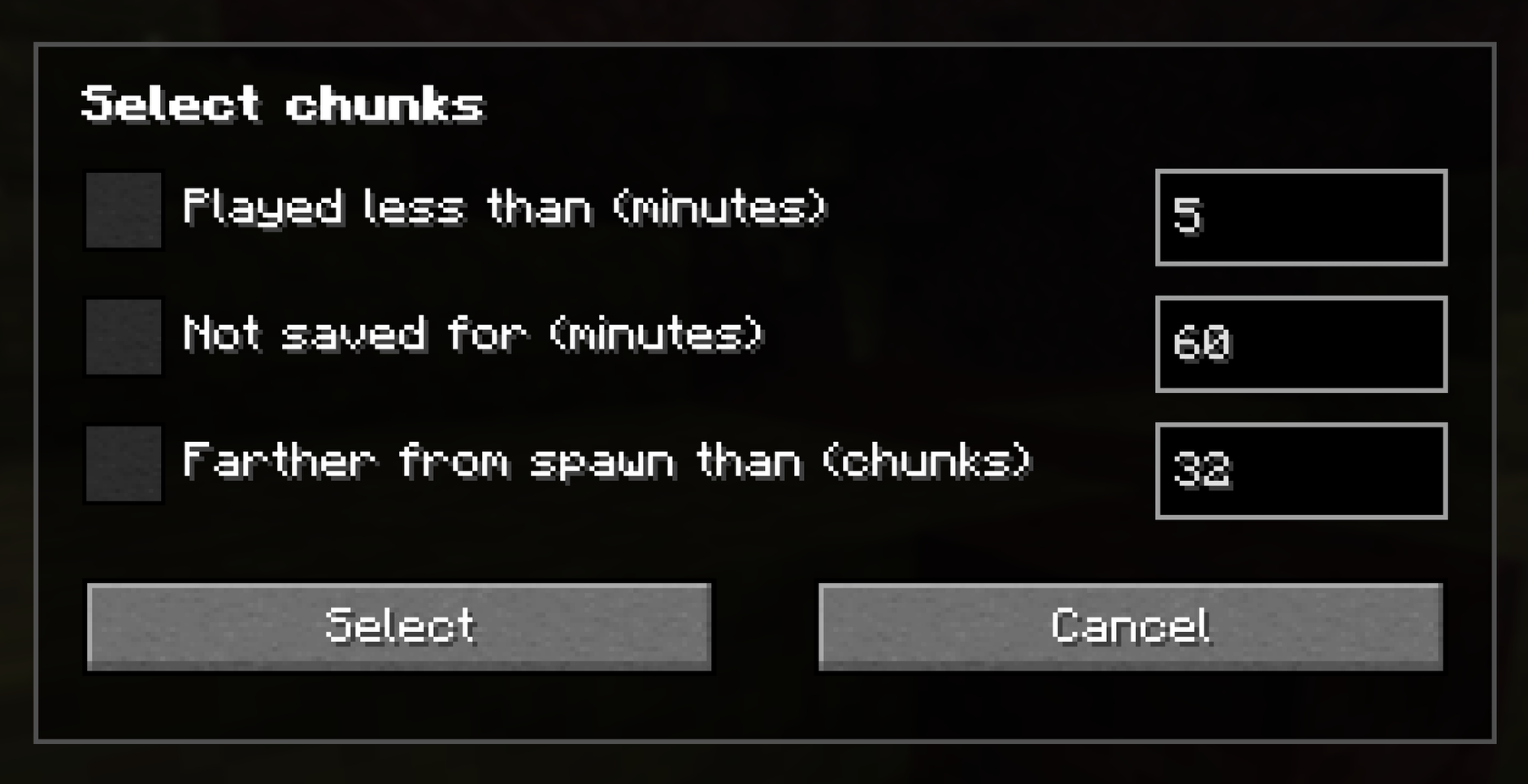
View the whole map & select chunks by hand or by criteria (playtime, staleness, distance from spawn), and delete them so
the game regenerates them on the next visit.
- Terrain rendering straight off the region files
- Respects data driven properties (biome tint, blocks, …)
- 3 LoD layers based on zoom
- Max-height slider to cut the view down (e.g. under Nether roof)
- Overlays/heatmaps (e.g. inhabit time, #(tile-)entity, custom NBT path, …)
- Markers (e.g. player markers)
- Every dimension the save has, including custom dimensions
- Deletes
region/,entities/andpoi/together (after backup)
📒 Wiki / Guide
Exporting
A selection & world-clip can be exported, containing all region, POI & entity data stored in vanilla format.
Selections are useful to export for later & repeated use.
Cross-compatible with standalone MCA-Selector tool
World Clips Storage: <instance>/chunkclips/
Selection Storage: <instance>/chunkclips/_selections/
Importing
All exports can be important in any world & any dimension (import may get cropped at Y).
The importer allows every version to be important, as long as it’s lower than the target (e.g. 1.18→26.2) and chunks get auto upgraded.
❗ 1 Section = 16 Blocks
| Option | ??? |
|:—————:|:——————————————————————————–:|
| Sections | Range of sections that is imported (blank=all, -4:0=only deepslate layer) |
| Y-Offset | How much the import is shifted up/down (0=keep, -4=shift 4 sections down) |
| Existing Chunks | Keep=Existing chunks stay, Replace=New chunks override, Merge=Blocks merge |
Import Examples
Reminder: A chunk has many 16x16x16 sections from top to bottom, that we can control (not blocks)
| Sections | Y-Offset | Result |
|:————-|:————-|:———————————————————————————————-|
| (blank) | 0 | Full copy |
| 0:3 | 0 | Only blocks y 0..63 go in. Everything above & below is untouched (merge) or empty (replace) |
| (blank) | 1 | Full clip 16 blocks shifted up |
| -4:-1 | 4 | Take deepslate layer (y -64..-1) and rise it to stone layer (y 0..63) |
| 19 | 0 | Only the top section (y 304..319) |
Overlays
See information directly on the map via Overlays.
Choose an Overlay in the menu View -> Overlays and it will scan the specific data and cache it for future toggles.
Number range overlays will show as heatmap in either manual set ranges or in automatic calculated ranges.
Categoric overlays (e.g. biomes) render in hashed colors and show the current hovered region info (e.g. river)
Advanced Settings
Some overlays take additional arguments, like the block & custom NBT overlay.
Those can be used to display everything that can be mapped to a numeric value.
Block Count: Input takes either (count all blocks), a block id minecraft:spawner or a block tag #minecraft:logs (tags resolve against installed datapacks)
NBT Path: Point at any NBT value from region/*.mca files. Arrays/Lists get resolved to their size.
Paths can be walked down with . & lists picked with [n] like sections[0].Y.
Read more about available data here: https://minecraft.wiki/w/Chunk_format
Directly integrated by Worlds with more useful world configurations & faster loading!
常见问题
Chunk Editor – MCA-Selector 支持哪些 Minecraft 版本?
Chunk Editor – MCA-Selector 支持 Minecraft Java 版 1.21.1–26.3,共 7 个版本,可用的加载器:Fabric / NeoForge / Quilt。下载时注意选择和你游戏版本一致的文件。
Chunk Editor – MCA-Selector 怎么安装?
先用 PCL2 或 HMCL 启动器安装对应版本的 Fabric / NeoForge / Quilt,再把下载的 .jar 文件放进游戏目录的 mods 文件夹,重新启动游戏即可。开启了版本隔离的,mods 文件夹在 versions/版本名 下面。运行环境:仅客户端。
Miraculixx 的其他作品
查看全部 →
VeinMiner
挖掉单个矿石/方块即可连锁挖掘整条矿脉,让枯燥的挖矿过程变得满足又有趣!FTB Ultimine 的替代方案

VeinMiner Hotkey
连锁挖矿附属 - 使用快捷键进行连锁挖矿,带动态准星与方块高亮

VeinMiner Enchantment
连锁挖矿附加 - 为附魔台添加连锁挖矿附魔。只有带有该附魔的工具才能进行连锁挖矿

Silk
Kotlin Minecraft API——面向 Fabric、Quilt 和 Paper
评论
登录后评论和评分