
Arrow+
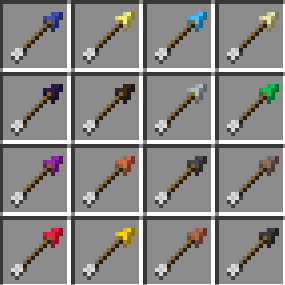
Build customizable arrows from vanilla materials. Mix heads, shafts and fletching to change damage, speed, drop, accuracy and underwater performance.
截图
介绍
Arrow+ — Build Your Own Arrows
Arrow+ expands Minecraft archery with customizable arrows crafted from vanilla materials. Combine a head, a shaft and fletching to change how your arrows hit and fly—all in a crafting table.
Build for damage, longer shots, a flatter trajectory or underwater combat. No smeltery or special workstation is required.
Customize Every Part
Arrowheads
Heads determine base damage, ignition and effects on hit. Choose from 19 heads, including flint, copper, iron, diamond and netherite.
Shafts
Shafts change launch speed and gravity. Copper and iron offer more range than wood, while a netherite shaft trades range for higher impact damage and a steeper drop. Bamboo offers lower gravity at the cost of speed.
Fletching
Fletching changes air resistance, underwater resistance, accuracy and gravity. Use a regular feather, try phantom membrane for reduced drop and tighter spread, or craft kelp and prismarine fletching for better underwater performance.
Mix parts freely to find a combination that suits your bow and playstyle.
Simple Crafting
Place your ingredients in one vertical column:
- Top: Arrowhead material
- Middle: Shaft
- Bottom: Fletching
Some materials, such as sticks, bamboo, bone, paper and phantom membrane, work directly as parts. Metal and gem shafts, along with special fletching, have their own crafting recipes.
Flint with a regular stick and feather still makes vanilla arrows. Swap either part to create a modular flint arrow.
Hold Shift over arrows and materials to see their stats. Compact tooltips show the essentials, while expanded tooltips explain damage, speed, drop, drag and spread.
More Ways to Use Your Arrows
- Add potion effects while keeping your chosen head, shaft and fletching.
- Fire Arrow+ arrows from bows, crossbows and dispensers.
- See arrow colors change on your bow as you draw it.
- Use JEI to browse materials and recipes, including combinations with different parts.
- Add Fletching Recipe to craft arrows at the Fletching Table for double the output.
Datapack Customization
Heads, shafts and fletching are defined through datapacks. Modpack creators can adjust existing materials or add new ones without writing Java code.
Customize damage, ignition, effects, launch speed, gravity, air and water resistance, accuracy, colors and crafting output.
Visit the Arrow+ Wiki for recipes, material stats, an interactive arrow builder and datapack documentation.
Versions and Installation
The modular arrow system is available on Fabric and NeoForge starting with:
| Minecraft | Arrow+ version |
| — | — |
| 26.3 | 26.3.0.2 |
| 26.2 | 26.2.0.2 |
| 26.1.2 | 26.1.2.104 |
Install the Arrow+ file matching your Minecraft version and mod loader. Fabric installations also require Fabric API. JEI and Fletching Recipe are optional.
Older Arrow+ releases use different crafting and customization systems. Select the matching documentation using the wiki’s version switcher.
When updating from an earlier Arrow+ build on the same Minecraft version, existing arrows migrate to the modular system while preserving their counts, potion contents, custom names and custom data. Back up your world before updating.
常见问题
Arrow+ 支持哪些 Minecraft 版本?
Arrow+ 支持 Minecraft Java 版 1.20.1–26.3,共 15 个版本,可用的加载器:Fabric / Forge / NeoForge。下载时注意选择和你游戏版本一致的文件。
Arrow+ 怎么安装?
先用 PCL2 或 HMCL 启动器安装对应版本的 Fabric / Forge / NeoForge,再把下载的 .jar 文件放进游戏目录的 mods 文件夹,重新启动游戏即可。开启了版本隔离的,mods 文件夹在 versions/版本名 下面。运行环境:客户端和服务端都要装。
CoolerProMC 的其他作品
查看全部 →
Uncraft Everything
Crafted wrong item? Uncraft everything with this mod!
Uncraft Everything
Crafted wrong item? Uncraft everything with this mod!

Cobblemon: Better Campfire Pot
A Cobblemon addon to make cooking pot faster and automation friendly.

Cobblemon: Better Campfire Pot
A Cobblemon addon to make cooking pot faster and easier automation.
评论
登录后评论和评分