
Short Sword
A lightweight PvP-focused resource pack that shortens swords for maximum screen visibility and cleaner combat
截图


介绍
Short Sword
A lightweight resource pack that shortens all swords to give you better visibility and maximum screen space during PvP. Works perfectly on almost all versions and can be used as an overlay!
What this project does
- Shortens Sword Models: It shrinks the default size of all swords in Minecraft to prevent them from blocking your view.
- Enhances PvP Sight: Gives you a much clearer view of your opponents during intense combat
Why you should download it
- Vanilla-Friendly: It retains the classic, familiar texture style of standard Minecraft swords just shorter!
- Performance Friendly: Extremely lightweight, meaning it has absolutely zero impact on your FPS.
- Overlay Support: You don’t need to change your main resource pack; just place this on top of any pack.
⚠️ Critical Information & How to Use
- How to Install: Download the pack, place it in your
.minecraft/resourcepacksfolder, and activate it in-game. - Overlay Setup: For the best experience, make sure to move this pack to the very top of your selected resource packs list so it overrides other sword textures properly.
Available Editions
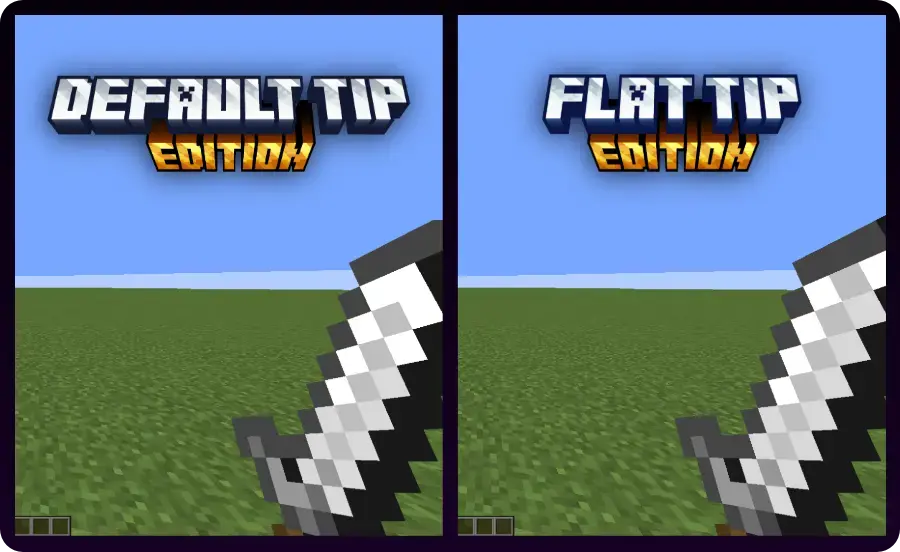
There are two versions included in this short sword resource pack:
- Default Tip Edition – Keeps the original sharp point but shrinks the blade.
- Flat Tip Edition – Cuts off the top for a clean, flat look.
Gallery
常见问题
Short Sword 支持哪些 Minecraft 版本?
Short Sword 支持 Minecraft Java 版 1.21.11。下载时注意选择和你游戏版本一致的文件。
Short Sword 怎么安装?
把下载的 .zip 文件(不用解压)放进游戏目录的 resourcepacks 文件夹,进游戏后在「选项 → 资源包」里把它移到右边启用。
Fring 的其他作品
查看全部 →
Vulkan Optimization
用Vulkan优化解锁超高帧率,告别卡顿!

Eating Animation Fork (Fabric/NeoForge)
A mod that adds sprite animations for edible and drinkable items Fork of Eating Animation

Sodium Optimization
A lightweight, performance focused Fabric modpack designed to deliver maximum frame stability

Rainbow Enchantment Glint+
Give all your enchanted items a vibrant, animated rainbow glint! Fork of Rainbow Enchantment Glint
评论
登录后评论和评分