
White GUI’s
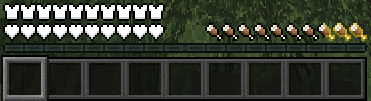
The White GUI resource pack offers a minimalist HUD redesign by converting health hearts, hardcore hearts, hunger icons, and item/armor durability indicators into a sleek, pure white color scheme.
截图

介绍
The White GUI resource pack completely overhauls the standard Minecraft Heads-Up Display (HUD), elevating the user interface into a sleek, modern, and minimalist visual environment. Designed specifically for players who appreciate clean aesthetics, high visual contrast, and a refined gaming atmosphere, this pack replaces traditional, brightly colored status icons with a beautifully stylized monochrome color scheme.
Every visual component has been meticulously reworked to maintain complete clarity and functionality while seamlessly integrating into a cohesive, contemporary design language.
Key features and visual enhancements include:
Minimalist Health Bar: Replaces the classic red heart icons with crisp, vibrant white hearts for standard survival mode, giving your health meter a modern and polished look.
Hardcore Mode Health Bar: Retains the critical distinction of Hardcore mode while upgrading the visual style. The customized white hardcore hearts keep the iconic danger aesthetic intact within a unified monochrome palette.
Modern Hunger Bar: Completely transforms the traditional shank and drumstick icons into clean, modern white hunger indicators that blend effortlessly with the rest of the interface.
High-Contrast Durability Indicators: Replaces standard colored durability bars with bright, easy-to-read white durability meters for all armor sets, tools, and weapons. This ensures you can instantly check your gear’s status during intense gameplay without visual clutter.
常见问题
White GUI’s 支持哪些 Minecraft 版本?
White GUI’s 支持 Minecraft Java 版 1.21–26.2,共 16 个版本。下载时注意选择和你游戏版本一致的文件。
White GUI’s 怎么安装?
把下载的 .zip 文件(不用解压)放进游戏目录的 resourcepacks 文件夹,进游戏后在「选项 → 资源包」里把它移到右边启用。
Mrsad 的其他作品
查看全部 →
Realistic Sky
用这个资源包为你的 Minecraft 世界焕然一新!它专为打造细节惊艳、逼真写实的天空而设计,同时保留所有原版材质。

Bedwars 64×64
[Bedwars 64x64] is a high-performance 64x64 resource pack engineered specifically for competitive BedWars, SkyWars, and fast-paced PvP. Operating at a native 64x64 resolution, it delivers a high-definition aesthetic while maintaining maximum FPS stability.
Bedwars 64×64
[Bedwars 64x64] is a high-performance 64x64 resource pack engineered specifically for competitive BedWars, SkyWars, and fast-paced PvP. Operating at a native 64x64 resolution, it delivers a high-definition aesthetic while maintaining maximum FPS stability.

Crystal PVP Purple
A Crystal PvP resource pack that turns the End Crystal 3D and purple, adding animated items and custom purple-themed textures.
评论
登录后评论和评分