
Pickup HUD
作者:kotleni
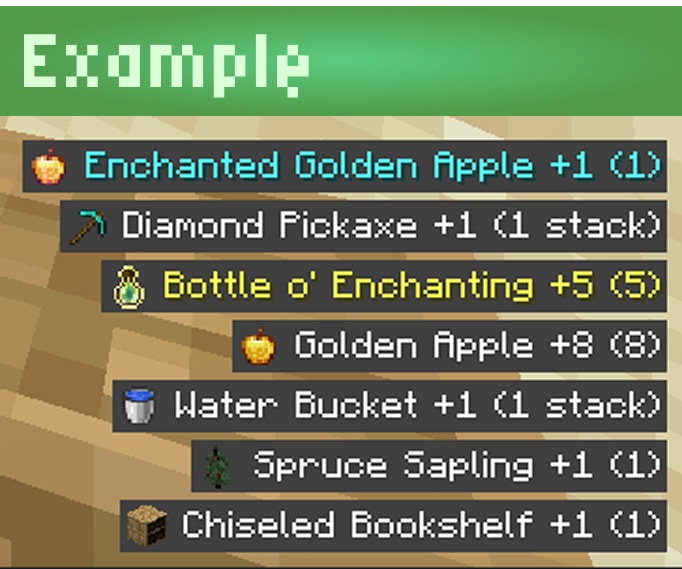
Displays and tracks newly picked-up items and gained experience directly on your screen (HUD). Never miss what you collect! Configurable. Pick Up.
截图
介绍
中文介绍正在准备中,下面暂时显示原文。

Pickup HUD
Client-side HUD notifications for picked-up items and experience, with tracked-item tools and configurable layout. Never miss what you collect!
Features
- HUD messages for items and experience pickups.
- Tracked Items menu:
- Search by item name or ID.
- See item icon, display name, and full identifier.
- Track / Untrack / Toggle / Clear actions.
- Optional filtering:
- Show only tracked items.
- Play sound only when tracked items are picked up.
- Customizable HUD appearance:
- Left/right and top/bottom alignment.
- X/Y offsets.
- Message/background opacity and shade.
- Message count, duration, spacing, and icon display options.
Suggestions & Support
Need a specific version support? Or maybe a new feature?
Send your issue request to Github Issues or email me [email protected].

常见问题
Pickup HUD 支持哪些 Minecraft 版本?
Pickup HUD 支持 Minecraft Java 版 1.21–26.2,共 13 个版本,可用的加载器:Fabric。下载时注意选择和你游戏版本一致的文件。
Pickup HUD 怎么安装?
先用 PCL2 或 HMCL 启动器安装对应版本的 Fabric,再把下载的 .jar 文件放进游戏目录的 mods 文件夹,重新启动游戏即可。开启了版本隔离的,mods 文件夹在 versions/版本名 下面。运行环境:仅客户端。


评论
登录后评论和评分