
截图




介绍
⚠ IMPORTANT!
This mod is _NOT_ compatible with Embeddium!
Flashables adds multiplayer-compatible dynamic lights and a variety of custom flashlight items to Minecraft.
Bring light with you wherever you go — no more fumbling in the dark!
🔦 Features
- Dynamic Lighting: Works in multiplayer without the usual flicker or lag.
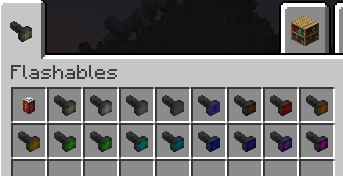
- Custom Flashlights:
- Multiple beam colors (17 total, from classic white to vivid pink).
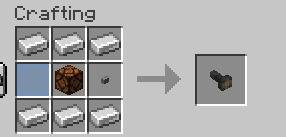
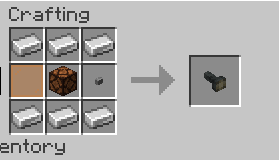
- Change the color of your flashlight at any time — just combine it with a matching glass pane in a crafting grid.
- Battery System:
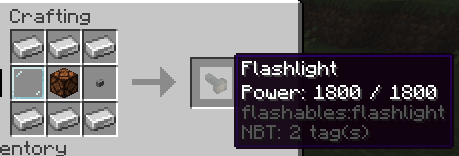
- Flashlights run on replaceable batteries.
- Energy drains while active, so plan ahead!
- Recharge or swap in fresh ones.
- Crafting Recipes:
- Recipes for flashlights and batteries included right in the mod.
- Color-changing recipe works with any flashlight and glass pane.
- Dynamic Light Items:
- Not just flashlights — many vanilla and modded items can emit light when held!
- Includes torches, lanterns, froglights, end rods… and a few surprises you’ll have to discover yourself.
🛠 Mod Integration
You can register your own light items or add compatibility for other mods using the built-in registrar:
com.smibii.flashables.lights.LightItemRegistry.register(
Items.TORCH, LightMode.AREA, LightColor.ORANGE, List.of(LightPosition.MAINHAND, LightPosition.OFFHAND)
);
Add as many as you like — the system is flexible enough to handle anything from handheld lamps to magical glowing artifacts.
📣 Support / Issues
- Do not report issues to Veil. If something breaks while using Veil with Flashables, please report it here on the Flashables page/issue tracker. We’ll handle Veil-integration problems on our side.
- Remember: Embeddium is not supported. Please remove it before reporting any bugs.
✅ Usage & Permissions:
You may include this mod in your modpack or modify it to fit your needs, but please give proper credit.
常见问题
Flashables 支持哪些 Minecraft 版本?
Flashables 支持 Minecraft Java 版 1.20.1,可用的加载器:Forge。下载时注意选择和你游戏版本一致的文件。
Flashables 怎么安装?
先用 PCL2 或 HMCL 启动器安装对应版本的 Forge,再把下载的 .jar 文件放进游戏目录的 mods 文件夹,重新启动游戏即可。开启了版本隔离的,mods 文件夹在 versions/版本名 下面。运行环境:客户端和服务端都要装。

评论
登录后评论和评分