
介绍
The self-service anti-griefing plugin for Minecraft servers — now with full 3D subdivisions




Stop _responding_ to grief and prevent it instead. GriefPrevention stops grief before it starts automatically without any effort from administrators, and with very little (self service) effort from players.
GriefPrevention3D is a fork of the popular GriefPrevention plugin that adds full 3D subdivision support to land claims. Players can now create subdivisions with precise height boundaries for more complex builds.
Watch this video to learn more how GriefPrevention works in-game.
Key Features
- 3D Subdivisions Create subdivisions with exact Y-level boundaries.
/3dsubdivideclaimsUse this command to switch to 3D subdivision mode.
####
- 3D Admin Claims Create free, height-bounded administrative claims with exact Y coordinates.
/3dadminclaimsUse this command or /aclaim mode admin3d to switch to 3D admin claim mode.
Requires the griefprevention.adminclaims permission.
####
- Shaped Claims / SubClaims
  AllowShapedClaims: false
  AllowShapedSubClaims: false
Set to true to enable non-rectangular claims & subdivisions.
/shapedclaims
/shapedsubdivideclaims
Use this command to switch to the shaped claims mode.
####
- Merge Claims Merge two of your claims into a single larger claim.
/mergeclaimsStand in the first claim and run /mergeclaims, then go to the second claim and run /mergeclaims again or right-click with your golden shovel. Both claims and the area between them become one claim.
Can also be done with /shapedclaims — shape a path that overlaps another claim you own and they merge automatically.
####
- Nested Subclaims
AllowNestedSubClaims: falseSet to true to allow subdivisions inside other subdivisions.
####
- Visualization Glow
VisualizationGlow: falseSet to true to enable glowing claim boundary visualization. (Requires 1.19.4+)
####
- Unified Command Handler In GriefPreventionData/alias.yml:
enabled: trueProvides unified commands like:
/claim create
/claim trust
/claim abandon
View Docs
####
- Neighbor Trust & Minimum Distance
  GriefPrevention:
    Claims:
      MinimumDistance: 0
Enforce a minimum distance between top-level claims to prevent claim spam and overcrowding. When set, players cannot create claims within the configured distance of another player’s claim.
/claim trust <player> neighbor— Grant a player neighbor trust so they can bypass minimum distance checks for your claims./neighbortrust <player>(alias:/distancetrust <player>) — Standalone command for the same purpose./claim distance check— Show the configured minimum distance and list nearby claims./claim distance toggle— While standing in your own claim, toggle whether ALL players can bypass minimum distance for that claim.- Existing nearby claims auto-grant neighbor trust to each other, cleaned up automatically when claims are abandoned.
####
- Scroll Resize
/scrollresizeResize a claim or subdivision with your mouse wheel while holding the claim tool, with a live preview of the new boundary. Scrolling up pushes the side you are facing away from you, scrolling down pulls it toward you. Right-click applies the resize; left-click, drop, or swapping hands cancels it. Works on 3D subdivisions and shaped claims, down to a single block.
####
- Wither Explosion Toggle
/witherexplosionsUse this command to toggle wither explosions inside your claim.
####
- Fabric Support 18.2.6+ GriefPrevention3D builds now are a universal jar for fabric and paper/spigot servers. View the progress here
####
Subtle Changes
- Per-Player Locale: Enabled by default. Players receive messages in their client language when a translation is available, falling back to English. See Supported Languages for the full list. Disable with
PerPlayerLocale: falsein config.yml. - Action Bar Messages: You can now define a list of message keys that should be chosen to be shown in the action bar instead of chat.
- Rate Limited Messages: Denials that repeat on their own — an arrow bouncing off a claimed decorated pot, a swing at a claimed animal, a piston placed outside a claim — are sent at most once per 10 seconds, counted separately for each message so one denial never hides another.
- Resizing a claim now selects it and is accessible using common commands like
/claim abandonor/claim trustduring that resize session /restrictsubclaimwhile standing in main claims now instantly restricts all subdivisions inside/trustlistnow shows inherited permissions- Manage trust uses
/managetrustandgriefprevention.managetrust. Permission-node trust uses/permissiontrust <permission> <access|container|build|manage>or/aclaim trust permission <permission> <type>. It requiresgriefprevention.permissiontrust, inherited bygriefprevention.adminclaims; bare dotted nodes and bracketed[permission.node]targets are accepted. - Split the
griefprevention.eavesdroppermission togriefprevention.eavesdrop.pm&griefprevention.eavesdrop.softmutefor more granular permission control - Soft-muted players’ messages are now blocked on DiscordSRV’s side too, so they no longer leak into Discord chat
- Various bug fixes and quality-of-life improvements
- Full compatibility with original GriefPrevention features
- Works with Spigot, Paper, Purpur, and Folia
- Maintains all anti-grief protections
Supported Languages
GriefPrevention3D ships with translations for every language below. Set one for the whole server with
Locale: in config.yml, or leave PerPlayerLocale: true and each player is served their own client language,
falling back to English.
| Code | Language |
|——|———-|
| en | English |
| cs_CZ | Czech |
| de_DE | German |
| es | Spanish |
| fr_FR | French |
| id_ID | Indonesian (Bahasa Indonesia) |
| ja_JP | Japanese |
| ms_MY | Malay |
| pl_PL | Polish |
| pt_BR | Portuguese (Brazil) |
| ru_RU | Russian |
| tr_TR | Turkish |
| uk_UA | Ukrainian |
| zh_CN | Chinese (Simplified) |
| en_PT | Pirate Speak |
See the Locale guide for how to customise messages or
add a language of your own.
Supported Platforms: Fabric, Spigot, Paper, Purpur, and Folia.
GriefPrevention3D targets and supports 1.8 – latest available version for non-fabric servers.
Fabric support currently only covers 1.21.2 – latest.
Download
⬇ Download the GriefPrevention3D.jar plugin here.
Documentation
For usage instructions, see the official GriefPrevention3D Documentation.
Addons
Addons provide additional features to GriefPrevention. Some of these addons are listed in GitHub Discussions
Support
- 📖 Documentation – Learn how GriefPrevention3D works. Contains answers to most questions.
- Issue Tracker – Report problems or bugs on the issue tracker. Check if someone else reported your issue before posting.
- GitHub Discussions – New ideas, feature requests, or other general discussions.
- Discord Community
Original Plugin
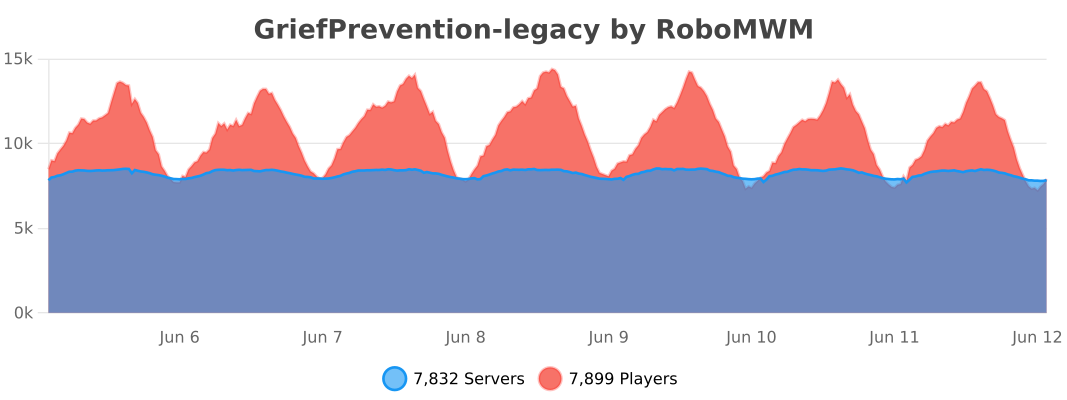
This is a fork of GriefPrevention by RoboMWM.
常见问题
GriefPrevention3D 支持哪些 Minecraft 版本?
GriefPrevention3D 支持 Minecraft Java 版 1.8.8–26.3,共 67 个版本,可用的加载器:Bukkit / Fabric / Folia / Paper / Purpur / Spigot。下载时注意选择和你游戏版本一致的文件。
GriefPrevention3D 怎么安装?
先用 PCL2 或 HMCL 启动器安装对应版本的 Bukkit / Fabric / Folia / Paper / Purpur / Spigot,再把下载的 .jar 文件放进游戏目录的 mods 文件夹,重新启动游戏即可。开启了版本隔离的,mods 文件夹在 versions/版本名 下面。运行环境:仅服务端。

评论
登录后评论和评分