
截图


介绍
中文介绍正在准备中,下面暂时显示原文。
Clean Armor HUD
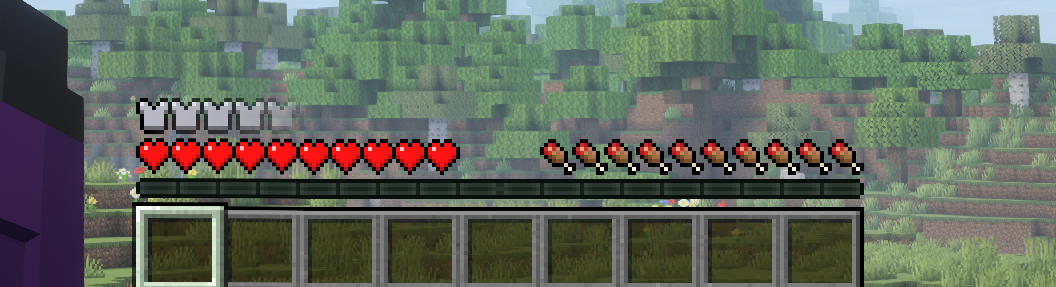
A lightweight resource pack that removes the armor bar from Minecraft’s in-game HUD.
Designed for players who want a cleaner interface and more screen space without altering gameplay.

Overview
Clean Armor HUD removes only the armor GUI element while keeping the rest of the HUD fully intact.
It is ideal for immersive gameplay, cinematic recordings, and minimal UI setups.
Why Use This Resource Pack?
- Minimal interface for better immersion
- Increased visibility for screenshots and videos
- Clean and modern HUD appearance
- Simple and non-intrusive
Features
- Hides the armor bar HUD element
- Leaves all other HUD elements unchanged
- Compatible with vanilla Minecraft
- Works with most modded clients
- Can be safely combined with other resource packs
Installation
- Download the resource pack from Modrinth
- Place the
.zipfile into yourresourcepacksfolder - Enable it in Minecraft’s Resource Pack menu
Compatibility
- Tested on current Minecraft versions
- Expected to work on most mod loaders and clients
Performance Impact
None.
This resource pack only modifies GUI textures and does not affect gameplay or performance.
常见问题
No Armor gui 支持哪些 Minecraft 版本?
No Armor gui 支持 Minecraft Java 版 1.20.2–1.21.11,共 17 个版本。下载时注意选择和你游戏版本一致的文件。
No Armor gui 怎么安装?
把下载的 .zip 文件(不用解压)放进游戏目录的 resourcepacks 文件夹,进游戏后在「选项 → 资源包」里把它移到右边启用。

评论
登录后评论和评分