
截图


介绍
中文介绍正在准备中,下面暂时显示原文。
Compact F3 Plus
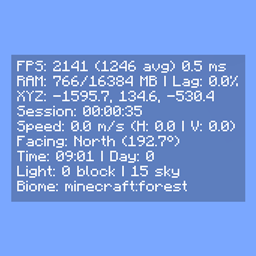
A minimal, fully customizable HUD overlay for NeoForge, Forge and Fabric that replaces the vanilla F3 debug screen with a clean, readable interface.
Modes
- Replace F3 (default):
F3opens the compact HUD instead of the vanilla debug screen. - Standalone: Keep vanilla F3 intact and toggle the HUD separately via
F8(rebindable in Controls).
HUD Elements
- FPS – current, average and 1% low, with dynamic color indicators based on thresholds
- RAM usage
- Lag meter – stutter rate monitor for diagnosing frame drops
- Server TPS
- GPU and CPU in use
- XYZ coordinates
- Matching Nether / Overworld coordinates
- Network ping
- Facing direction: cardinal + axis + pitch
- Biome and dimension
- Block and sky light levels
- Local difficulty
- Session timer
- In-game time and day counter
- Slime chunk indicator
- Horizontal and vertical movement speed
- Item durability
- Currently playing music track
- Rendered entity count
- Dropped items in sight
- Crop growth progress
- Targeted block, fluid, and entity
- Blockstate properties of the targeted block
Configuration
Every element can be individually toggled. The HUD can be anchored to any screen corner with adjustable X and Y offsets.
Settings are saved to
config/compactf3plus-client.toml (NeoForge, Forge)
config/compactf3plus.json (Fabric)
and accessible via Mod Menu (Fabric) or the NeoForge / Forge mod list.
Credits
- username65735 – original Compact F3 and open-source release
常见问题
Compact F3 Plus 支持哪些 Minecraft 版本?
Compact F3 Plus 支持 Minecraft Java 版 1.7.10–26.3,共 21 个版本,可用的加载器:Fabric / Forge / NeoForge / Quilt。下载时注意选择和你游戏版本一致的文件。
Compact F3 Plus 怎么安装?
先用 PCL2 或 HMCL 启动器安装对应版本的 Fabric / Forge / NeoForge / Quilt,再把下载的 .jar 文件放进游戏目录的 mods 文件夹,重新启动游戏即可。开启了版本隔离的,mods 文件夹在 versions/版本名 下面。运行环境:仅客户端。
评论
登录后评论和评分