截图

介绍
Retrocrash
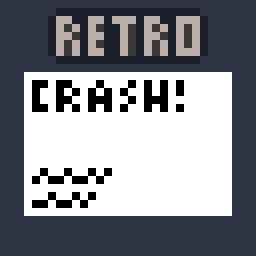
Remakes the old beta crash screen and makes it available for modern versions of the game.

Features
- Compatibility with resource packs that change the logo
- Changing the background/style is not yet supported, but is planned for the future
- Every version listed receives the same support _(1.19.x will always be updated at the same time as 1.21.x)_
- Forge <1.20 support is planned
Usage
If you’d like to test this out, Minecraft already comes with a shortcut to crash the game (hold F3 + C in-game for a few seconds)
Outside this, this mod intercepts Minecraft’s crash screen handler to show this screen, wait until it’s closed, and resume all crash handler functionality after.
Crash logs are still made, crashes are still displayed in your launcher, and this mod shouldn’t clash with any other.
Support
Please report any issues or ideas you have over on the GitHub Issues page, or request any features to be added over on the discussions page!
常见问题
Retrocrash 支持哪些 Minecraft 版本?
Retrocrash 支持 Minecraft Java 版 1.16–1.21.10,共 27 个版本,可用的加载器:Fabric / NeoForge。下载时注意选择和你游戏版本一致的文件。
Retrocrash 怎么安装?
先用 PCL2 或 HMCL 启动器安装对应版本的 Fabric / NeoForge,再把下载的 .jar 文件放进游戏目录的 mods 文件夹,重新启动游戏即可。开启了版本隔离的,mods 文件夹在 versions/版本名 下面。运行环境:仅客户端。
FlooferLand 的其他作品
查看全部 →
Text to Voice
Text to speech addon for Simple Voice Chat. Type to speak and audio will be sent through SVC and/or Voicemeeter

Showbiz
Advanced animatronic show simulator compatible with RR Engine. Watch the Rock-afire Explosion perform, or any other band through addons (FNaF, etc)

Showbiz TFM Addon
FNaF animatronics that can play real 1970s shows! (Showbiz addon)

Ouch My Eyes
Turns down the brightness on snow, making it less blinding
评论
登录后评论和评分