介绍
Warmpix Landmark Guide
Warmpix Landmark Guide lets an operator mark a building, write a short description, and show that building’s name and outline when a player looks toward it. It is made for Minecraft 26.3 / NeoForge servers and adventure maps that have named structures they want people to notice from a distance.
Why download it
Download it if you run a 26.3 NeoForge world with custom buildings and want a lightweight way to label them in-world, without replacing the buildings themselves. Players only need the mod installed to see names and outlines. Editing landmarks requires operator level 2.
Requirements and limits you should know first
- Minecraft 26.3 (the jar targets
[26.3]and does not include 26.4) - NeoForge 26.3.0.23-beta or later
- Install on both the client and the server. Landmark data is stored on the server and synced to clients for display.
- No other required mods
- License: MIT. This GitHub repository is a release upload only and does not include source.
- The jar is about 8 MiB, mostly because it bundles a font.
- Language: the pack ships
en_usandzh_cnfiles, but those files currently contain only the drafting pen’s item name. Almost all of the editor, search, and hint text is hardcoded in Simplified Chinese. English-speaking operators should expect a Chinese admin UI.
Removing a landmark does not change any blocks.
What it adds
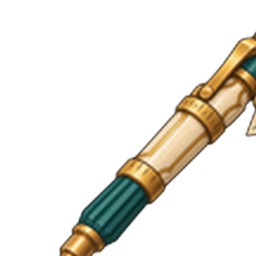
- Architect’s Drafting Pen: left-click to set corner A, right-click to set corner B, sneak-right-click to open the landmark book. Editing requires operator permission level 2.
- Each landmark can have a name, a category, a multi-line description, an outline colour, a view distance from 16 to 96 blocks, and an entrance position.
- A selection may be at most 96×96 and at most 65,536 blocks. At most 128 landmarks can be stored, and landmarks can be imported.
- When a player looks at a registered building, its name and outline are shown. The landmark book can search by name, category, and dimension.
- The interface is drawn in a handwriting-like style and bundles the LXGW WenKai font (SIL Open Font License 1.1; the license is included in the jar).
中文介绍
建筑地标导览(WarmPix Landmark Guide)是一款面向 Minecraft 26.3、NeoForge 的模组。管理员用测绘笔圈选建筑、写好简介,玩家远远看向建筑就会显示它的名字和轮廓。适合需要给建筑做导览的服务器或冒险地图。
版本与安装
当前版本 1.1.1。需要 Minecraft 26.3(不包含 26.4)和 NeoForge 26.3.0.23-beta 或更高。无其他模组前置。客户端和服务端都要安装。数据保存在服务器,客户端同步显示。许可为 MIT,免费提供。本 GitHub 仓库只用于发布 jar,不含源码。jar 约 8 MB,主要是内置字体。
需要先知道:语言文件目前几乎只包含测绘笔的物品名,编辑界面、搜索和提示语大部分是写死的简体中文。移除导览不会改动任何方块。编辑地标需要 OP 2 权限。
主要内容
- 建筑测绘笔:左键选 A 角、右键选 B 角,潜行右键打开城镇地标册
- 地标可填写名称、分类、多行简介、轮廓强调色、远眺距离(16–96 格)和入口位置
- 选区最大 96×96、不超过 65536 个方块;最多保存 128 条导览,支持导入
- 玩家看向已登记的建筑时显示名称与描边;地标册可按名称、分类、维度搜索
- 手绘风界面,内置霞鹜文楷字体(SIL OFL 1.1 许可,许可证随 jar 附带)
Made by the WarmPix team. Official site: warmpix.com · QQ group 705556278
由 WarmPix 团队制作。官网:warmpix.com ,QQ 群 705556278。
常见问题
Warmpix Landmark Guide 支持哪些 Minecraft 版本?
Warmpix Landmark Guide 支持 Minecraft Java 版 26.3,可用的加载器:NeoForge。下载时注意选择和你游戏版本一致的文件。
Warmpix Landmark Guide 怎么安装?
先用 PCL2 或 HMCL 启动器安装对应版本的 NeoForge,再把下载的 .jar 文件放进游戏目录的 mods 文件夹,重新启动游戏即可。开启了版本隔离的,mods 文件夹在 versions/版本名 下面。
CatfishW 的其他作品
查看全部 →
Warmpixel Backpacks
为 Minecraft 26.3 NeoForge 添加六款建模精美的背包,支持分页收纳、搜索、排序,以及能保留所有物品的锻造台升级。Curios 为可选前置。

WarmPix SwordForge
在天界锻造祭坛体验三阶段锻造小游戏,使用六把拥有连招、技能和终极技的特效剑,还有一位会在战斗中成长的剑灵。适用于 Minecraft 26.3 NeoForge。
Warmpix Decor
提供 8 个类别的 166 件可互动家具,以及 10 种手持玩具:坐下、打开柜子、开关灯,还能用装饰刷重新设计家具。适用于 Minecraft 26.3 NeoForge。

Warmpix Neon
为 Minecraft 26.3 NeoForge 添加可控霓虹灯、激光、标牌和 16 通道灯光控制台,以及赛博酒吧装饰。没有合成配方。
评论
登录后评论和评分