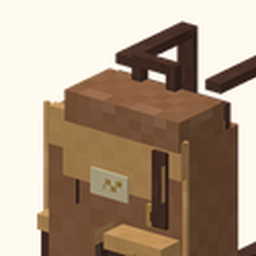
Warmpixel Backpacks
为 Minecraft 26.3 NeoForge 添加六款建模精美的背包,支持分页收纳、搜索、排序,以及能保留所有物品的锻造台升级。Curios 为可选前置。
介绍
Warmpixel Backpacks
Warmpixel Backpacks adds six separately modelled backpacks to Minecraft 26.3 / NeoForge, with paged compartments, search, sorting, and smart deposit/restock. Upgrading a backpack at a smithing table keeps everything that was inside it.
Why download it
Download it if you want extra portable storage on a 26.3 NeoForge client and server, with upgrades that do not empty the pack, and optional wear-on-the-back support when Curios is installed.
Requirements
- Minecraft 26.3 (the jar targets
[26.3,26.4), so 26.4 is not included) - NeoForge 26.3.0.23-beta or later, and below 26.4
- Install on both the client and the server
- No required extra mods
- Optional: Curios API 17.0.0-beta.2 up to (but not including) 18. If Curios is present, a backpack can be worn in the back slot and is visible on the player.
- Language files for Simplified Chinese and English are included
- License: All Rights Reserved. The project is free to download and use. This GitHub repository is a release upload only and does not include source.
What it adds
- Six backpacks: Canvas Satchel, Leather Backpack, Explorer Backpack, Reinforced Backpack (54 slots), Expedition Backpack (81 slots), and Quantum Backpack (108 slots).
- The first three are crafted at a crafting table. The last three are upgraded at a smithing table with Reinforced Fabric, a Tempered Frame, and a Quantum Core respectively. Items already in the backpack are kept through the upgrade.
- Right-click while holding a backpack to open it. A custom keybind is supported. With Curios installed, it can be worn on the back.
- Several compartments, opened as pages. Shift-click moves items on the current page.
- Search by name or ID, highlighting matches across every compartment.
- Sort, merge, deposit only matching items, restock stacks you already carry, and deposit or withdraw in bulk, while leaving the hotbar and worn equipment alone.
- A backpack cannot be placed inside another backpack, a shulker box, or a bundle.
Upgrade materials: Reinforced Fabric, the Tempered Frame, and the Quantum Core have no crafting recipes. A server operator who wants those upgrades in survival has to provide the materials (for example by giving them or by adding their own recipes).
中文介绍
暖像行囊(Warmpixel Backpacks)是一款面向 Minecraft 26.3、NeoForge 的模组。六款各自建模的背包,分页隔层、搜索、整理、智能存取,在锻造台升级时物品全部保留。
版本与安装
当前版本 1.1.0。需要 Minecraft 26.3(不包含 26.4)和 NeoForge 26.3.0.23-beta 或更高。无必需前置;可选 Curios(装了可穿戴在背部饰品栏)。客户端和服务端都要安装。游戏内有简体中文和英文。许可为 All Rights Reserved(保留所有权利),免费提供。本 GitHub 仓库只用于发布 jar,不含源码。
三种升级材料没有合成配方,单独使用时需要由服主另行提供(例如管理员发放或自定义配方)。
主要内容
- 六款背包:帆布行囊、皮革背包、行者背包、强韧背包(54 格)、远征背包(81 格)、量子背包(108 格)
- 前三款工作台合成;后三款在锻造台分别用复合纤维布、淬炼合金框架、量子储存核心升级,背包里的物品全部保留
- 手持右键打开,支持自定义快捷键;装了 Curios 时可穿戴在背部,身上能看到背包模型
- 多隔层翻页,Shift+点击快速转移当前页物品
- 按名称 / ID 搜索,跨全部隔层高亮匹配格子
- 整理、合并、智能存入(只存已有同类)、补给随身(补满身上已有堆叠)、整批存入 / 取出,保留快捷栏和装备
- 背包不能放进背包、潜影盒或收纳袋
Made by the WarmPix team. Official site: warmpix.com · QQ group 705556278
由 WarmPix 团队制作。官网:warmpix.com ,QQ 群 705556278。
常见问题
Warmpixel Backpacks 支持哪些 Minecraft 版本?
Warmpixel Backpacks 支持 Minecraft Java 版 26.3,可用的加载器:NeoForge。下载时注意选择和你游戏版本一致的文件。
Warmpixel Backpacks 怎么安装?
先用 PCL2 或 HMCL 启动器安装对应版本的 NeoForge,再把下载的 .jar 文件放进游戏目录的 mods 文件夹,重新启动游戏即可。开启了版本隔离的,mods 文件夹在 versions/版本名 下面。
CatfishW 的其他作品
查看全部 →
Warmpix Neon
为 Minecraft 26.3 NeoForge 添加可控霓虹灯、激光、标牌和 16 通道灯光控制台,以及赛博酒吧装饰。没有合成配方。

WarmPix SwordForge
在天界锻造祭坛体验三阶段锻造小游戏,使用六把拥有连招、技能和终极技的特效剑,还有一位会在战斗中成长的剑灵。适用于 Minecraft 26.3 NeoForge。
Warmpix Decor
提供 8 个类别的 166 件可互动家具,以及 10 种手持玩具:坐下、打开柜子、开关灯,还能用装饰刷重新设计家具。适用于 Minecraft 26.3 NeoForge。
Warmpixel Item Sort
适用于 Minecraft 26.3 NeoForge 的一键整理物品栏和箱子功能,支持锁定槽位、按相同物品存入、补货,以及 10 秒内撤销。整理操作由服务器执行。
评论
登录后评论和评分