Xiaoxiang_ AutoBuild
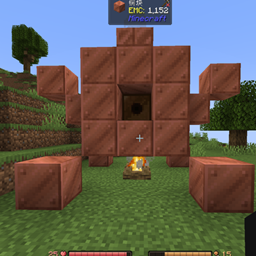
Unofficial addon for Xiaoxiang's Cultivation.An addon for Xiaoxiang's Cultivation that auto-builds complete alchemy and refining furnace structures from the ghost projection on right-click, consuming matching blocks in survival mode.
介绍
**Xiaoxiang AutoBuild**
An addon for *Xiaoxiang’s Cultivation* that removes the tedious manual construction of the Alchemy Furnace and Refining Furnace.
This is an unofficial addon for Xiaoxiang’s Cultivation. It is not affiliated with, endorsed by, or authorized by the original author, and was published without explicit permission. The original mod is required and is not included in this project. Please do not reupload this addon or include it in modpacks without permission.
Instead of right-clicking a core to view a ghost projection and then placing every block by hand, simply right-click the core again and the addon builds the complete structure instantly.
**Features**
– Instantly auto-builds the full Alchemy Furnace and Refining Furnace multiblocks from the original mod’s projection data.
– Includes hidden parts of the structure, such as the campfire placed beneath the base.
– Survival mode: consumes matching blocks from the player’s inventory, and accepts copper oxidation/waxed variants.
– Creative mode: builds for free without consuming materials.
– If materials are insufficient or the build area is obstructed, nothing is destroyed and the original ghost projection plus the missing-block message remain available.
– Completed structures keep their normal behavior: right-click opens the core’s GUI.
**Requirements**
– Minecraft 1.20.1
– Forge 47+
– Xiaoxiang’s Cultivation 0.3+ (required)
**Note**
This addon is built against Xiaoxiang’s Cultivation 0.3.328. Future changes to the original mod’s internal structure code may require an updated release.
常见问题
Xiaoxiang_ AutoBuild 支持哪些 Minecraft 版本?
Xiaoxiang_ AutoBuild 支持 Minecraft Java 版 1.20.1,可用的加载器:Forge。下载时注意选择和你游戏版本一致的文件。
Xiaoxiang_ AutoBuild 怎么安装?
先用 PCL2 或 HMCL 启动器安装对应版本的 Forge,再把下载的 .jar 文件放进游戏目录的 mods 文件夹,重新启动游戏即可。开启了版本隔离的,mods 文件夹在 versions/版本名 下面。
评论
登录后评论和评分